AUX.IN
USB
音量踏板接口
AUX.IN
USB
7
Connecting a Footswitch
Connecting a Volume Pedal
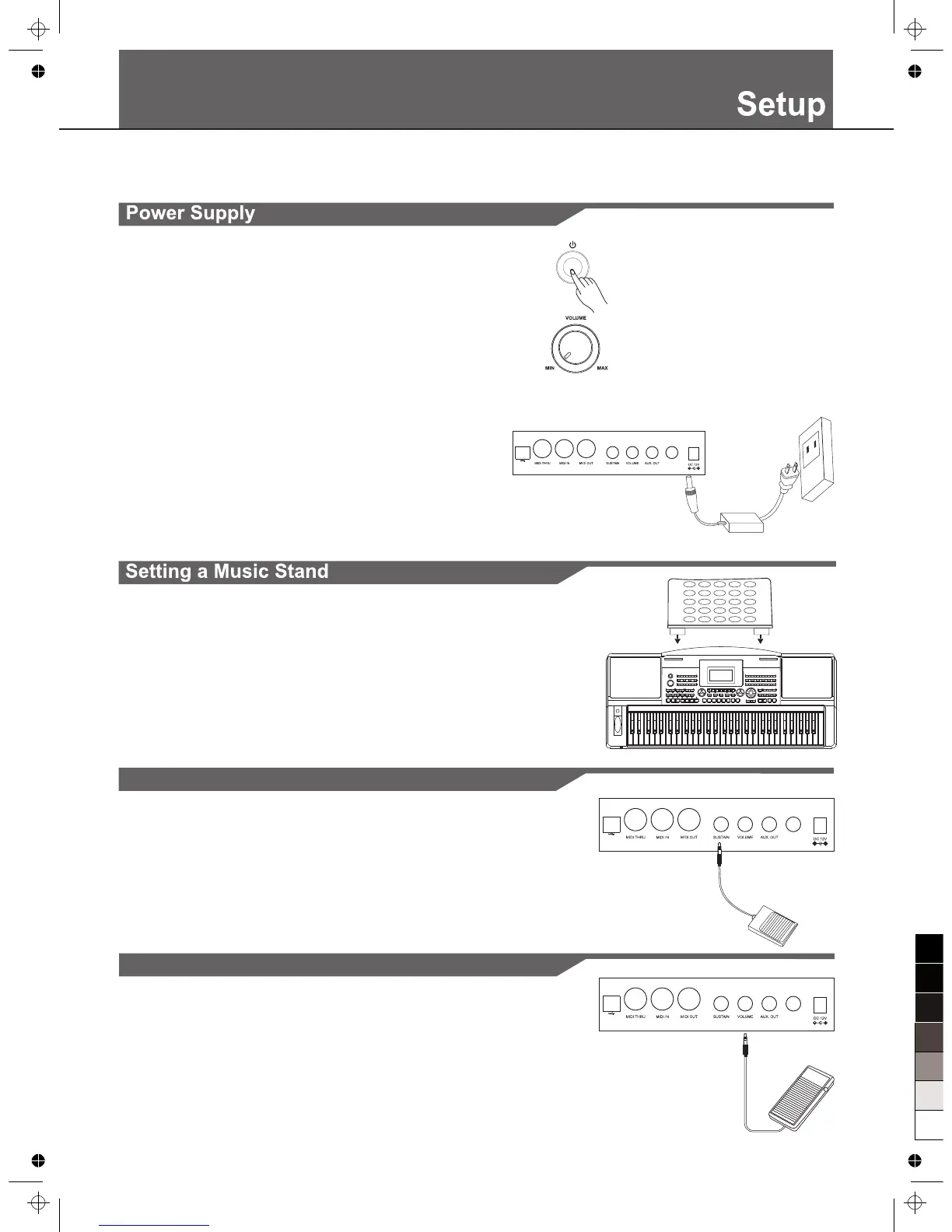
An optional volume control can be plugged into the volume jack for
adjusting the volume of sound.
This section contains information about setting up your instrument and preparing to play. Please go through this section
carefully before turning the power on.
The instrument is supplied with a music stand that can be attached
to the instrument by inserting it into the slot at the rear of the panel.
The sustain function lets you produce a natural sustain as you
play by pressing a footswitch. Plug an optional footswitch into
this jack and use it to switch sustain on and off.
AUX.I N
USB
1. Make sure that the keyboard is turned off. Before you switch your
keyboard on or off , turn down the volume of keyboard and any
connected audio equipments first.
2. Connect the AC adaptor to the power supply jack of this keyboard.
3. Plug the AC adaptor into an AC outlet.
4. Press the [POWER] button, the LCD will display “wait...!”, which
indicates the keyboard has powered on.
5. If you are ready to turn off the keyboard, press the [POWER]
switch again.
Notes:
1. In the IDLE mode, the keyboard will automatically shutdown in 30
minutes later if you do not take any action on the keyboard.
2. When the keyboard is not in use or during thunderstorm, please
disconnect the power for safety purpose.



 To Next Page