Your keyboard can perform sounds of
100 different musical instruments. The
name and two-digit number for each pre-
set voice is listed on VOICES list on the
keyboard's top panel .
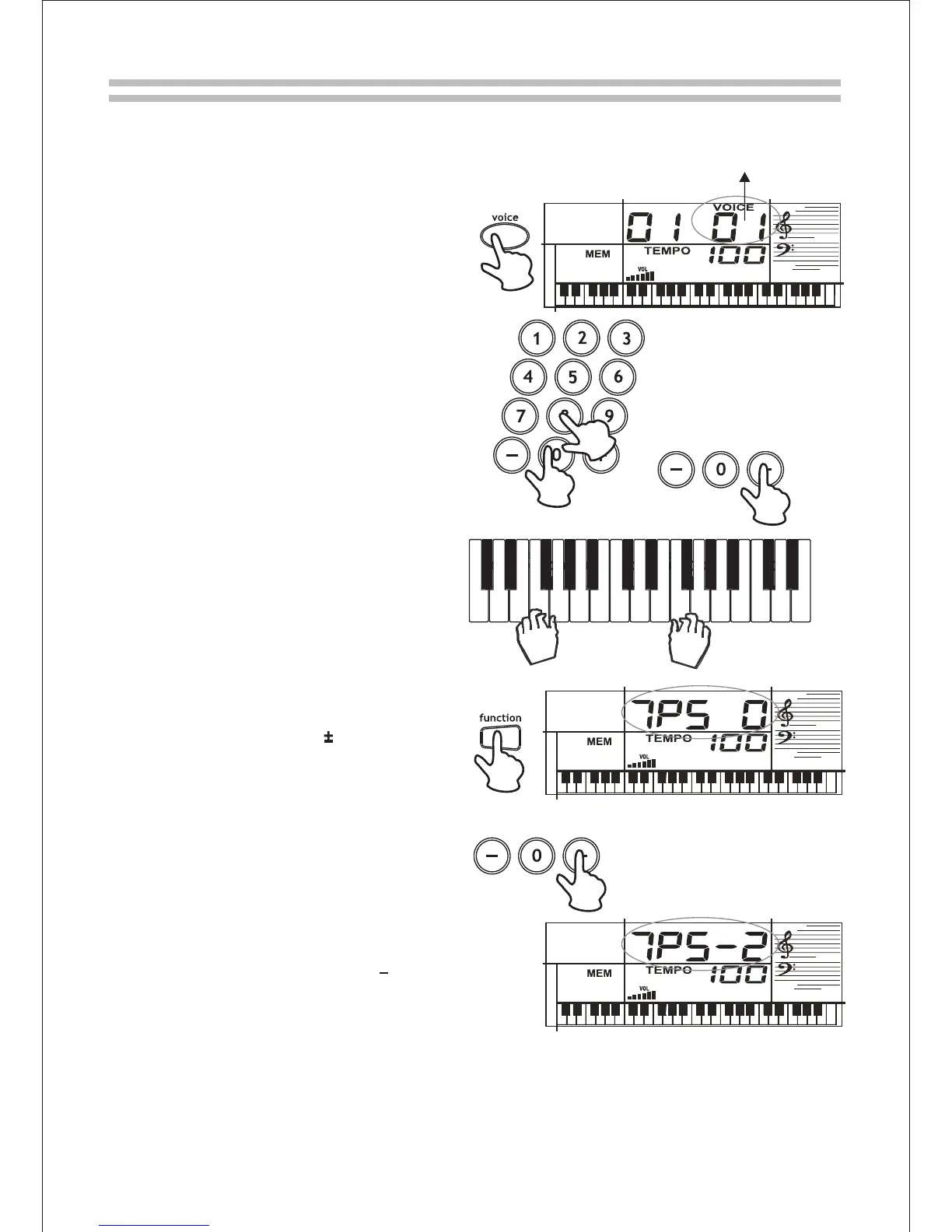
Press [function], and the LCD will
display 'TPS 0'; use [+] or [-] to shift
the pitch in a range of 6 semi-tone .
The keyboard automatically selects
the key of middle C each time you
turn it on. For added flexibility, press
[function] until 'TPS 0' displays. The
number displayed after 'TPS 0' is the
current transpose value. If there is no
symbol on its left, the value is
positive. If there is a '-' on its left, the
value is negative. Press [+]、[-] to
adjust the keyboard holistic pitch
within +6 semi-tones. Press [+] and
[-] at the same time to return the
transpose to 0. The new transpose
value is available imm-ediately after
set up.
" "
Press [voice], VOICE and the current
voice 's code appears.
To change the voice, choose a preset
voice from the VOICES list and enter
its two-digit number on the keypad.
Precede a single-digit number with a
'0 '. For example, to select Clavi (08),
press '0 ' and '8 '. As you press the
keys, the selected digits appear.
You can use [+] or [-] to move up or
down to the next tone.
You may now start playing the key-
board.
Voice
Selecting a Voice
Transpose
6
6
6
1.
1.
3.
4.
2.
2.
From 00 to 99
8



 To Next Page