PlayingMediacontents
>MyApps>Media
Bydefault,thereareContentSharingdisplayedontheMediascreen.Ifyourmobiledeviceisconnectedto
theTV,itsnamealsoappearsontheMediascreen.
NOTE
FormoreinformationaboutContentSharing,refertoitsdetailedintroduction.
>MyApps>Media>connecteddevice
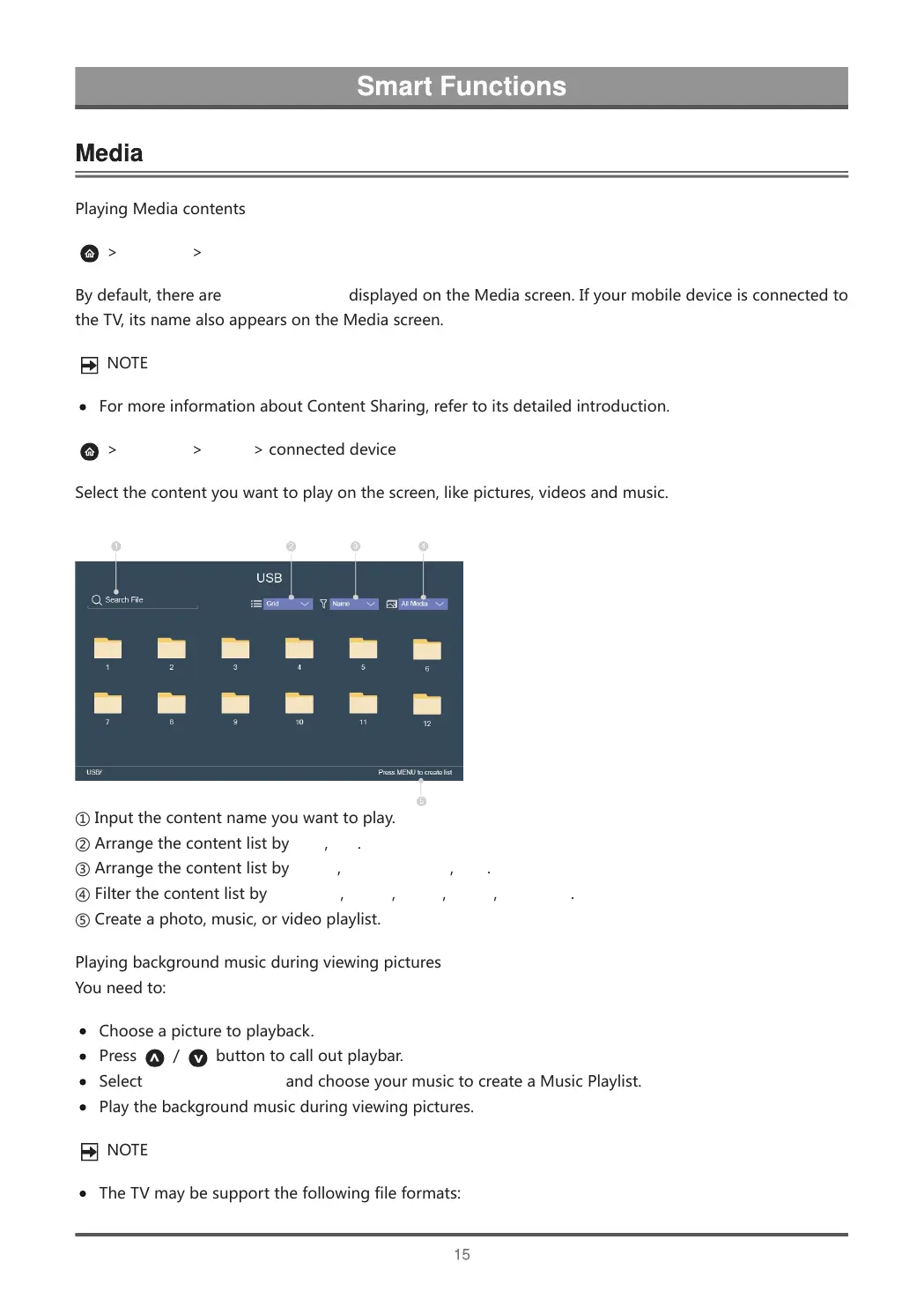
Selectthecontentyouwanttoplayonthescreen,likepictures,videosandmusic.
①Inputthecontentnameyouwanttoplay.
②ArrangethecontentlistbyGrid,List.
③ArrangethecontentlistbyName,DateModified,Size.
④FilterthecontentlistbyAllMedia,Photo,Video,Music,Recorded.
⑤Createaphoto,music,orvideoplaylist.
Playingbackgroundmusicduringviewingpictures
Youneedto:
Chooseapicturetoplayback.
Press / buttontocalloutplaybar.
SelectBackgroundMusicandchooseyourmusictocreateaMusicPlaylist.
Playthebackgroundmusicduringviewingpictures.
NOTE
TheTVmaybesupportthefollowingfileformats:



 To Next Page