10
EN
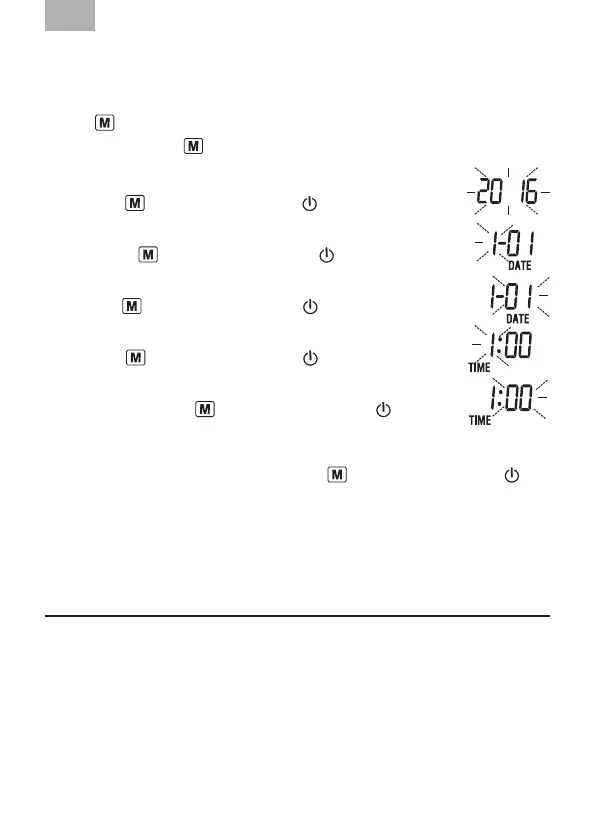
The setting procedure as follows:
It is essential to set date and time. Otherwise, you will not be able to save your
measured value correctly with a date and time.
To use
“ ”
button to be adjustment button.
If you press and hold
“
”
button, you can set the values more
quickly.
1. Year setting: the year ashes on the display: choose the desired
year with
“
”
button and conrm with
“ ”
(ON / OFF) button.
2.
Month setting: the month ashes on the display: choose the desired
month with
“
”
button and conrm with
“ ”
(ON / OFF) button.
3. Day setting: the day ashes on the display: choose the desired
day with
“
”
button and conrm with
“ ”
(ON / OFF) button.
4. Hour setting: the hour ashes on the display: choose the desired
hour with
“
”
button and conrm with
“ ”
(ON / OFF) button.
5. Minute setting: the minute ashes on the display: choose
the desired unit with
“
”
button and conrm with
“ ”
(ON / OFF) button.
6.
Measurement unit setting: the unit “KPa” or “mmHg” ashes on the display:
choose
the desired measurement unit with
“
”
button and conrm with
“ ”
(ON / OFF) button.
Please be noticed, the clock will begin to run from 2016-01-01 01:01, and Unit in
mmHg, if no key is pressed within 20 seconds.
5. Carrying Out a Measurement
5.1 Before the measurement
Avoid eating, smoking as well as all forms of exertion directly before the
measurement. All these factors inuence the measurement result. Try and
nd time to relax by sitting in an armchair in a quite atmosphere for about ten
minutes before the measurement.
Measure always on the same arm (normally left).
Attempt to carry out the measurements regularly at the same time of day, since
the blood-pressure changes during the course of the day.


 To Next Page