DE
FR
IT
EN
ES
NL
117
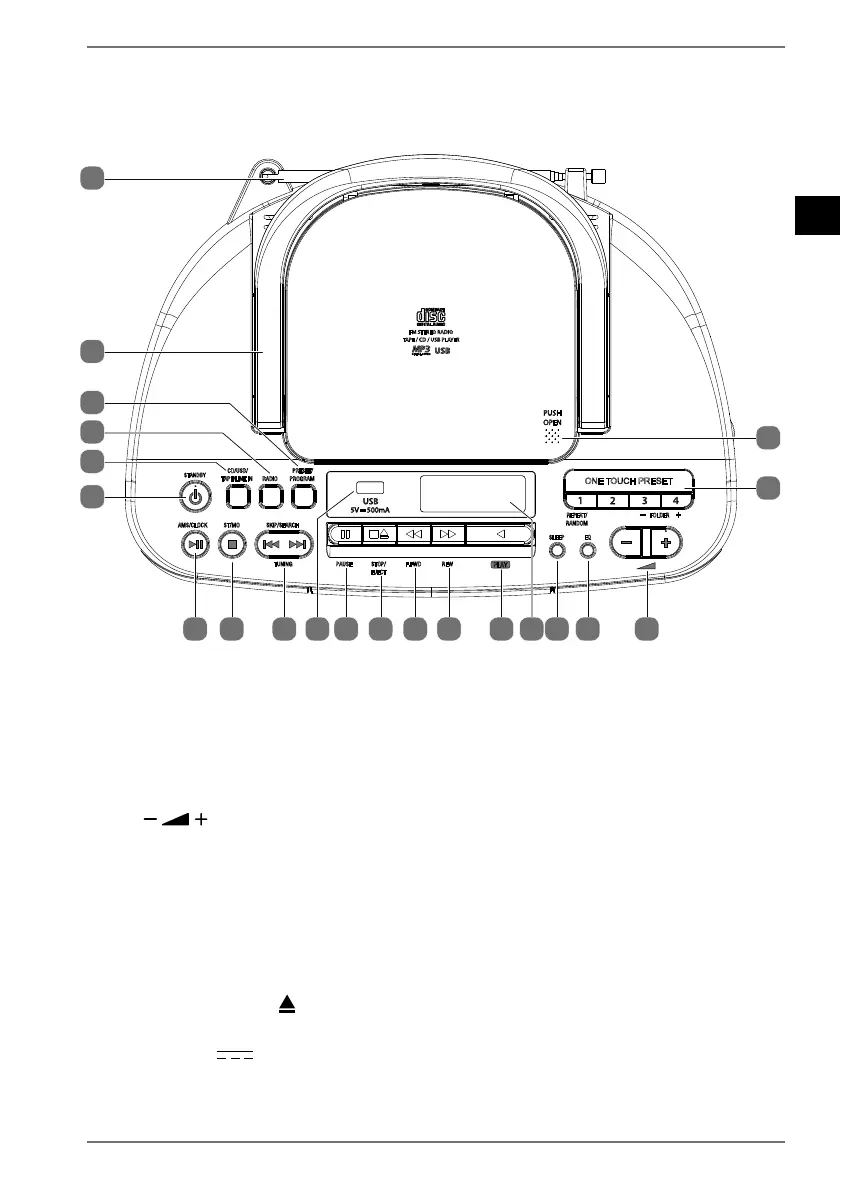
6. Vista general del aparato
6.1. Parte superior
STANDBY
PRESET/
PROGRAM
CD/USB/
TAPE/LINE IN
RADIO
AMS/CLOCK
ST/MO
SKIP/SEARCH
ONE TOUCH PRESET
REPEAT/
RANDOM
EQ
SLEEP
FOLDER
TUNING PAUSE STOP/
EJECT
F.FWD REW
TAPE / CD / USB PLAYER
FM STEREO RADIO
16
17
18
19
20
21
15 14 13 12 11 10 9 8 7 6 5 4 3
2
1
1) PUSH OPEN: abrir el compartimento de CD
2) ONE TOUCH PRESET 14: selección directa de emisoras de radio memori-
zadas 1-4
REPEAT/RANDOM: modo de repetición/reproducción aleatoria
FOLDER /+: en el modo USB/MP3-CD, una carpeta de archivos hacia atrás/
hacia delante
3) : regulador de volumen
4) EQ: seleccionar el modo de ecualizador, activar/desactivar el modo Bass
5) SLEEP: activar el modo de reposo
6) Pantalla
7) PLAY: iniciar la reproducción del casete
8) REW: retroceso rápido (casete)
9) F.FWD: avance rápido (casete)
10) STOP/EJECT : parar la reproducción del casete/expulsar el casete
11) PAUSE: pausar la reproducción del casete
12) USB 5V 500mA: toma de conexión para memoria USB


 To Next Page