6-8
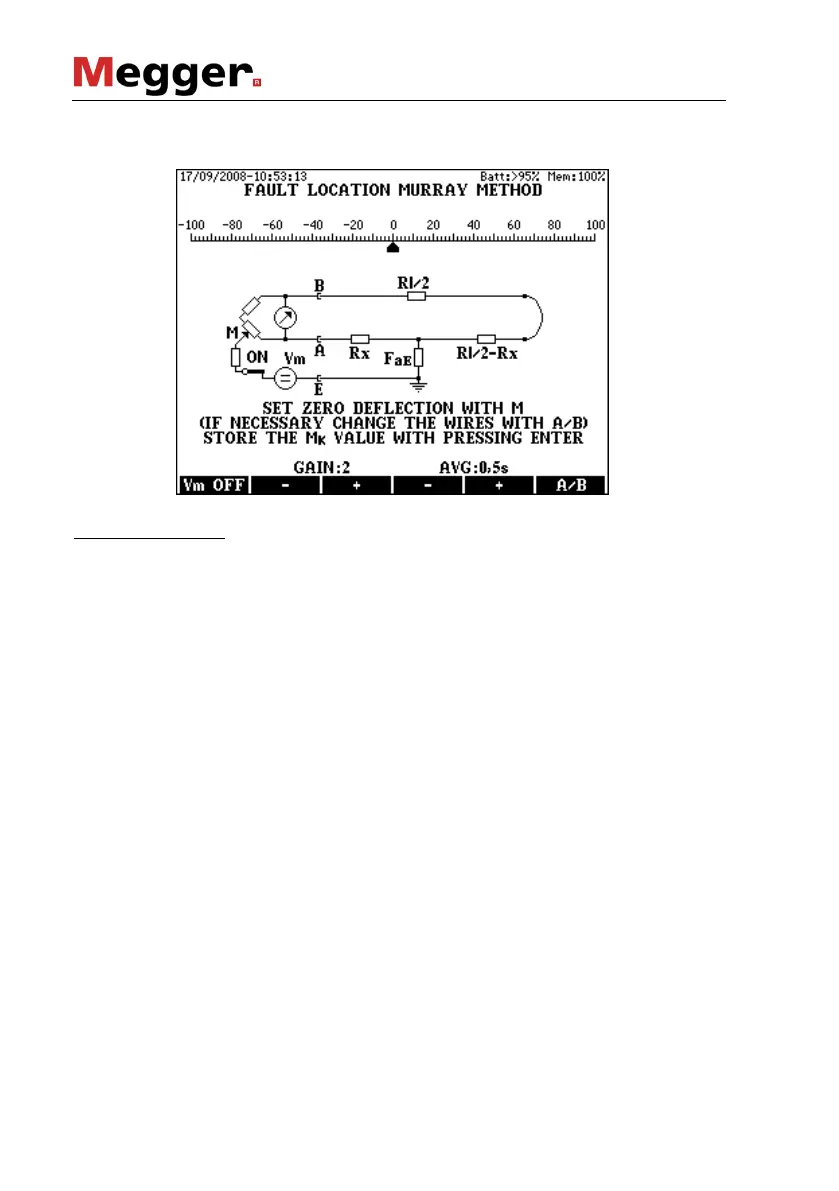
Having the measurement started the following display appears after a few
seconds and the bridge is ready for balancing.
Bridge Balancing
• Select the minimum gain with key F2
• Switch the measuring voltage off with the Vm OFF (F1) key and
keep it pressed until the pointer reaches a stable position. While
the key is pressed KMK 8 measures the disturbing DC voltage.
• After releasing the key, KMK 8 performs a null-correction
compensating the effect of disturbing voltage. The null point
remains in the middle. Set the pointer to the 0 point with the M
balancing potentiometer
• Increase the gain gradually with key F3 and repeat the first two
points until reaching the perfect balance. The balance is perfect
when the gain is 4 or 5 and the pointer stands on the 0 point with
pressed and released F1 key as well.
• The device performs numerous measurements per second. The
pointer shows the result of the last measurement. When the line is
too noisy the pointer is waving around a middle point and the
reading is difficult. The waving of pointer can be reduced by
average calculation.
• Five averaging times are provided: 0, 0.5, 1, 2 or 4 sec. (0= no
averaging)
• The averaging time can be changed with keys F4 and F5. When
the balancing is completed press ENTER and the results appear.



 To Next Page