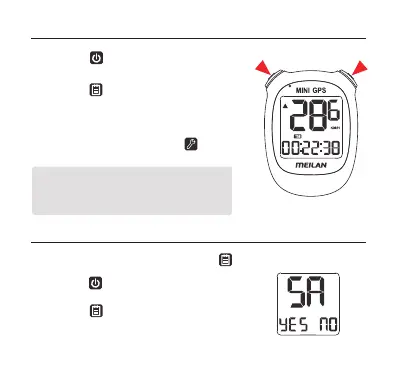
3. If you need to delete the record of this time
riding, you can long press the setting
button.
• During a workout:
•
Ending a workout
1. Press the left top button to switch
current/average/maximum speed display.
1. To end a workout, press and hold the right top button.
2. Press the
left top button to select YES to
confirm and save the workout record;
Press the right top button to select NO not to
save the workout record, it will be deleted.
2. Press the right button to switch current
time, riding time, distance, altitude, total
time and ODO.
* During a workout, the device will start and
stop automatcially in sync with the
movement of the bicycle.
15


 To Next Page