020
MA3 Integrated D/A Converter Manual
meitner © 2020 Meitner Audio, All Rights Reserved. Meitner Audio reserves the right to amend specifications & design without notice.
mConnect Control App
File Playback and Control
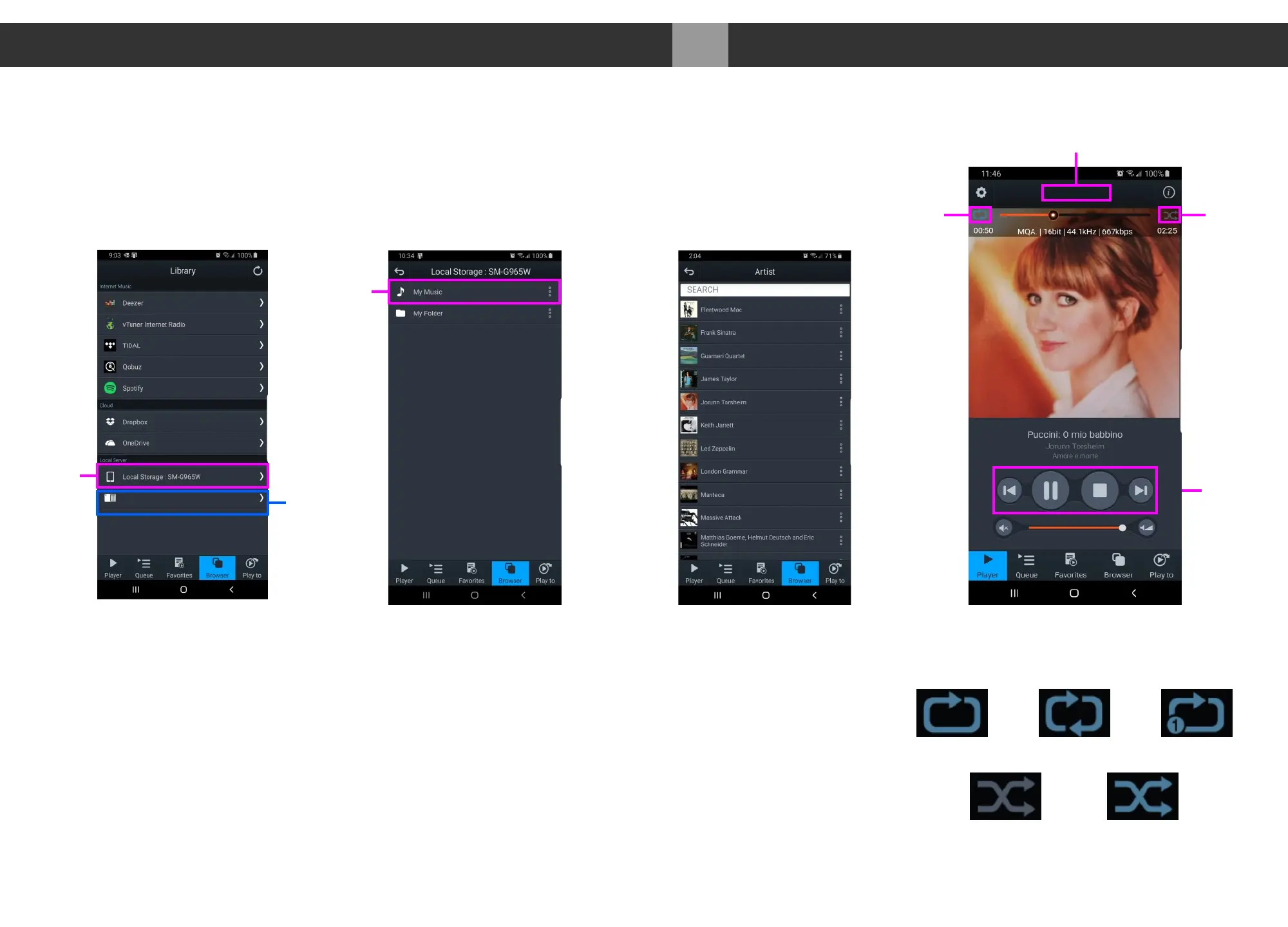
4. In our example we select tracks from the “Local Server” which show audio
files on the mobile/tablet device, USB storage connected to the MA3
or any DLNA/UPnP enabled storage on the network.
5. Select “My Music”, and select how you would like to display the files. Eg. by
artist, by album or by genre. Once a file is selected playback will start.
Playback controls are available below the track art. At the top, the track jump
function, playback status, type of file, bitrate, sample rate, stream rate
and length of file information.
6. On the right is a usage guide with regards to the Repeat and Shuffle
functions. Press the icons to select appropriate function.
Music Selection
Artist View
Playback
ShuffleRepeat
Playback
Controls
Local
Storage
My
Music
MA3 Selected
Playback Device
USB Flash
drive storage
Play Through Repeat All Repeat Track
Shuffle off Shuffle on
Repeat and Shuffle Functions
Meitner_MA3 Server
Meitner_MA3


 To Next Page