12
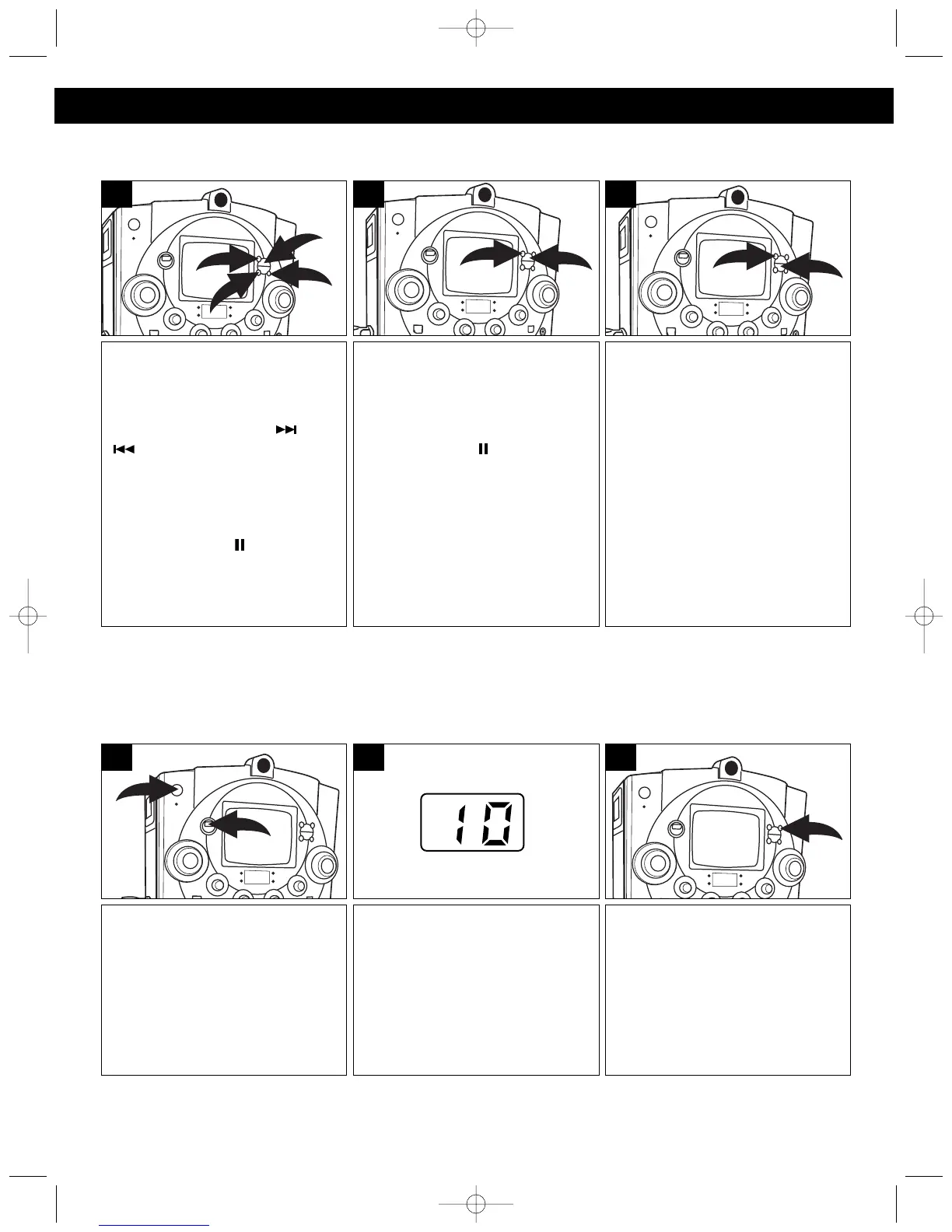
To repeat a single track, while in
the Stop mode, press the
REPEAT button ❶ once; the
REPEAT indicator will blink.
Press the Skip/Search ( ) ❷ or
() ❸ button to select the
specific track that you wish to
repeat. When the desired track
number blinks in the display,
within five seconds, press the
PLAY/PAUSE ( ) button ❹ to
begin playback. The specific track
you selected will be repeated
continuously.
2
4
1
3
1
To cancel Repeat Playback,
press the REPEAT button ❶ until
the REPEAT indicator goes out.
You can also cancel Repeat
Playback by pressing the Stop
(■) button ❷.
2
1
3
To repeat all of the tracks on a
disc continuously, while in the
Stop mode, press the REPEAT
button ❶ twice; the REPEAT
indicator will light solid. Press the
Play/Pause ( ) button ❷ to
repeat all tracks.
2
1
2
REPEAT PLAYBACK
Press the POWER button ❶ to
turn the unit on. Slide the
FUNCTION switch ❷ to the CDG
position.
2
1
1
Press the PROGRAM button; “0”
will blink in the display and the
PROGRAM indicator will blink.
3
Press the CD Door OPEN/ CLOSE
button to open the CD compartment
door and insert your disc in the CD
player. Press the CD Door
OPEN/CLOSE button to close the
CD compartment door. Wait for the
CD player to read the table of
contents and display the total
number of tracks on the disc.
2
PROGRAMMED PLAYBACK
The CD player in this unit has a 20 track programmable memory that allows you to program up to 20 tracks
on any disc for playback in any desired order. You may program 20 different tracks or you may also program
certain tracks to play more than once.
To perform programmed playback, proceed as follows:
OPERATION (CONTINUED)
CONTINUED ON THE NEXT PAGE
MKS8580.O/M.QXD 8/6/03 3:09 PM Page 12




 To Next Page