17
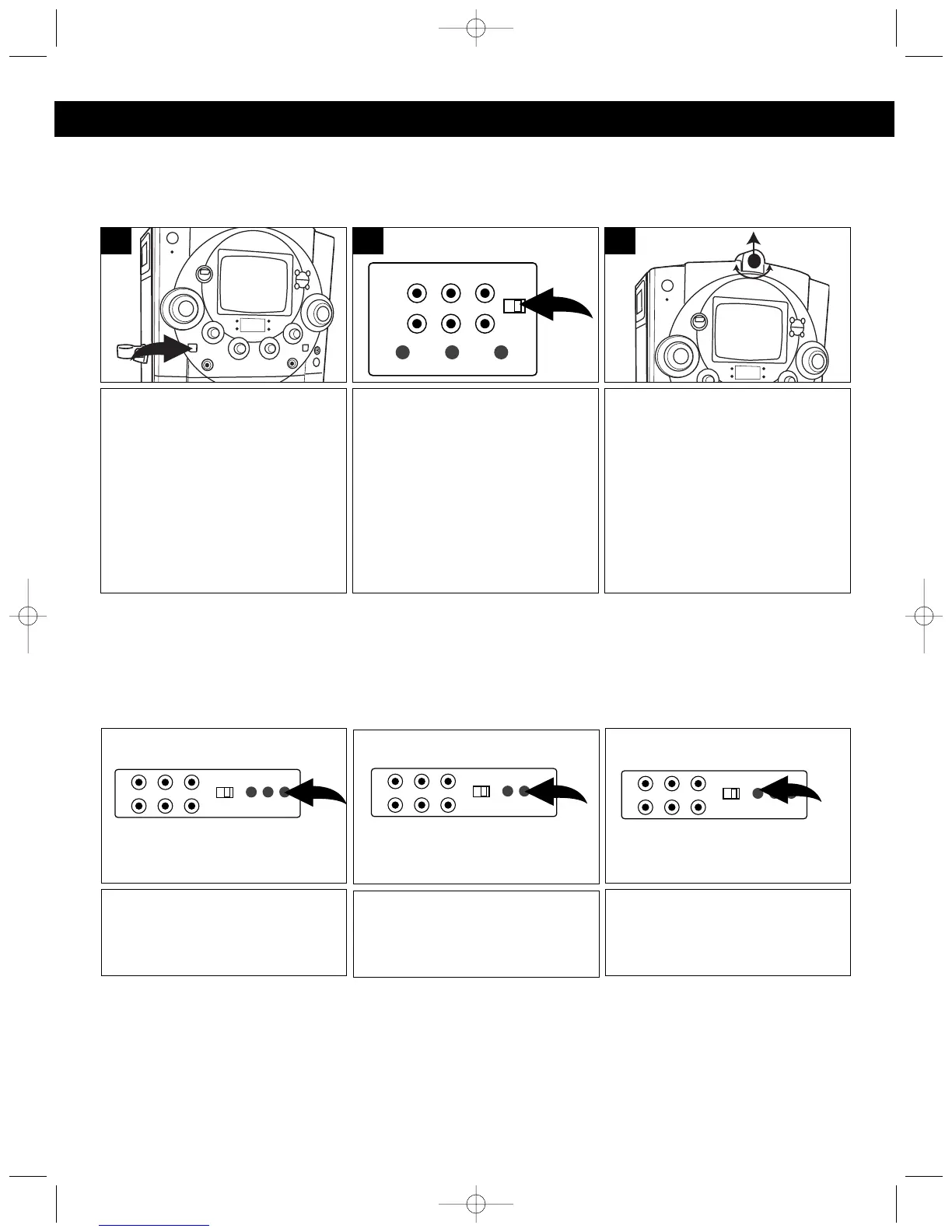
Slide the MONITOR switch to the
CAMERA position.
1
Open the camera compartment
and remove the protective cover
on the camera lens. The camera
will then show the image on the
monitor and/or the external TV
screen.
ADJUSTING FOCUS: Rotate the
ring located on the outside of the
camera lens to adjust the
camera’s focus.
3
When connected to an external
TV, slide the CDG/CAMERA
switch to the CAMERA position to
see the image from the camera on
the external TV.
2
USING THE BUILT-IN CAMERA
OPERATION (CONTINUED)
V-HOLD CONTRAST BRIGHTNESS
If the picture moves up and down
or rolls, rotate to adjust the
vertical hold.
If the picture is too strong or too
weak, rotate to adjust the contrast
and clearly define the shades of
blacks, grays and whites.
If the picture is too light or too
dark, rotate to adjust the
brightness.
ADJUSTING THE PICTURE
When watching a CD+G on the monitor screen, adjust the brightness, v-hold and contrast as follows:




 To Next Page