7 | Page
REMOTE TRANSMITTER OPERATING INSTRUCTIONS
TO TURN ON THE APPLIANCE:
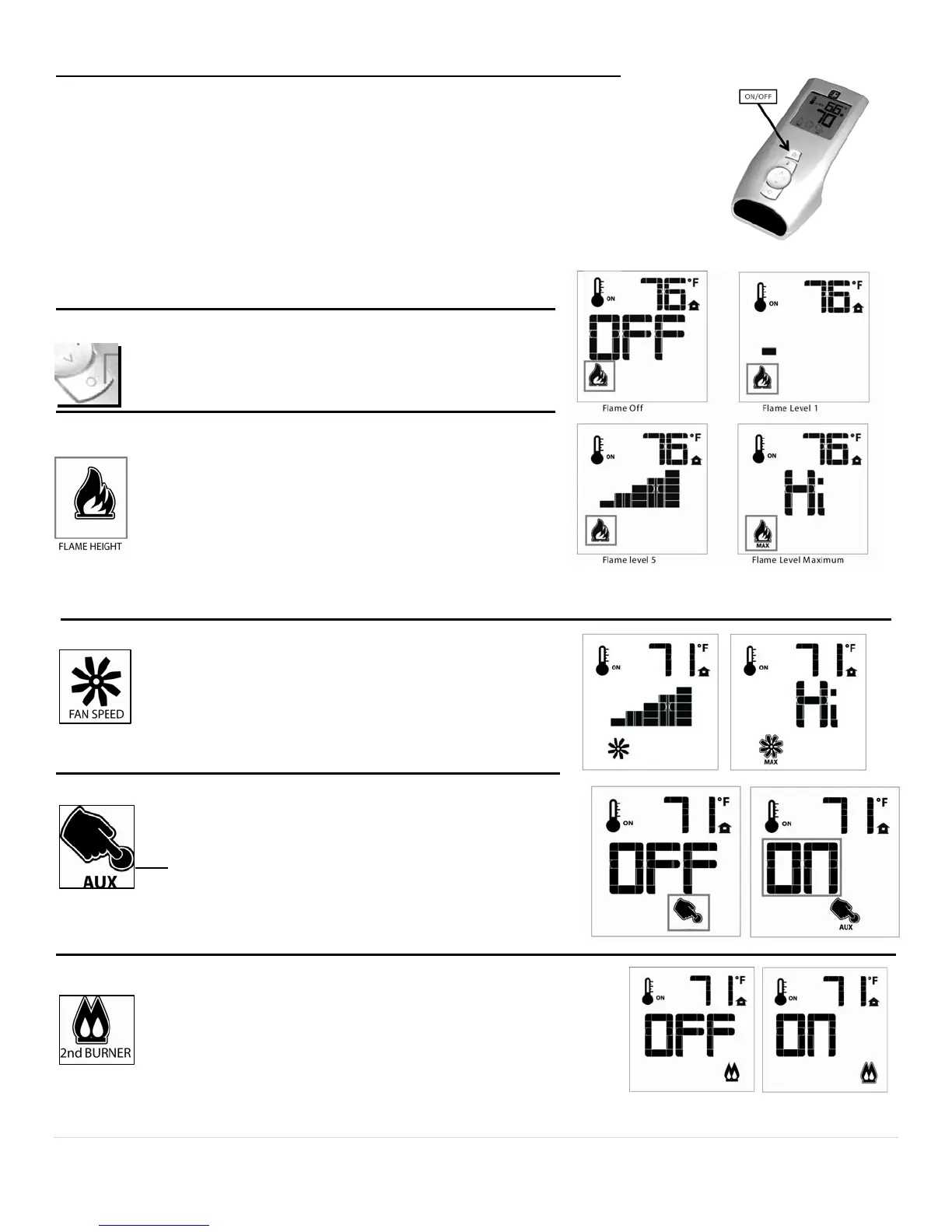
1. Press the ON/OFF button. The transmitter display will show all active icons on the screen.
2. Select the Thermostat Mode by pressing the Thermostat Key: OFF (meaning Manual
Mode), ON (meaning normal Thermostat) or Smart (meaning Smart Mode).
a. In OFF (Manual Mode), the appliance will ignite and start on HI.
b. In ON (Normal Thermostat Mode), the appliance will only ignite if the Set Temperature
is greater than the Room Temperature.
c. In SMART (Smart Mode), the appliance will only ignite if the Set Temperature is greater
than the Room Temperature.
TO TURN OFF THE APPLIANCE, press the ON/OFF button.
MODE KEY
Pressing the MODE KEY toggles between the various availa-
ble functions: Flame Height, Fan Speed, Aux (Accent Light)
On/Off and Secondary Burner On/Off.
Flame Height: 6 flame height Levels are available. While the Flame
Height Icon is displayed, pressing the Up or Down button
once will increase or decrease the flame height by 1 of 6 in-
crements. If the flame height is at Level 1 and the Down but-
ton is pressed, all burners will turn OFF. If in IPI mode, the
pilot light will also extinguish. If in Standing Pilot Mode, the
pilot light will remain ON. Note: If in SMART model, the flame
height function is not available for manual adjustment. In
SMART mode, the flame height regulates automatically.
Fan Speed Control: The fan speed can be adjusted through six (6)
speeds and OFF. To activate this function, press the MODE
Key to index to the fan control icon. Use the UP/Down Arrow
Key to turn ON, OFF or adjust the fan speed. A single “beep”
will confirm reception of the command.
Aux (Accent-Light): This function controls the Mendota Accent Light func-
tion. Pressing the UP key in this mode will TURN ON the Accent
Light and Pressing the DOWN key will TURN OFF the Accent
Light. A single “beep” will confirm reception of the command.
Note
: The Accent Light Dimmer control is located adjacent to the
Remote Receiver. Turn the Dimmer Control Knob to dim or
brighten the Accent Light. Once you set your desired brightness
level, you may use the AUX function to turn the Accent Light On or Off at
that preset level.
Secondary Burner: This function controls the Secondary Burner’s ON/OFF fea-
ture. Pressing the UP Key in this mode will TURN ON the Secondary
Burner and Pressing the DOWN Key will TURN OFF the Secondary
Burner. The flame level will not change when you turn the Secondary
Burner On or Off. The flame level can only be changed in the Flame
Level mode.


 To Next Page