Operation Unsetting Your Ward(s)
If your user code is assigned to more than
one ward you may be able to select the
wards that you want to unset.
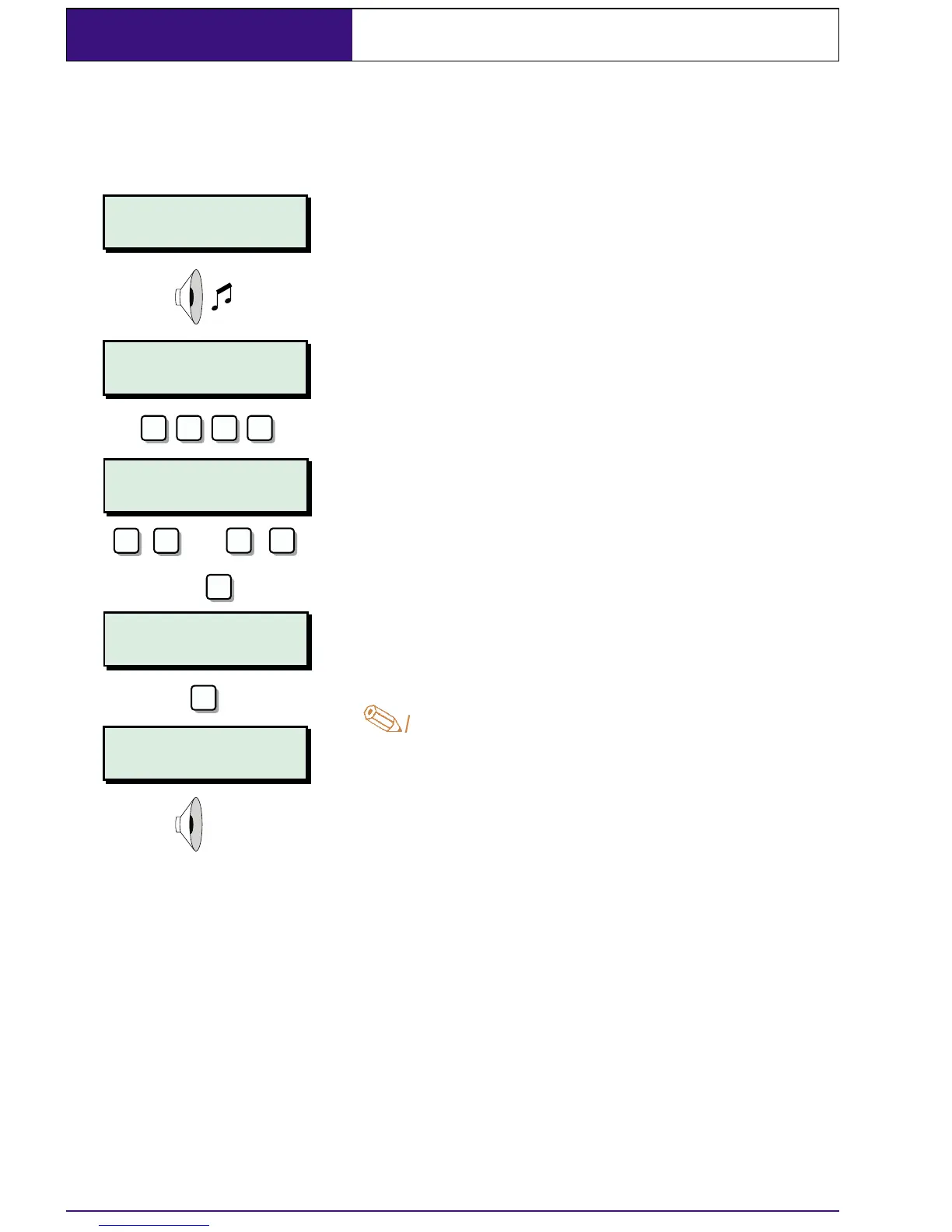
1. Enter the protected area via the
designated entry point, the internal
sounder will sound.
2. Proceed directly to the remote keypad
and enter your passcode. The display
will show that the ward in entry is going to
be unset.
3. Select other wards by pressing 1 - 8,
pressing
A or C will toggle the display
between wards A - H & wards I - P.
4. When the required wards are displayed
press
[ to unset them. The internal
sounder will stop.
.
If your passcode is not entered or [ is
not pressed before the entry timer
expires an alarm tone will be
generated from the internal sounders.
A second entry timer is then started. If
you fail to enter your passcode or press
[ before the second entry timer expires
a full alarm condition will occur.
14
?
Unset wards :-
A,*,*,*,*,*,*,*
Unset wards :-
A,B,*,*,*,*,*,*
? ? ?
ENT
1
A/
8
C
or
-
2
e.g.
ENTRY A.........
Enter Your Code!
AB..............
17:30 Sun 01 JAN
SYSTEM OPEN
17:30 Sun 01 JAN


 To Next Page