18
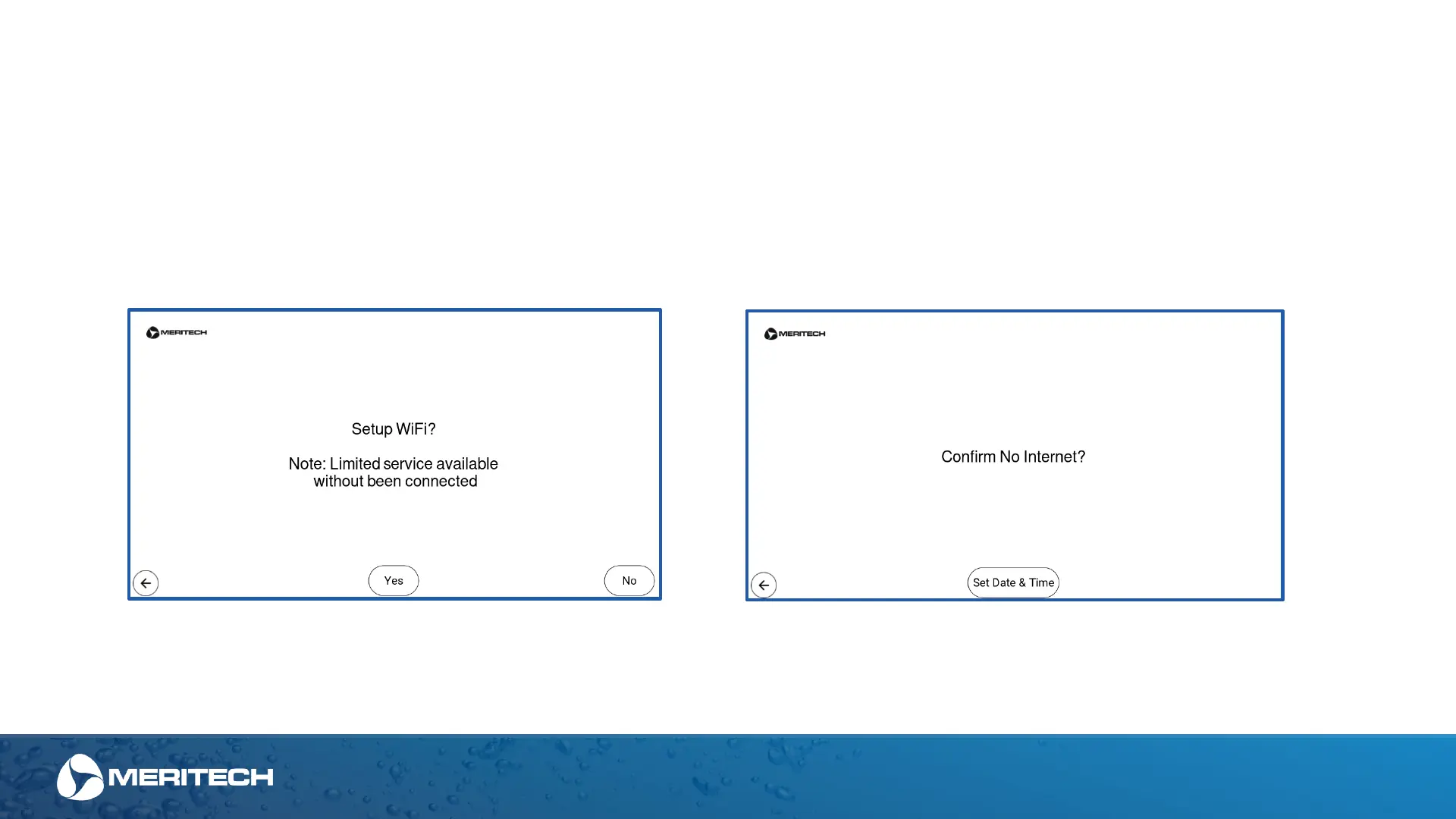
Setting up the Wi-Fi connection:
Connecting the system to Wi-Fi will allow Meritech to monitor the health of the station and assist with trouble-shooting and updating software. Additionally,
connecting to Wi-Fi will allow the compliance data that is generated from the system be available to you on the App (under development). No data is shared
with any other source than Meritech and no personal information or identification is collected or shared.
If the "Yes" button is selected and you choose to connect the station to Wi-Fi, you will be guided through entering your Wi-Fi Network credentials.
If the "No" button is selected, please note that limited service and diagnostics may be limited. Additionally, time & date will have to be set manually, see page
31 to set the date and time in the system.
Unless written notice is provided otherwise by Customer to Meritech prior to the delivery of EVO system products, Customer ag rees and authorizes the sharing and uploading to Meritech’s or Meritech’s affiliated
servers from Internet-connect-capable EVO system products the following data: customer identification, unit serial number, manufacturing date, operational, troubleshooting, and maintenance data. The data will
be used by Meritech to provide Customer maintenance and repair services. Data collected will not include any personal identifying information of specific users of the EVO system products.
Station Setup Screens


 To Next Page