Merrychef conneX
®
Installation and User Manual
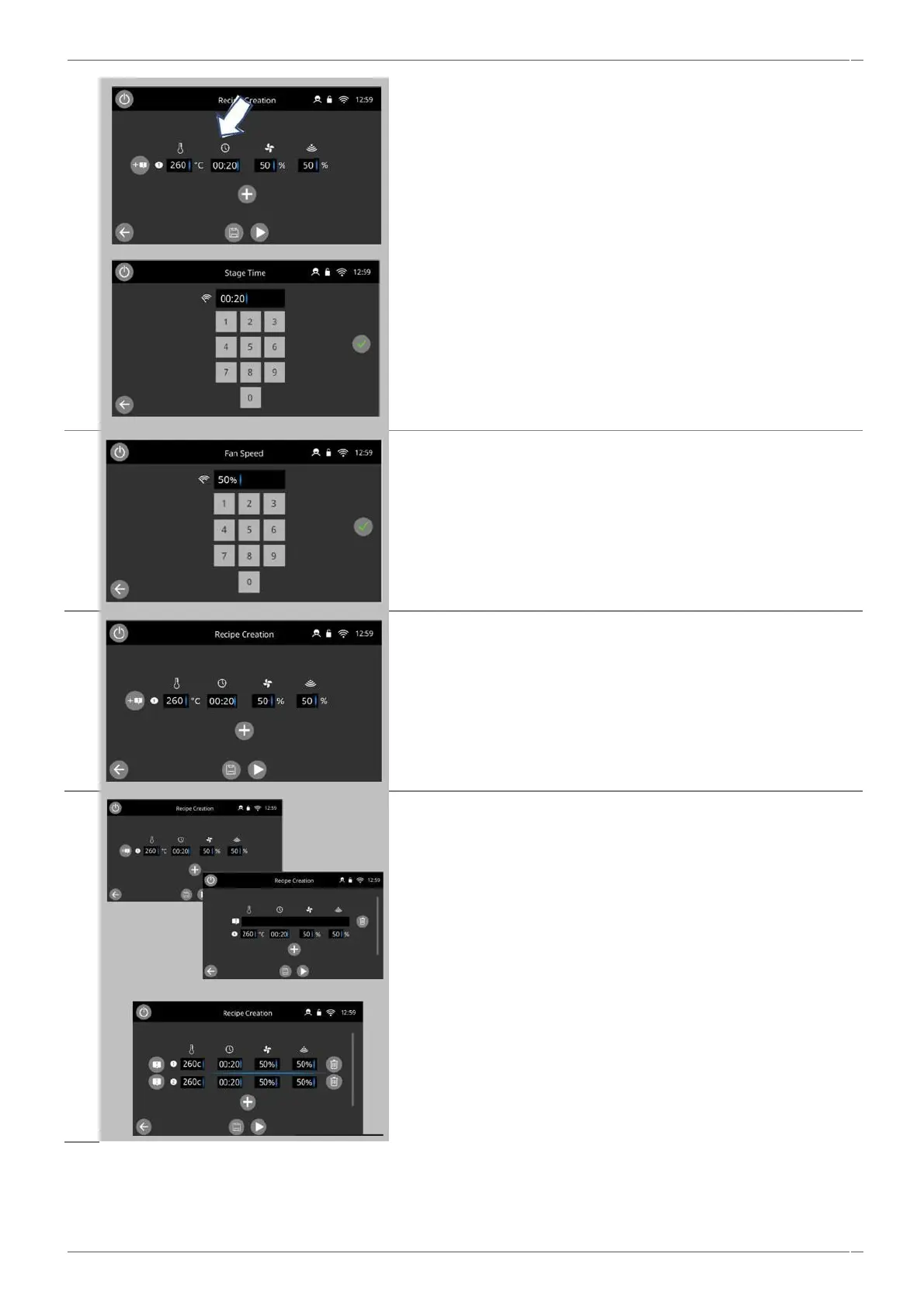
To input the cook time, select the box under the 'clock' icon.
Enter the cooking time in the keypad up to a maximum of 10 minutes
for each stage.
Example: Enter 110 (for 1 minute and 10 seconds).
Select the green tick to save the inserted value.
To input the 'fan' speed select the box under the ‘fan’ icon.
Set the fan speed in the keypad (10-100%)
Select the green tick to save the inserted value.
To input the 'microwave' power select the box under the ‘microwave’
icon.
Set the microwave power in the keypad (0 and 5-100%).
Select the green tick to save the inserted value.
Select the ' + Note' button to enter an instruction of a stage line
(optional).
Example: "Use the green basket".
When cooking the instruction appears in the display at the beginning
of that stage.
Select this instruction line to enter a stage instruction. this can be a
text only, image only or text and image prompt.
Select the 'plus' button at the bottom to add a new stage.
Delete a stage by pressing the 'trash' button next to that stage.
Cooking profiles can have up to a maximum of 6 stages.
Repeat the steps 2-6 from stage 1 above to create a new stage.
Scroll up and down to view the stages of the cook profile.



 To Next Page