Service & Parts Manual original Instructions
Part Number 32Z3871 US
Issue 3
41
SPARES &
REPLACEMENT
6 7
8
9
10
5
3
2
4
1
19.3 PM (Personality Module)
replacement
The PM on the SRB contains the Firmware.
The PM on the QTS contains the Firmware,
Oven Serial Number, Temperature
Calibration, Cooking Programs, Application
Icons and the Recipe Images.
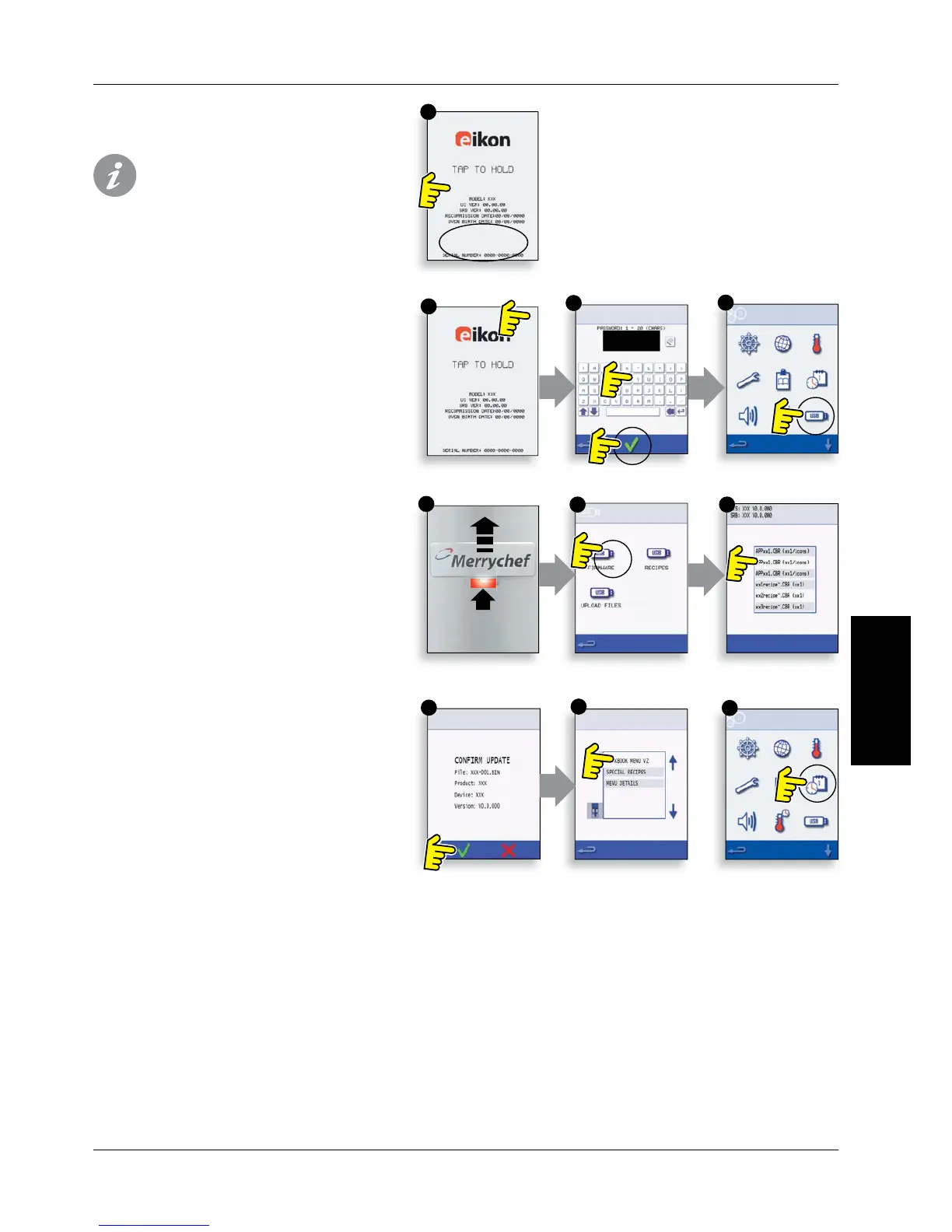
19.3.1 With a new PM tted and casing re tted, switch
on the oven and tap the screen to hold and check the
QTS and SRB versions (1) are the latest release, if not,
execute a Firmware update using the latest versions.
For details see ‘Firmware Updates’ (Servicing section).
19.3.2 Tap the top right of the screen to bypass the
preheat stage (2).
19.3.3 Enter the service password and select OK to
display the Settings menu, see (3).
19.3.4 Select the USB symbol (4).
19.3.5 Slide the Merrychef badge upwards and insert
the USB Memory Stick into the slot (5).
19.3.6 Once the USB has stopped ashing, select the
required USB recipe symbol (6).
19.3.7 Select the Application Icons le to download
(7). Note; a tinted band over a le name indicates the
le is not valid for that oven.
19.3.8 Check the le information shown is correct
before selecting OK (8), if not, select ‘X’ and locate the
correct le.
19.3.9 When completed, select recipes to load the
cooking programs (9). Once the programs are loaded
the oven restarts.
19.3.10 Enter the Date & Time settings (10). For details
see under ‘Oven Control Settings’ (Product Information
section).
19.3.11 Enter the oven serial number (Found on the
oven Rating Plate at the rear of the oven)
19.3.12 Turn the oven switch OFF/ON.
19.3.13 Remove the USB and keep in a safe place.
Reposition the USB cover.



 To Next Page