12
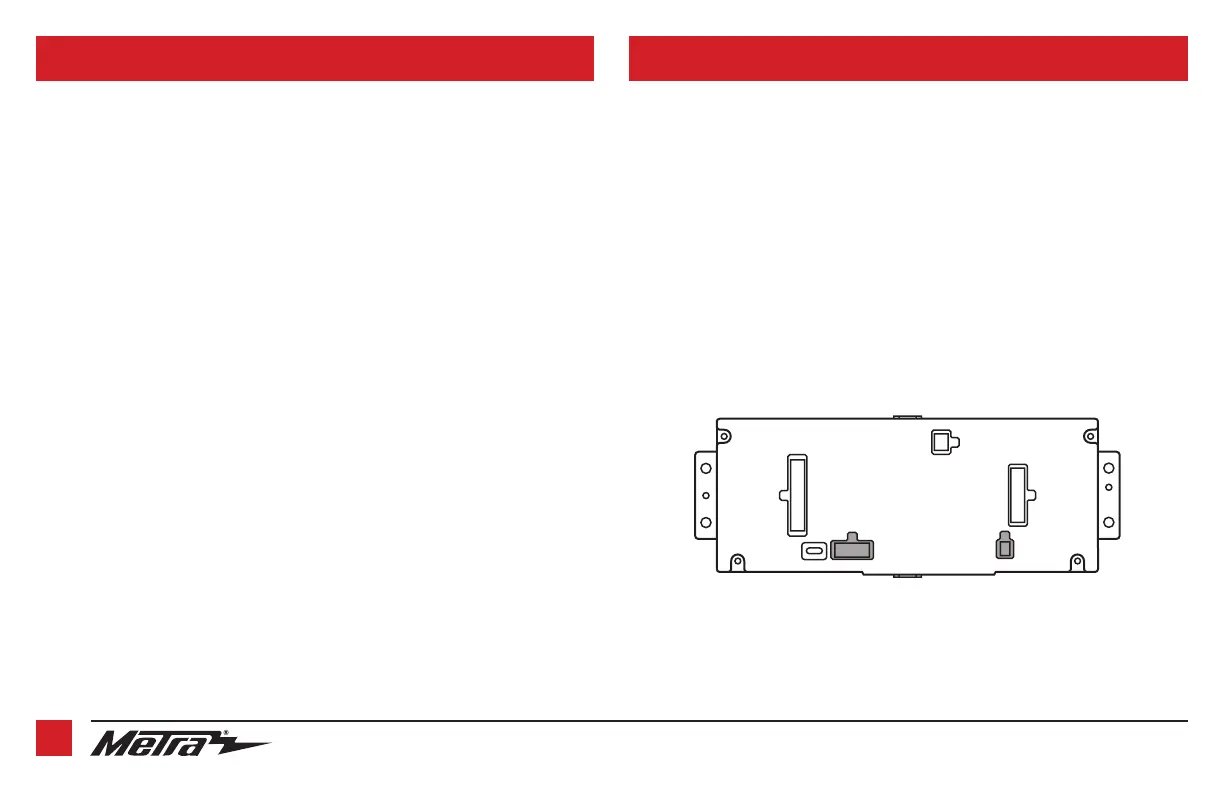
With the key in the off position:
1. Connect the
5722 harness
into the
touchscreen display
, ports “A” and “B”,
and then to the wiring harness in the vehicle.
2. Connect the
4-pin harness with yellow RCA jacks
into port “C” in the
touchscreen display
.
3. Disregard ports “D” and “E”, they will not be used in this application.
4. Port “F” is an update port for future software upgrades.
A
B
C
E
F
D
CONNECTIONS TO BE MADE (CONT.) INSTALLING THE INTERFACE
4-pin harness with yellow RCA jacks:
This harness is to be used to add an aftermarket backup camera to the
touchscreen display
, if
so desired.
• Connect the Yellow RCA jack labeled “Rearview camera”, to the RCA jack on the aftermarket
backup camera.
Note:
If this method is chosen, the backup camera option must be enabled in the
Configuration Settings Screen.
• Disregard the Yellow RCA jack labeled “AUX video”, it will not be used in this application.


 To Next Page