2
DASH DISASSEMBLY
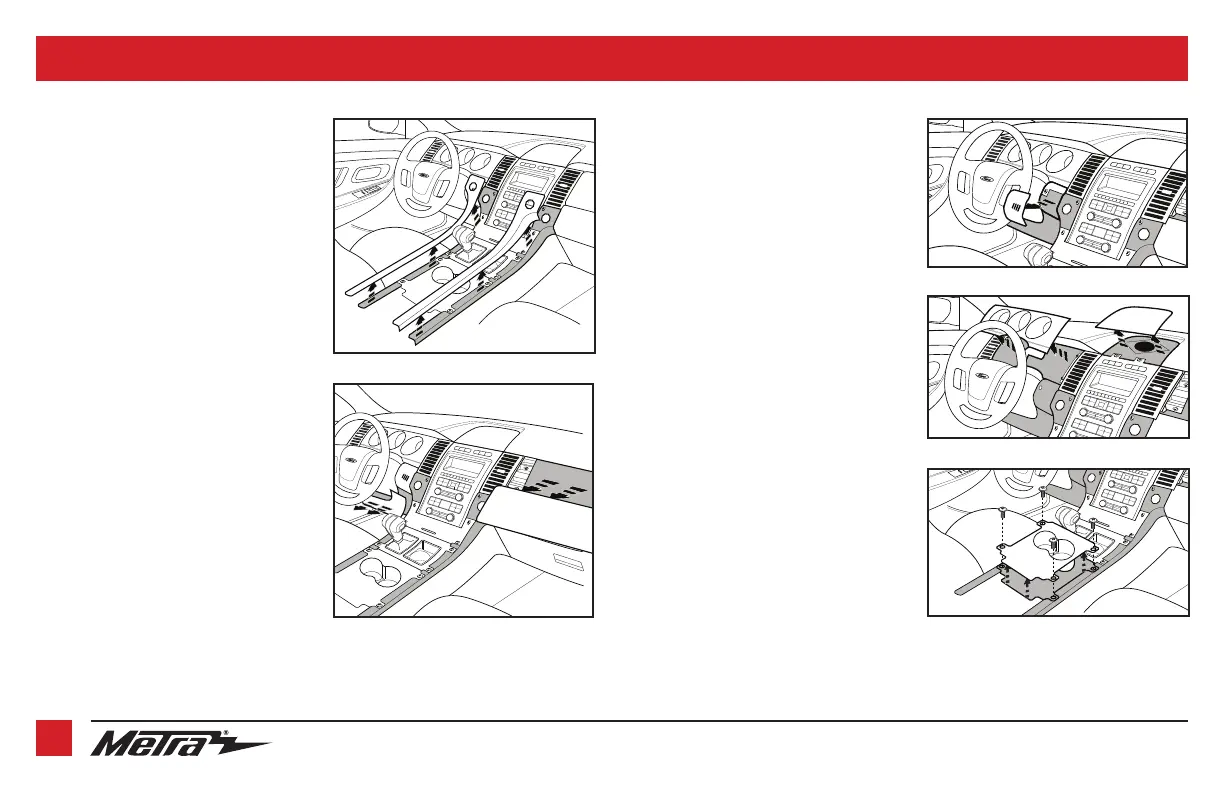
1. Unclip and remove the (2) trim panels
on the left and right side of the center
console. (Figure A)
2. Unclip and remove the trim panel to the
right of the passenger a/c vent.
(Figure B)
3. Unclip and remove the knee bolster
panel below the steering column.
(Figure B)
4. Remove the (1) 9/32” screw from the
trim panel to the left of the steering
column which has the interior light
switch in it.
5. Unclip and remove the trim panel
between the steering column and the
key cylinder, and then remove the (1)
9/32” screw exposed. (Figure C)
6. Unclip and remove the gauge cluster
trim panel. (Figure D)
7. Unclip and remove the trim-panel/
speaker-grill above the radio/climate
control panel. (Figure D)
8. Remove the (4) 9/32” screws securing
the cup holder trim panel, and then
unclip and remove. (Figure E)
Continued on the next page
(Figure C)
(Figure D)
(Figure E)
(Figure B)
(Figure A)


 To Next Page