REV. 10/28/2020 INST99-5838CH
7
KIT PREPARATION
(CONT.)
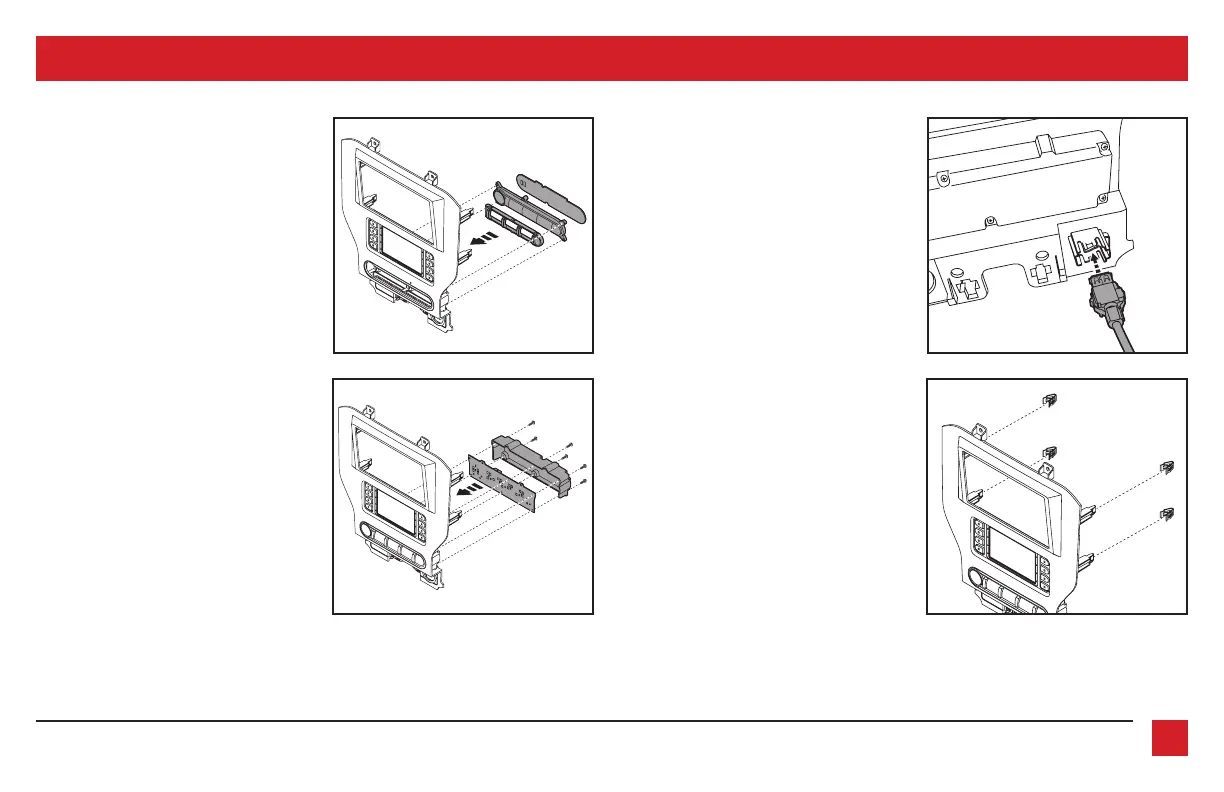
To the 99-5838CH radio trim panel:
1. Attach the engine start/stop trim,
engine start/stop switch panel, and
then the rubber button membrane.
(Figure A)
2. Secure the engine start/stop circuit
board and cover to the switch/cover
assembly using the (6) #4 x 1/2” Phillips
pan-head screws provided. (Figure B)
3. Insert the USB cable into the USB slot,
through the rear. (Figure C)
4. Attach the (4) panel clips provided.
(Figure D)
Continue to Kit Assembly
(Figure B) (Figure D)
(Figure A) (Figure C)



 To Next Page