386.257.1187
|
MetraOnline.com
6
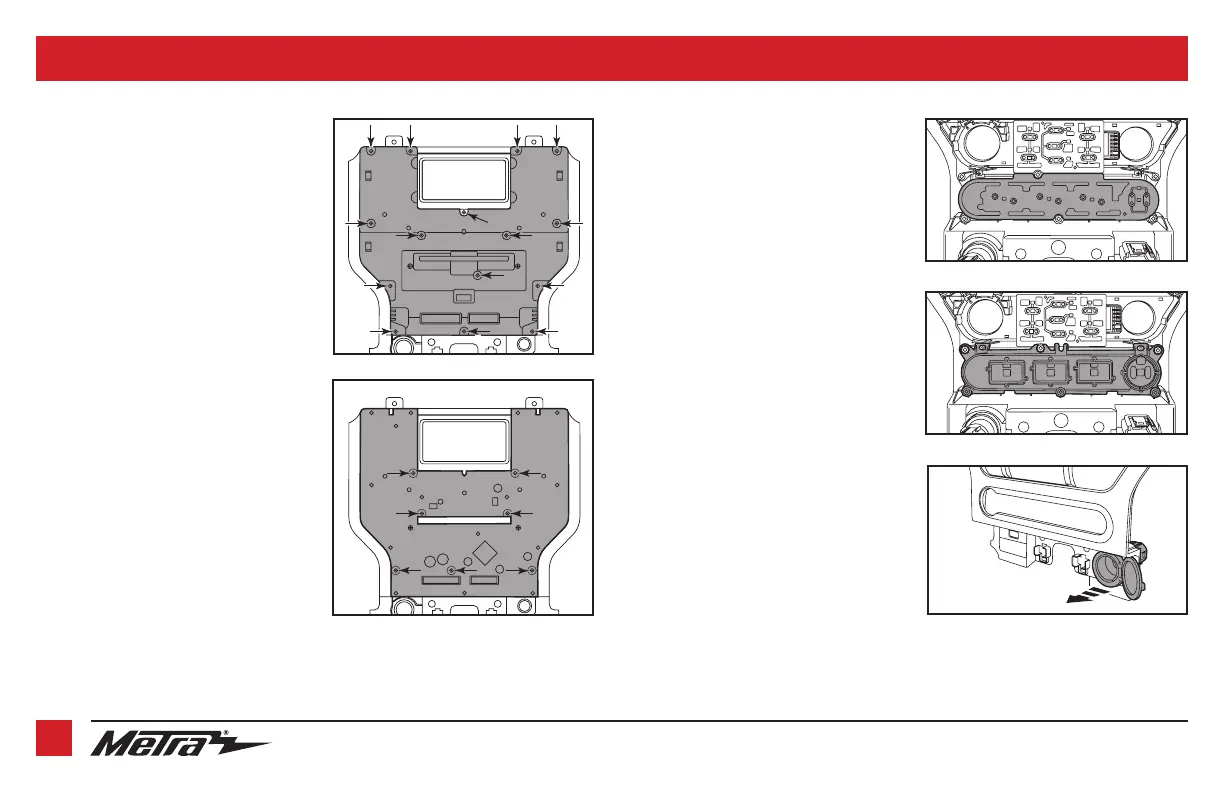
3. Remove the rubber button membrane
from the back of the engine start/stop
switch panel. (Figure C)
4. Remove the engine start/stop switch
panel. (Figure D)
5. Press in on the (2) retaining tabs inside
the power outlet to remove the inner
portion, and then unsnap the outer ring
and cover. (Figure E)
Continued on the next page
From the factory radio/climate control panel:
1. Remove the (15) T-10 Torx screws securing
the plastic panel cover to the rear of the
panel, and then remove. (Figure A)
2. Remove the (7) T-10 Torx screws securing
the circuit board, and then remove.
(Figure B)
(Figure B)
(Figure A)
(Figure E)
(Figure C)
(Figure D)
KIT PREPARATION (CONT.)



 To Next Page