99-7524B
Manual climate control
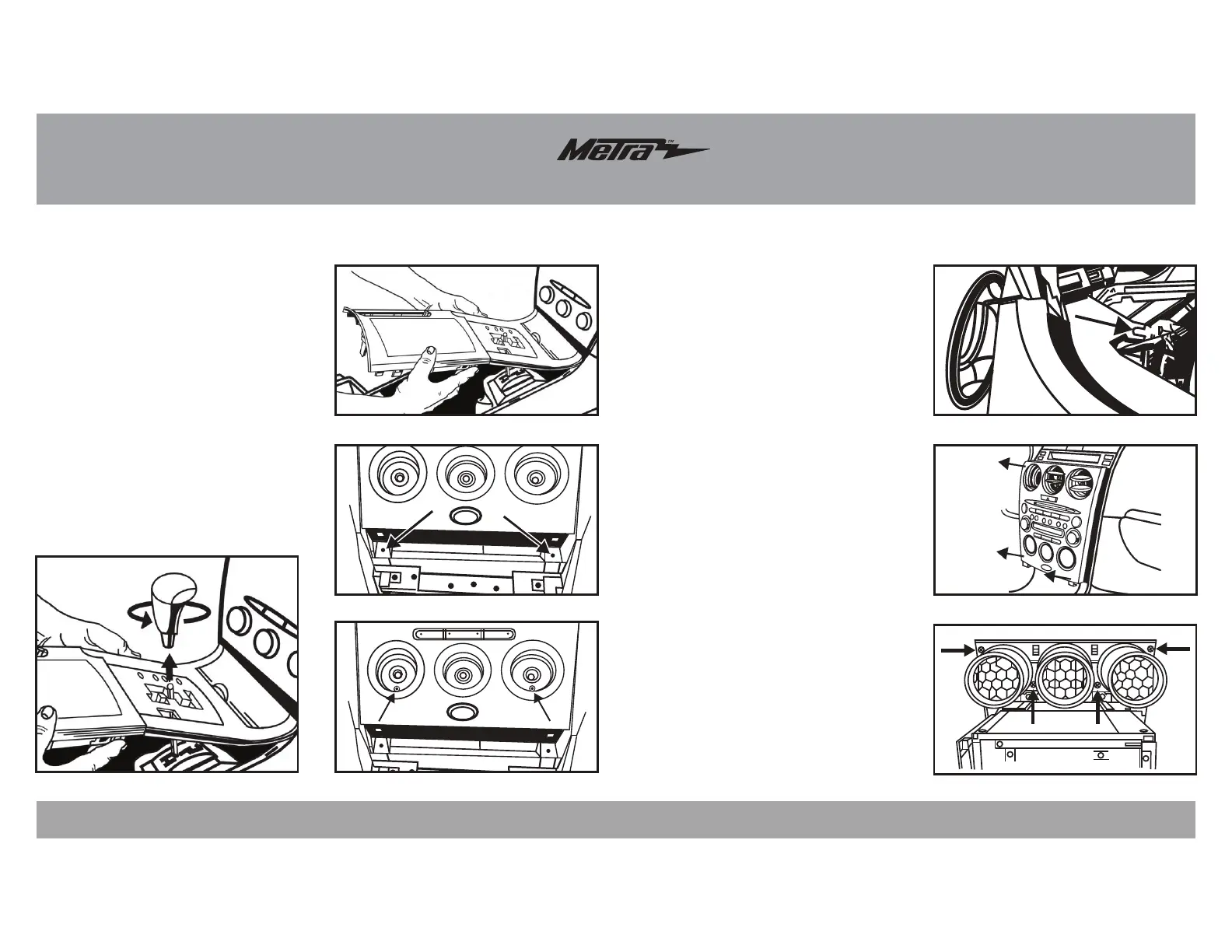
1. Unscrew the shift knob counter
clockwise to remove. (Figure A)
2. Unclip and remove the cup holder/
parking brake cover and shifter
cover as one radio. (Figure B)
3. Remove (2) Phillips screws from
the bottom of the radio/climate
control panel. (Figure C)
4. Pull the climate control knobs off
and remove (2) Phillips screws
from behind knobs. (Figure D)
Dash Disassembly
(Figure B)
(Figure F)
(Figure A)
(Figure E)
(Figure C)
(Figure G)
(Figure D)
3
5. Open glove box, squeeze sides
together and let open fully then
remove (1) 10mm bolt from the
side of the radio bracket. (Figure E)
6. Unsnap and remove radio/climate
control panel including climate
control vents at the top. (Figure F)
7. Remove (4) Phillips screws
securing vents to radio/climate
control panel to remove. (Figure G)
Continue on the next page
INSIDE
GLOVE BOX
A/C



 To Next Page