18
Open the menu 6. Tuning to TV stations
Fine tuning
The TV set is normally tuned to the centre frequency
of each of the TV channels. This is usually satisfac-
tory. If you are not satisfied, you can carry out fine
tuning of the frequency.
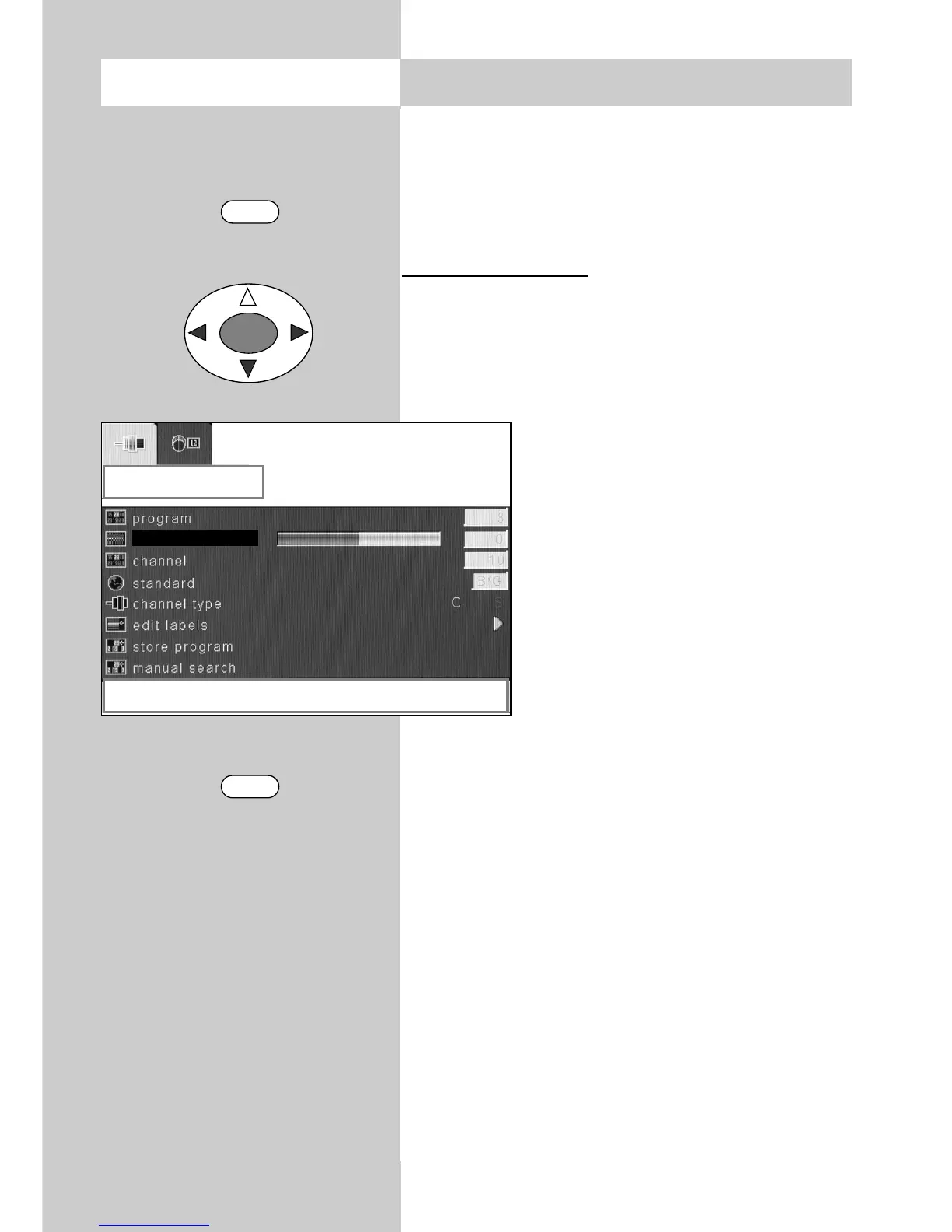
Executing fine tuning
• Switch to the programme position you wish to
adjust.
• Press the "MENU" key to open the TV menu.
• Use the cursor key to select the menu item
"Settings".
• Use the cursor key to select the
menu item "TV tuner".
• Press the "OK" key and open the
sub-menu "Programming".
• Use the cursor key to select the
menu item "Fine tuning".
• Use the cursor key to carry
out fine tuning.
• If you want to save the fine-tuning
setting, use the cursor key to
select the menu item "Store pro-
gram".
• Then press the cursor keys to save the set-
ting.
• Press the "TV" key to close the TV menu.
MENU
TV
OK
programming
right / left to adjust fine tuning
fine tune



 To Next Page