4
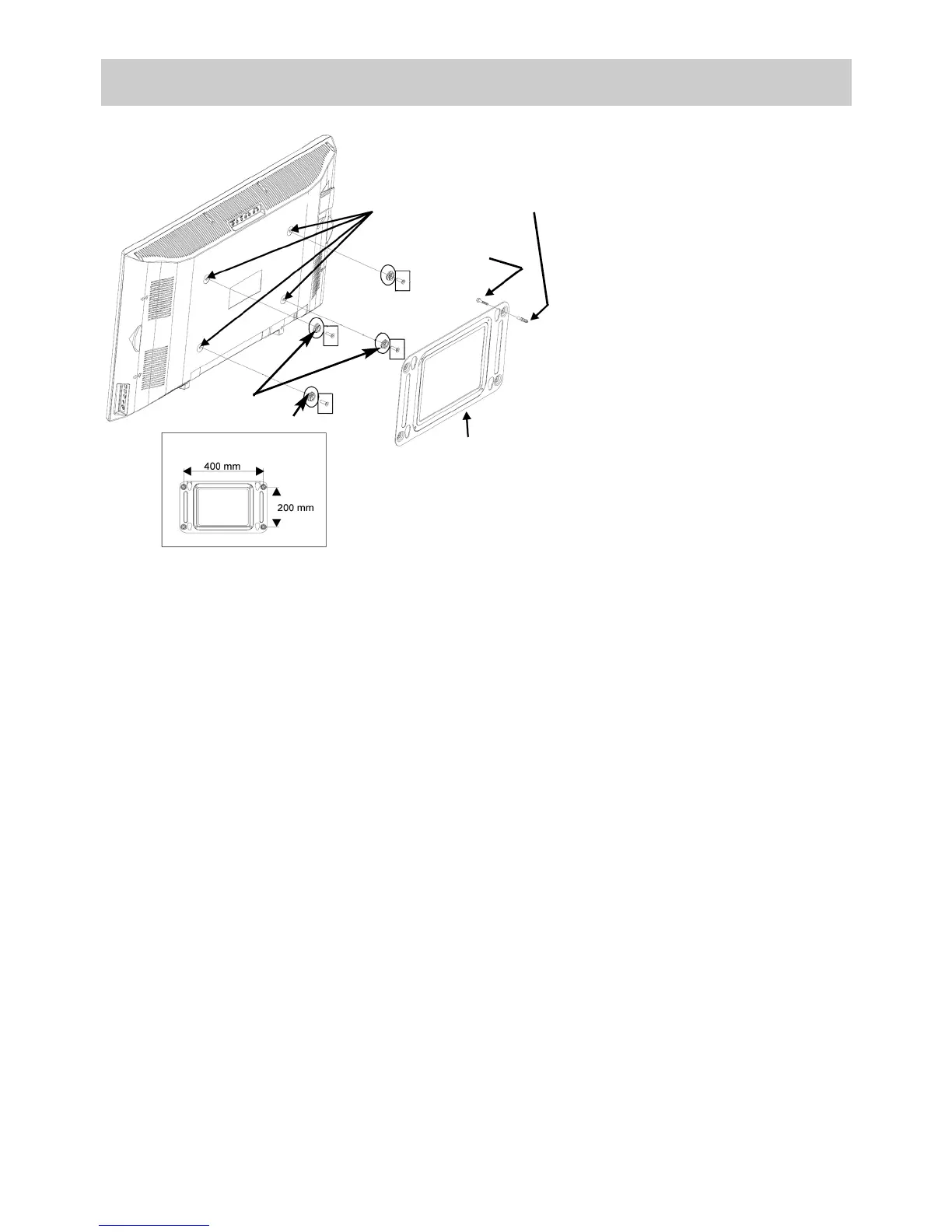
Wall mounting
Remove the base (if it is fitted).
• Remove the four caps from the
rear side.
• Insert the enclosed plastic
bolts in the holes and carefully
secure each one with a screw
M6x20 mm.
• Hold the wall bracket against
the wall at the desired posi-
tion and mark the positions of
the four mounting holes.
• Screw the wall bracket to the
wall with wall plugs and
screws.
• Insert the plastic bolts on the
TV set into the keyholes of the
bracket and push the TV set
fully downwards.
• Take care that no bright lights (including sunshine) shine directly on the screen, sin-
ce this can cause reflections and reduce the apparent brilliance of the picture.
• The best viewing distance is about five times the diagonal dimension of the screen.
For a TV set with a 75 cm screen, it is thus about 3.75 m.
• All cables and components connected between the antenna/broadband socket in
the wall and the TV set must comply with European Standard EN 60966-2-4.
• There may be no magnetic fields in the immediate vicinity of the TV set. External
loudspeakers should thus be positioned at a suitable distance from the set.
• The antenna connection cable used for the set should have a screening attenuation
of at least 75 dB.
• The use of unapproved cables and components will invalidate the type approval of
the TV set.
1. Setting up
plug
screw
Holes
wall bracket
plastic bolts



 To Next Page