MFJ-495 Memory Keyer Instruction Manual
© 2001-2009 MFJ Enterprises, Inc. 39
/R
Repeat – repeats playback from the beginning, even with calling messages. Note that any
character after “/R” will not be sent.
/S##
Speed – sets the current overall speed to ## WPM, where ## represents two digits in the
range of 05 to 99. When setting speeds under 10 WPM, leading zero must be used.
/SU#
/S+#
Speed Up – increases the overall speed by # WPM, where # is a single digit in the range of 0
to 9.
/SD#
/S–#
Speed Down – decreases the overall speed by # WPM, where # is a single digit in the range
of 0 to 9.
/T##
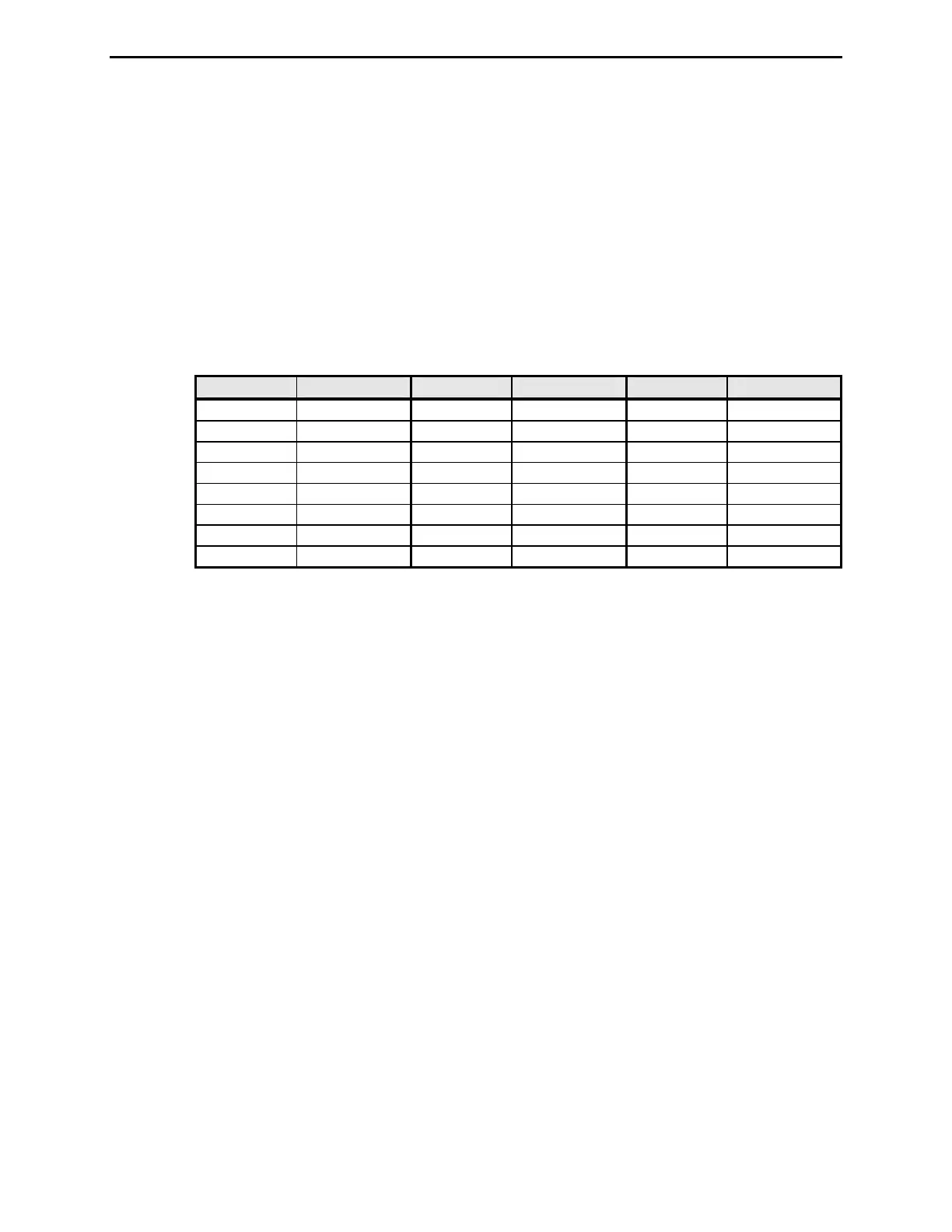
Tone – sets the current sidetone frequency to approximately ##0 Hz, where ## represents two
digits in the range of 30 to 99. Note that this command sets the sidetone to one of the 24
available frequencies.
## Tone Freq. ## Tone Freq. ## Tone Freq.
30, 31, 32 305 Hz 54, 55, 56 549 Hz 78, 79, 80 793 Hz
33, 34, 35 335 Hz 57, 58, 59 579 Hz 81, 82, 83 823 Hz
36, 37, 38 366 Hz 60, 61, 62 610 Hz 84, 85, 86 854 Hz
39, 40, 41 396 Hz 63, 64, 65 640 Hz 87, 88, 89 884 Hz
42, 43, 44 427 Hz 66, 67, 68 671 Hz 90, 91, 92 915 Hz
45, 46, 47 457 Hz 69, 70, 71 701 Hz 93, 94, 95 945 Hz
48, 49, 50 488 Hz 72, 73, 74 732 Hz 96, 97, 98 976 Hz
51, 52, 53 518 Hz 75, 76, 77 762 Hz 99 1006 Hz
/TU#
/T+#
Tone Up – increases the sidetone frequency by # available frequency, where # is a single
digit in the range of 0 to 9.
/TD#
/T–#
Tone Down – decreases the sidetone frequency by # available frequency, where # is a single
digit in the range of 0 to 9.
/U##
Ultra Speed – sets the ultra speed mode for a message at speed of ##0 WPM, where ##
represents two digits in the range of 10 to 99. For example, “10” is 100 WPM and “99” is
990 WPM. This command is used primarily for meteor scatter work. Note that Farnsworth,
Weighting, Character Space, Word Space, Keying Compensation, and Tone settings are
disabled during ultra speed message transmission. Also, messages using both regular speed
and ultra speed can be created. To exit the ultra speed mode, set ## to 00 such as /U00 and
the message will return to regular speed. Alternately, the message can be returned to a lower
regular speed by use of the /F, /S, or /W command.
/V##
Very Slow Speed – sets the QRSS mode for a message at very slow speed with dots of ##
seconds, where ## represents two digits in the range of 01 to 99. For example, “03” produces
three-second dots, nine-second dashes, three-second intra-character spaces, nine-second inter-
character spaces, and 21-second word spaces. QRSS is a very slow CW mode used by
amateurs interested in very weak signal operation on VHF and above frequencies and on HF
beacons. Note that Farnsworth, Weighting, Character Space, Word Space, Keying
Compensation, and Tone settings are disabled during very slow speed message transmission.
Also, messages using both regular speed and very slow speed can be created. To exit QRSS
mode, set ## to 00 such as /V00 and the message will return to regular speed. Alternately, the
message can be returned to a faster regular speed by use of the /F, /S, or /W command.
During QRSS mode, the bottom line of the display reads
SPEED = QRSS## where ## is
the selected QRSS speed. Pressing the Menu button restores the main menu. The Speed,
Farnsworth, Weight, and Tone main menus are not available in the QRSS mode.


 To Next Page