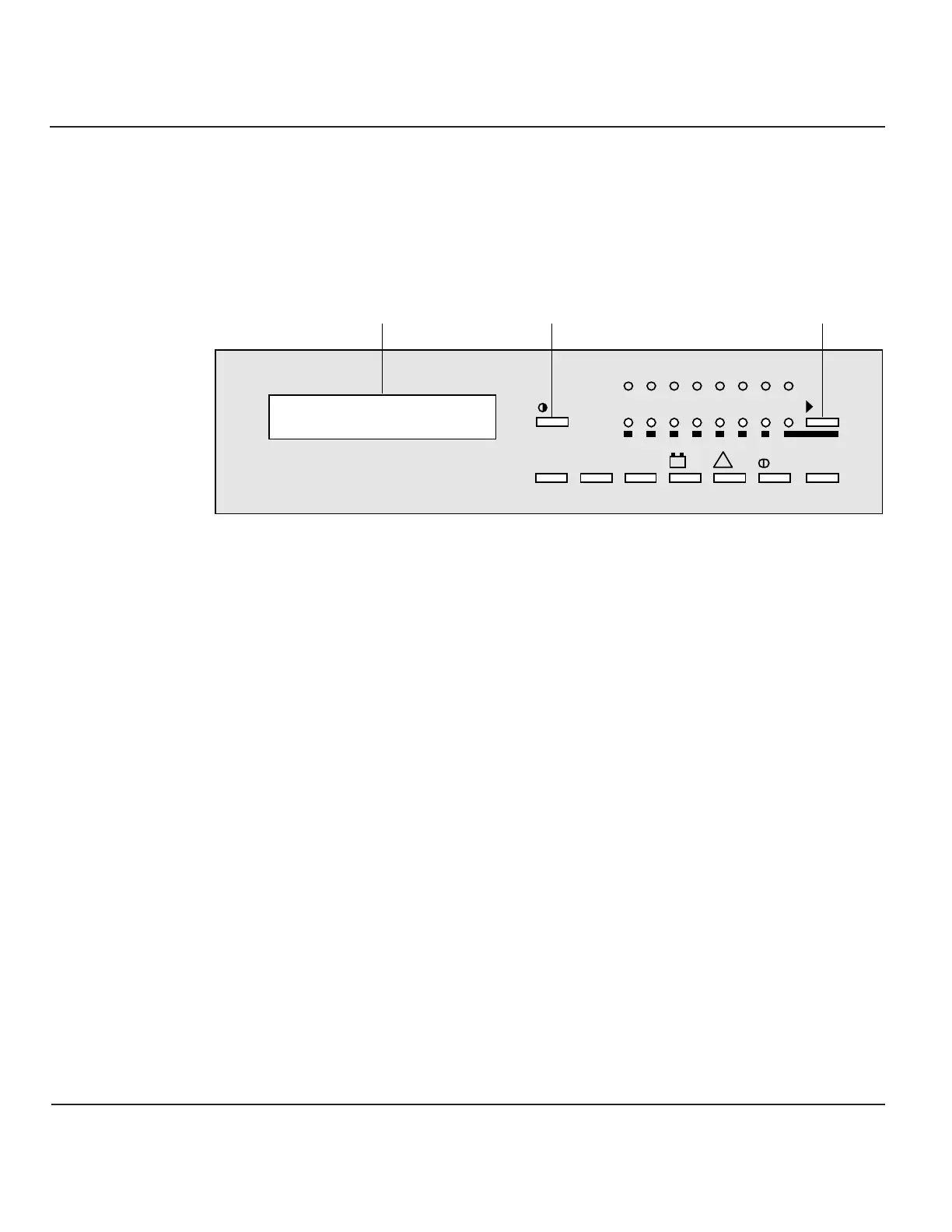
Pushbuttons
Following are brief descriptions of the function of the alphanumeric display
pushbuttons.
Figure Alphanumeric Display and Controls
2-6
ø
Settings pushbutton
This pushbutton is used to select the display language and adjust the LCD screen
contrast for optimal viewing.
˘
Pushbutton
This pushbutton primarily allows the selection of which UPS module or SSC the
display communicates with; it may also serve to indicate selection, negative
response, and other functions, depending on the displayed message.
◊
Pushbutton
This pushbutton provides access to voltage measurements, including:
• Main AC input (mains 1) phase-to-phase voltage
• Bypass AC input (mains 2) phase-to-neutral and phase-to-phase voltage
• Inverter output phase-to-neutral and phase-to-phase voltage
• Load phase-to-neutral and phase-to-phase voltage
Å
Pushbutton
This pushbutton provides access to current measurements, including:
• Main AC input (mains 1) current
• Bypass AC input (mains 2) current



 To Next Page