ENGLISH
3 — 1
86-81700-00 A01
Operation
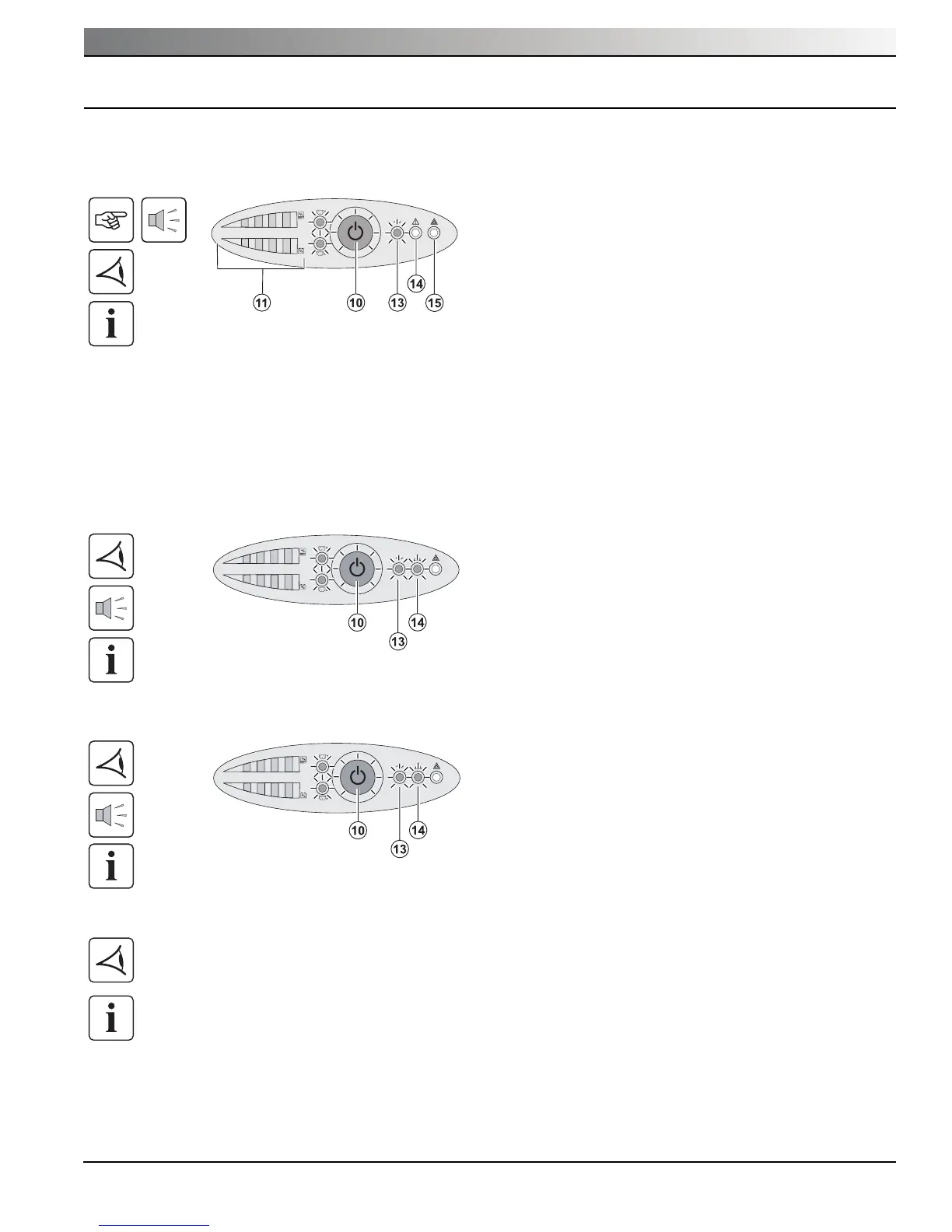
3.1 Start-Up and Normal Operation
3.2 Operation on Battery Power
Transfer to battery power
Low-battery warning
End of battery backup time
3.3 Return of AC Input Power
Following an outage, the UPS restarts automatically when AC input power returns (unless the restart function has been
disabled via UPS personalization) and the load is again supplied.
◗ All the LEDs go OFF.
◗ The audio alarms stops.
The UPS is completely shut down.
◗ Button (10) and LEDs (13) and (14) are ON.
◗ The audio alarm beeps every three seconds.
The remaining battery power is low. Shut down all
applications on the connected equipment because
automatic UPS shutdown is imminent.
◗ The connected devices continue to be protected by
the UPS when AC input power is no longer
available. The necessary energy is provided by the
battery.
◗ Button (10) and LEDs (13) and (14) are ON.
◗ The audio alarm beeps every ten seconds.
The connected devices are supplied by the battery.
Press button (10) for approximately 1 second.
◗ The buzzer beeps once and all the LEDs go ON
simultaneously.
◗ If AC input power is available, button (10) and LED
(13) are ON. The load is supplied by the AC-power
source. Conditions permitting, the UPS runs a
battery test, indicated by LEDs (11) and the buzzer.
◗ If AC input power is not available, button (10) and
LEDs (13) and (14) are ON. The load is supplied by
the UPS on battery power.
The connected devices are protected by the UPS.
If LED (15) is ON, a fault has occurred (see the
"Troubleshooting" section).
Operation





 To Next Page