EasyManua.ls Logo

Mi Mop 2 Pro - Controls and Indicators; Button Functions and Indicator Status

Mi Mop 2 Pro
442 pages
Print Icon
To Next Page IconTo Next Page
To Previous Page IconTo Previous Page
Loading...
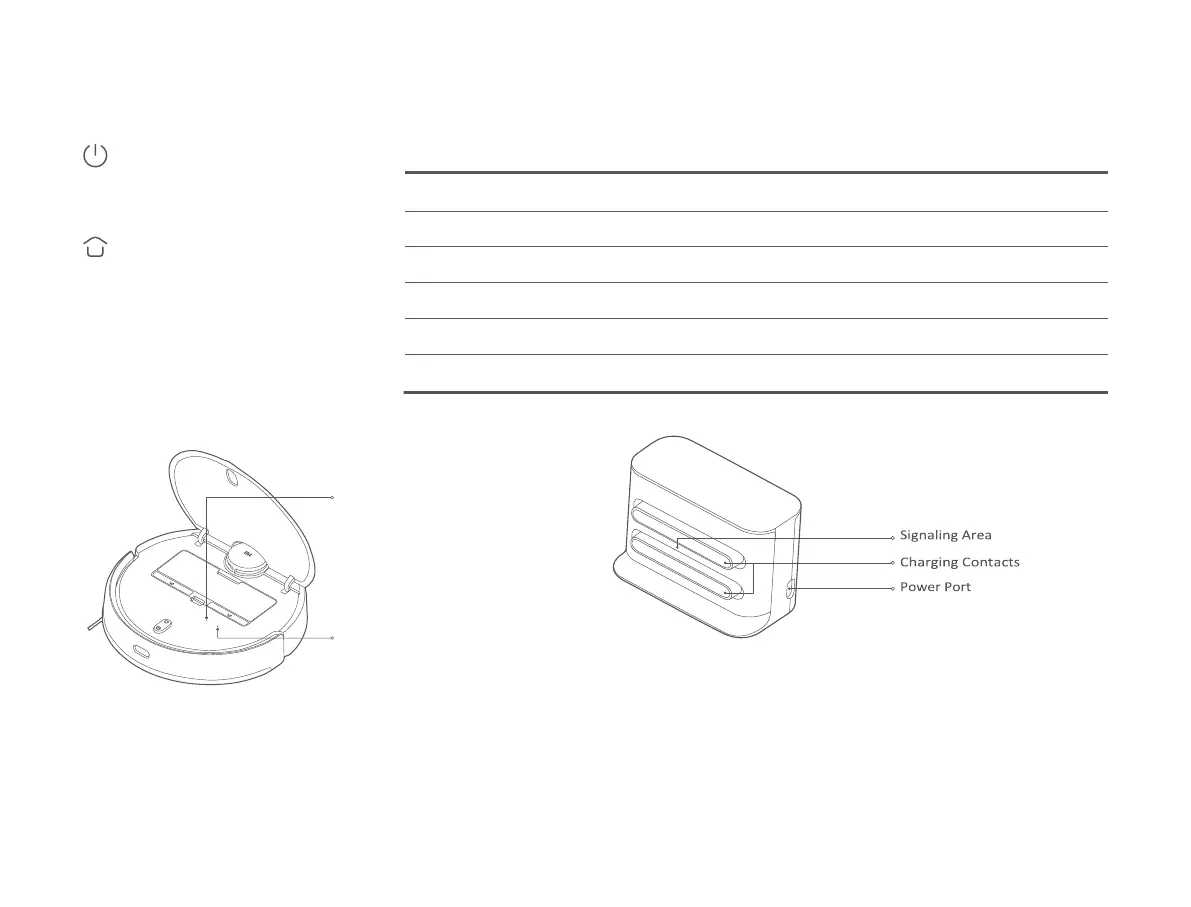
Power Button Indicator Status
Turn on/off: Press and hold for 3 seconds
Start/Pause: Press
Dock Button
Pause: Press when it is working
Start docking: Press when it is paused
Stop docking: Press when it is docking
06
Vacuum-Mop
Wi-Fi Indicator
Staying blue for 2 seconds then goes
off: Wi-Fi connected Blinking blue:
Connecting to
Wi-Fi/Updating firmware Blinking
yellow: Awaiting Wi-Fi connection
Reset Button
Press and hold for 3 seconds to
reset the system. Press and hold for
10 seconds to restore the system.
Charging Dock (Place against a Wall)

Yellow
Wi-Fi not connected
Breathing yellow
Charging (battery level < 15%)
Blinking yellow
Low battery/Error/Awaiting Wi-Fi connection
White
Turned on/Working normally/Fully charged/Wi-Fi connected/Downloading firmware
Blinking white
Returning to the dock to charge
Breathing white
Updating firmware/Charging (battery level ≥ 15%)

Table of Contents

Related product manuals