Copyright © 2009-2010 Micca, LLC. All rights reserved.
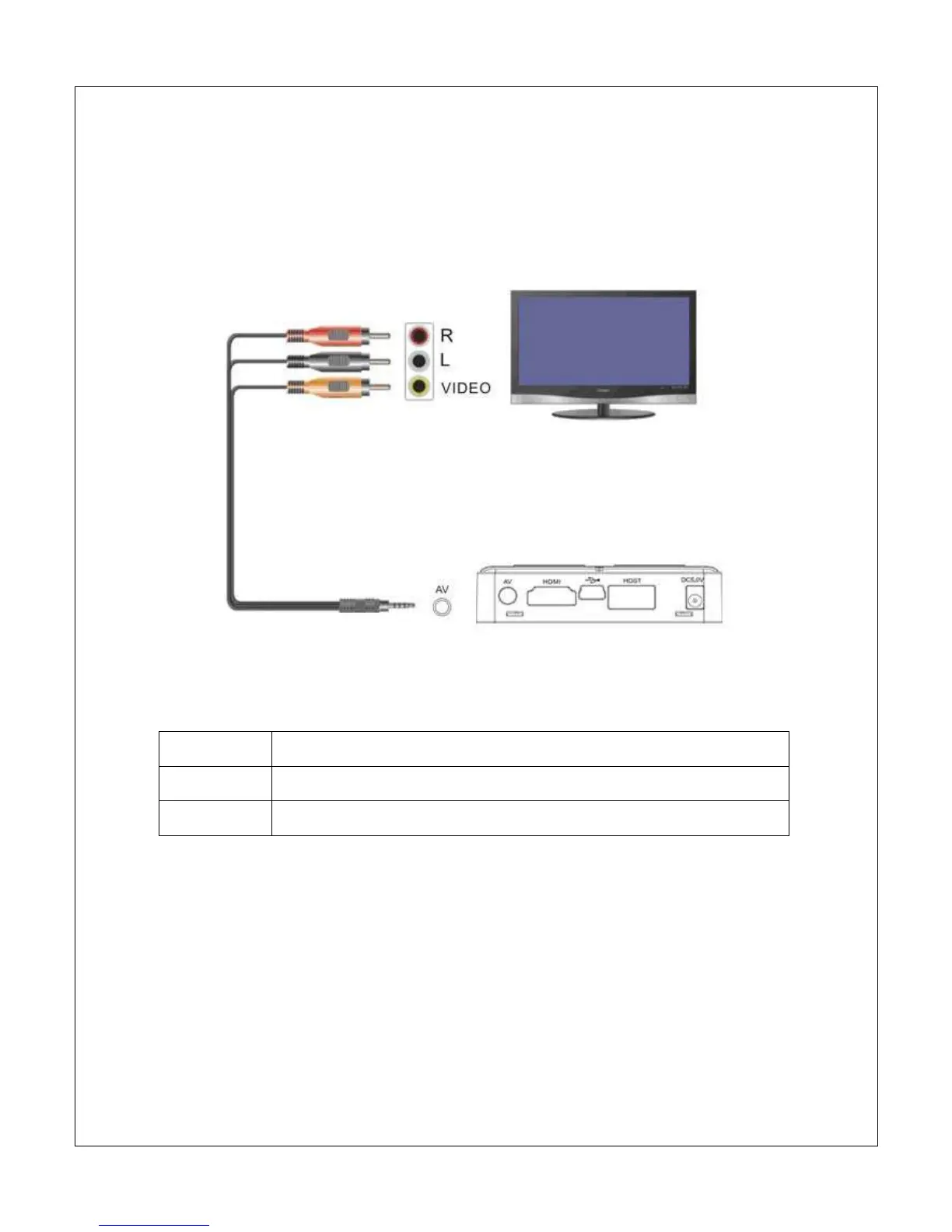
C. Analog AV Output
The Micca Slim can be connected to analog TVs and display devices through its
AV Out connector. Only use the supplied 3.5mm-to-RCA cable to ensure correct
signal polarity and avoid damage to the player and TV/display.
The RCA cable connectors are color coded to match the AV input on TVs and
display devices as follows:
Red
Right Audio Channel
White
Left Audio Channel
Yellow
Composite Video
The Micca Slim must be set to NTSC or PAL Composite mode for the analog AV
output to function. If there is no picture displayed after connecting the AV Output
and turning on the Micca Slim, press the <Setup> button on the remote and then
press the <TV Mode> button to switch between output modes until the correct
mode has been selected. There will be a short delay when switching output
modes so please wait a few seconds between presses of the <TV Mode> button.



 To Next Page