EasyManua.ls Logo

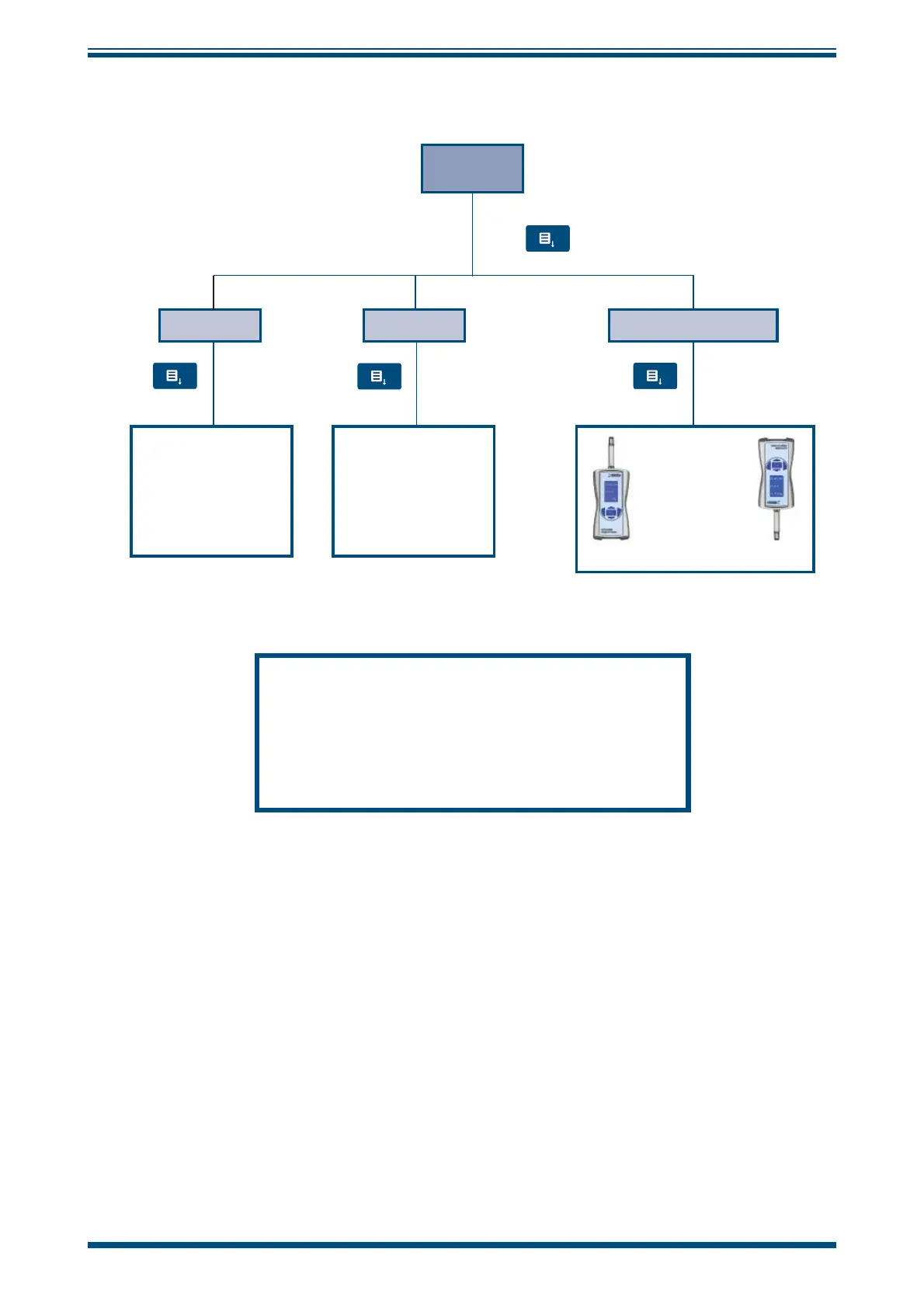
Michell Instruments MDM25 - Display Settings; Figure 6 Display Settings Menu

Michell Instruments MDM25
28 pages
Print Icon
To Next Page IconTo Next Page
To Previous Page IconTo Previous Page
Loading...
MDM25 User’s Manual
Michell Instruments 9
OPERATION
3.2.1 Display Settings
DISPLAY
CONTRAST
Set the contrast for
the display settings
by pressing the Up
and Down Keys
0 = no contrast
5 = full contrast
BACKLIGHT
Set the brightness
of the backlight by
pressing the Up
and Down Keys
0 = dark
5 = bright
DISPLAY ORIENTATION
Press
Press
Press
Press
Special feature:
The display
turns automatically
when hand meter
is positioned
upside-down
To store these settings in the memory, press the Menu
button which will open the Main page. When the hand
meter is turned on again this setting is saved.
To store the settings for ONLY the current session, press
the Left Key
The orientation
of the display
can be rotated
by 180º by
pressing the Up
and Down keys
Figure 6
Display Settings Menu

Related product manuals