CAN Bus Analyzer User’s Guide
DS50001848D-page 18
2009-2022
Microchip Technology Inc. and its subsidiaries
3.2 TRACE FEATURE
There are two types of Trace windows: Fixed and Rolling. To activate either Trace
window, select the option from the main Tools menu.
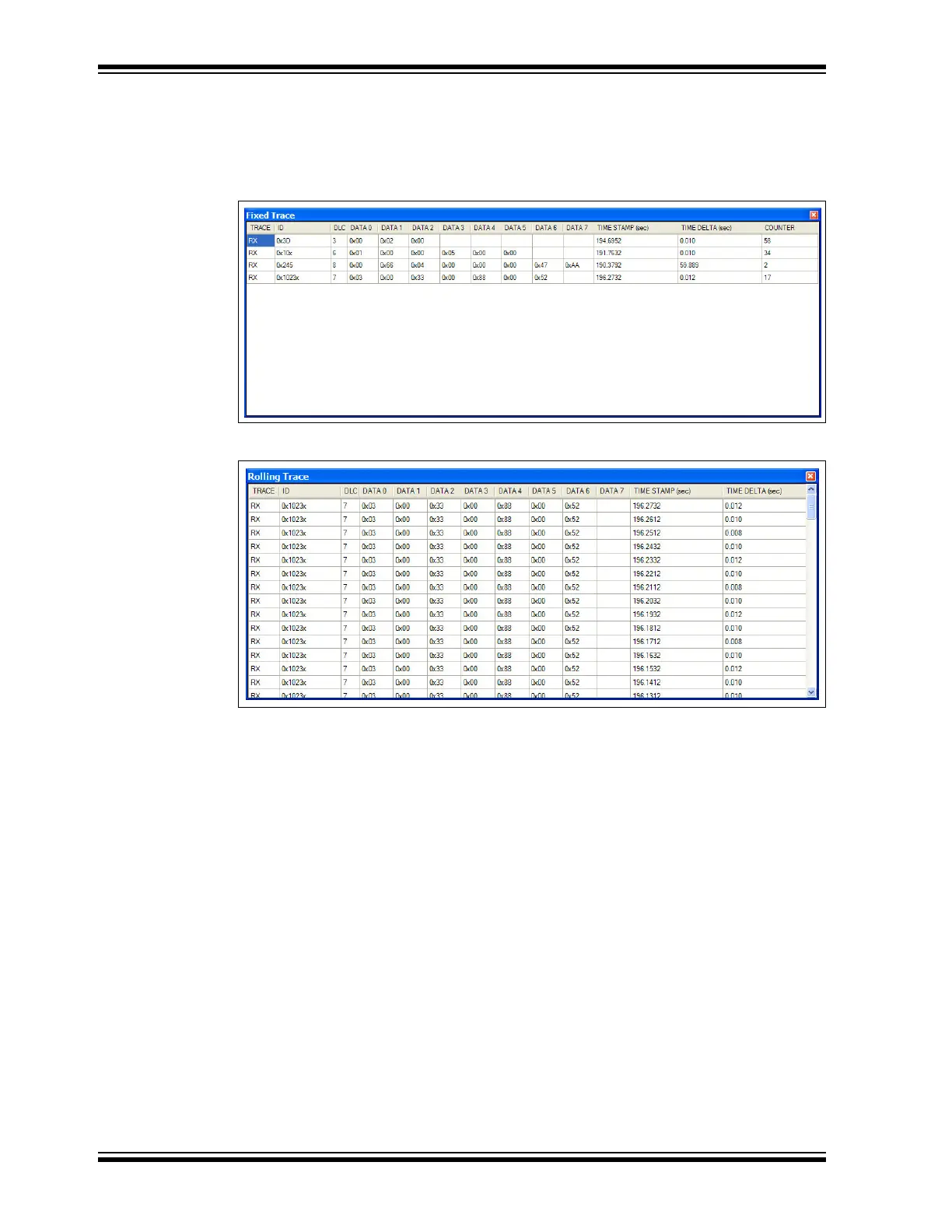
FIGURE 3-2: FIXED TRACE WINDOW
FIGURE 3-3: ROLLING TRACE WINDOW
The Trace window displays the CAN Bus traffic in a readable form. This window will list
the ID (Extended is signified with a preceding ‘x’ or Standard), DLC, DATA Bytes, the
Timestamp and the time difference from the last CAN Bus message on the bus. The
Rolling Trace window will show the CAN messages sequentially as they appear on the
CAN Bus. The time delta between messages will be based on the last received
message, regardless of THE CAN ID.
The Fixed Trace window will show the CAN messages in a fixed position on the Trace
window. The message will still be updated, but the time delta between messages will
be based on the previous message with the same CAN ID.


 To Next Page