CAN BUS ANALYZER
USER’S GUIDE
2009-2022
Microchip Technology Inc. and its subsidiaries DS50001848D-page 9
Chapter 1. Introduction
1.1 INTRODUCTION
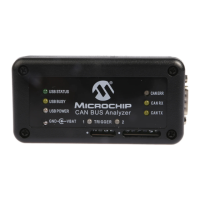
The CAN Bus Analyzer tool is intended to be a simple-to-use, low-cost CAN Bus
monitor, which can be used to develop and debug a high-speed CAN network. The tool
features a broad range of functions, which allow it to be used across various market
segments, including automotive, marine, industrial and medical.
The CAN Bus Analyzer tool supports CAN 2.0b and ISO 11898-2 (high-speed CAN with
transmission rates of up to 1 Mbit/s). The tool can be connected to the CAN network
using the DB9 connector or through a screw terminal interface.
The CAN Bus Analyzer has the standard functionality expected in an industry tool, such
as trace and transmit windows. All of these features make it a very versatile tool,
allowing fast and simple debugging in any high-speed CAN network.
The chapter contains the following information:
• Can Bus Analyzer Kit Contents
• Overview of the CAN Bus Analyzer
• CAN Bus Analyzer Hardware Features
• CAN Bus Analyzer Software
1.2 CAN BUS ANALYZER KIT CONTENTS
1. CAN Bus Analyzer Hardware
2. CAN Bus Analyzer Software
3. CAN Bus Analyzer software CD, which includes three components:
• Firmware for the PIC18F2550 (Hex File)
• Firmware for the PIC18F2680 (Hex File)
• The CAN Bus Analyzer PC Graphical User Interface (GUI)
4. USB mini-cable to connect the CAN Bus Analyzer to the PC
1.3 OVERVIEW OF THE CAN BUS ANALYZER
The CAN Bus Analyzer provides similar features available in a high-end CAN network
analyzer tool at a fraction of the cost. The CAN Bus Analyzer tool can be used to
monitor and debug a CAN network with an easy-to-use Graphical User Interface. The
tool allows the user to view and log received and transmitted messages from the CAN
Bus. The user is also able to transmit single or periodic CAN messages onto a CAN
Bus, which is useful during development or testing of a CAN network.
Using this CAN Bus Analyzer tool has many advantages over the traditional debugging
methods embedded engineers typically rely on. For example, the tool trace window will
show the user the received and transmitted CAN messages in an easy to read format
(ID, DLC, data bytes and timestamp).


 To Next Page