
 Need help?
Do you have a question about the MICROENER MM30-D and is the answer not in the manual?
Guidelines for storing and transporting the MM30-D relay according to standards.
Procedures for proper installation and electrical wiring of the MM30-D relay.
Checks for input quantities and power supply voltage accuracy within permissible limits.
Essential safety measures and precautions when handling the MM30-D, including ESD risks.
Details on the different types of power supply modules available for the MM30-D.
Procedures for maintaining and detecting faults in the MM30-D relay.
Defines reference input variables for relay operation and algorithms.
Details on measured input quantities like frequency and phase currents.
Covers mains frequency settings and phase current measurement principles.
Details on earth fault current and voltage inputs for protection functions.
Describes the operation and use of the directional earth fault element.
Details on the Thermal Image function (F49) and its parameters.
Covers settings for thermal protection, prealarm, and restart inhibition.
Details on Locked Rotor Protection (F51LR) settings and operation.
Explains Current Unbalance Protection (F46) and its inverse time element.
Covers Single Phasing (F47) and No-Load Running (F37) protections.
Details on Overcurrent Protection (F51), including pick-up and trip time.
Explains Earth Fault Protection (F64), including directional settings.
Settings for limiting the number of motor start attempts.
Manages motor starting transitions using parameters like current and time.
Details on the Autosetting function for automatic parameter configuration.
Explains measurement, tripping conditions, and sensitivity of the directional earth fault element.
Guidance on selecting characteristic angles for different earthing types.
Procedures for synchronizing and setting the relay's clock and calendar.
Details on time resolution, tolerance, and operation during power off.
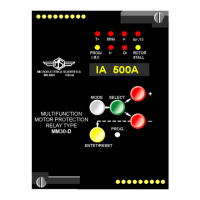
Overview of the five-key interface and 8-digit display for local control.
Explains how to navigate menus and select operation modes using the keys.
Description of eight signal LEDs indicating relay status and events.
Explains the reset procedures for various signal LEDs based on the cause.
Details on internal and optional output relays (R1-R4, REX-8) and their expansion.
Information on REX-8 modules for expanding output relay capabilities.
Details on connecting the relay via RS232/RS485 or fiber optic bus to a PC.
Information on the MODBUS RTU protocol and MSCOM software for communication.
Describes the three digital inputs (R.T., S.p.C., RTD) and their functions.
Overview of self-test, diagnostic functions, and fault indication.
Explains the operation of the MODE, SELECT, +/-, and ENTER/RESET keys.
Details on navigating menus and accessing programming modes via keys.
Displays actual measured values for current, voltage, temperature, etc.
Shows highest recorded values for temperature, currents, and starting times.
Records the last 5 tripping events with parameter values at the moment of tripping.
Counts the number of operations for each relay function.
How to display programmed settings and output relay configurations.
Details on how to program function settings using the front panel or serial port.
Covers programming of rated primary current (In, On) and mains frequency (Fn).
Automatic setting of parameters based on motor and system data.
Settings for thermal time constants, prealarm, restart inhibition, and starting.
Settings for various protection elements like Locked Rotor, Unbalance, Overcurrent, Earth Fault.
How to assign functions to output relays (R1-R4) for different tripping elements.
Details on output relay assignments specific to MM30-DX versions.
Procedures for performing manual tests with or without relay tripping.
Information on required maintenance and contacting service for malfunctions.
Lists approvals (CE, RINA, UL, CSA) and reference standards for the MM30-D.
Details on EMC compatibility, radiated emission, and immunity test specifications.
Covers accuracy, burden, voltage, and power supply characteristics.
Wiring diagram for standard output relay connections (SCE1423).
Wiring diagram for double output relay connections (SCE1499).
Wiring for RS485 serial bus and fiber optic connections.
Instructions for changing the phase current rated input via jumpers.
Explanation and interpretation of the thermal image curves for motor protection.
Analysis and interpretation of the inverse time unbalance protection element curves.
Step-by-step guide for drawing out and plugging in the PCB modules.
Provides overall dimensions, panel cut-out size, and mounting details.
Diagram showing the rear view of the terminal connections.
Visual diagram detailing keyboard operations and menu navigation flow.
Comprehensive table listing all programmable variables, ranges, and default settings.
Table showing default and actual settings for output relays associated with protection elements.
 General
| Operating System | Windows 10 Pro |
|---|---|
| Category | Mini PC |
| Connectivity | Wi-Fi 802.11ac, Bluetooth |
| Ports | HDMI, MicroSD slot, 3.5mm audio jack |
| Power | 12V DC |

 To Next Page