MANUAL.LM20 Revision C January 2023 Page 18 of 52
3.11 Using the Emergency Stop
At any time when operating the Microfluidizer
TM
Processor, pressing the Emergency Stop Button will stop
the intensifier pump and turn off the electric motor, setting the processor to a low energy. To re-set the
E-Stop:
1. Twist the E-Stop Button clockwise. This will reset the button.
2. Acknowledge the alarm(s) on the operator interface screen.
Follow directions in Section 3.9 to restart processor.
3.12 Operator Interface
The operator interface controls the functionality of the processor. It is through this color touch screen
that the operator will start/stop the processor, set the process pressure, and monitor the processor.
3.12.1 Home Screen
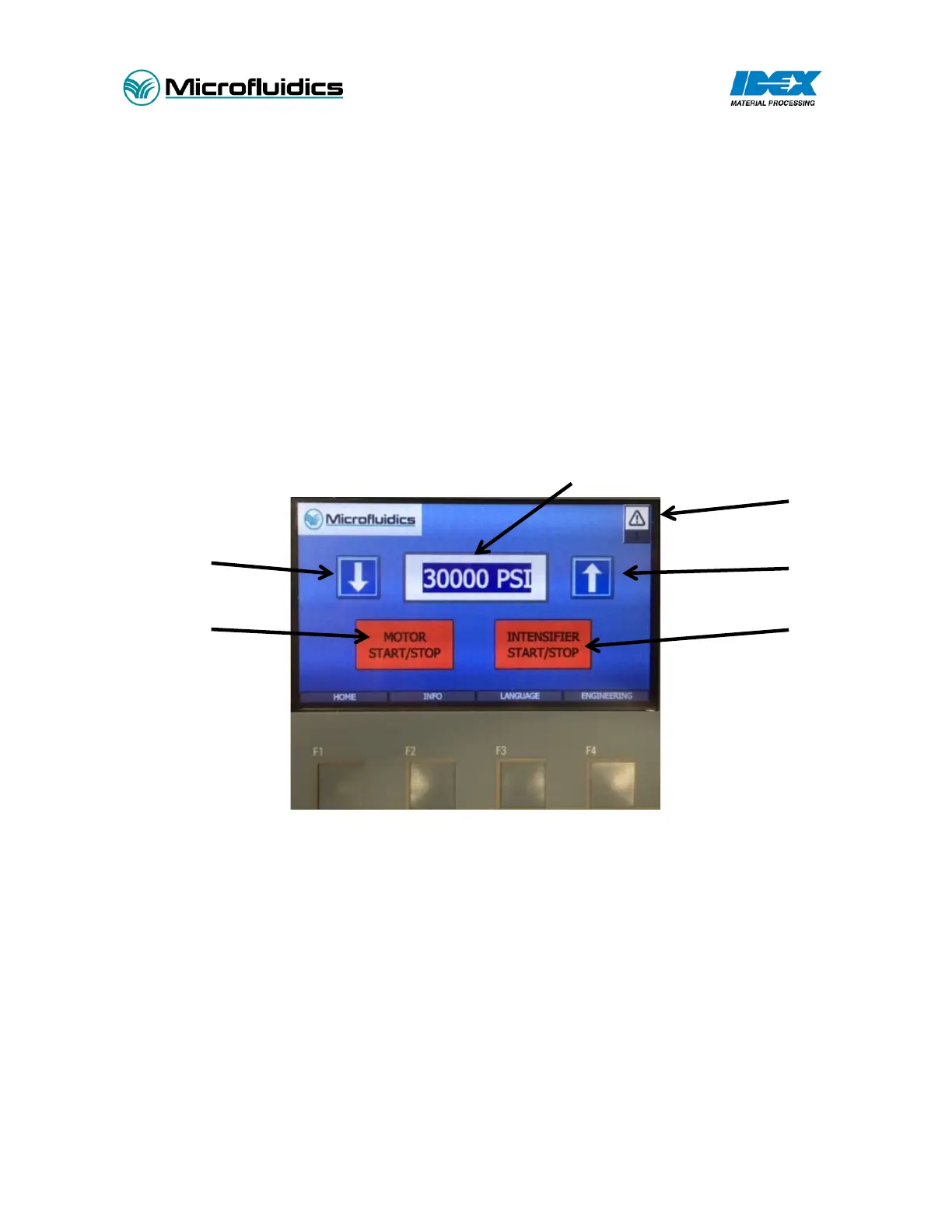
Figure 3 - Home Screen
1. Up/Down Arrows. Pressure can be increased/decreased by holding or tapping these butons.
2. Motor Start/Stop. The electric motor is turned on/off with this button.
3. Intensifier Start/Stop. The intensifier pump is turned on/off with this button.
4. Alarm Indication. When illuminated, indicates an alarm condition.
5. Pressure Setting. Clicking the pressure will open a key pad to type in desired pressure. This is
the pressure the LM20 will process at.


 To Next Page