17
6.8 AC Connections - Input and Output (Optional)
6.8.1 AC Input Connections:
This section describes how to connect the Power Pak’s input to a building’s electrical panel and/or to a
generator. This is optional, and applies in the case where an additional charging source is to be incorporated
into the system as a back-up to the solar power.
The Power Pak is not designed to accept AC inputs from multiple sources simultaneously, i.e. either the
electrical utility or a generator can be connected to the Power Pak’s AC input, but not both at the same time.
Please consult a qualified electrician if you want to connect to both.
STEPS to connect to AC Input
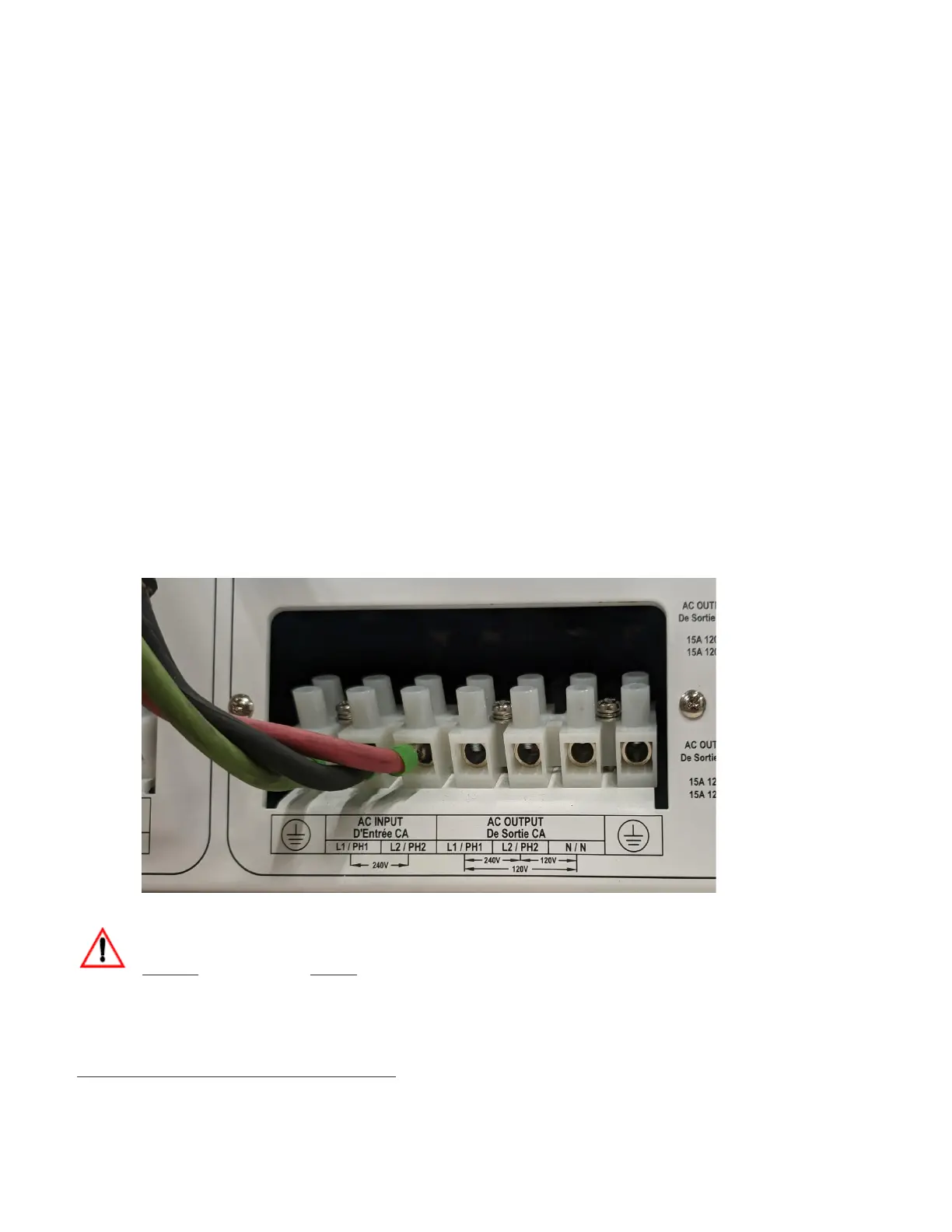
1. The Power Pak’s AC Input can be connected to an external AC power source to charge the batteries. A
generator or any power source providing the proper voltage may be used. The figure below shows a
power source connected to the Inputs.
2. For the Power Pak MINI, use a generator/source that outputs 120 V AC. For the COMPACT and
GRANDE, use a generator/source that outputs 240 V AC.
WARNING
Turn off the Power Pak before connecting power to the AC Terminal.
Please refer to your local laws and regulations and guidelines when connecting to the electrical panel.
NOTE: Given the nature of the charging circuitry, more power is delivered by traditional generators. Thus, it is
recommended to use a traditional generator, NOT an inverter-generator, as an AC power source. Note that


 To Next Page