• Username – At this point we enter the call sign for the APRS-IS server, you
can use the SSID. For example SR3XXX-10,
• Password - Validation code obtained during the registration of the callsign
in the APRS-IS network,
• Gate RF traffic to APRS-IS – If selected, WX3in1 collects all packets received by
radio (with the exclusion of RFONLY, NOGATE, TCPIP) and sends them to the APRS-
IS server,
• Gate msg from APRS-IS to RF – If selected WX3in1 will send messages received via
the Internet for sites that are heard in the APRS network (for which the RF frames
were received by WX3in1 in the past 15 minutes),
• IP1, IP2, IP3 - APRS-IS servers addresses which WX3in1 will try to connect. WX3in1
tries to connect to the first address and, in case of failure, it connects to the
next,
• Port – APRS-IS servers TCPIP port numbers,
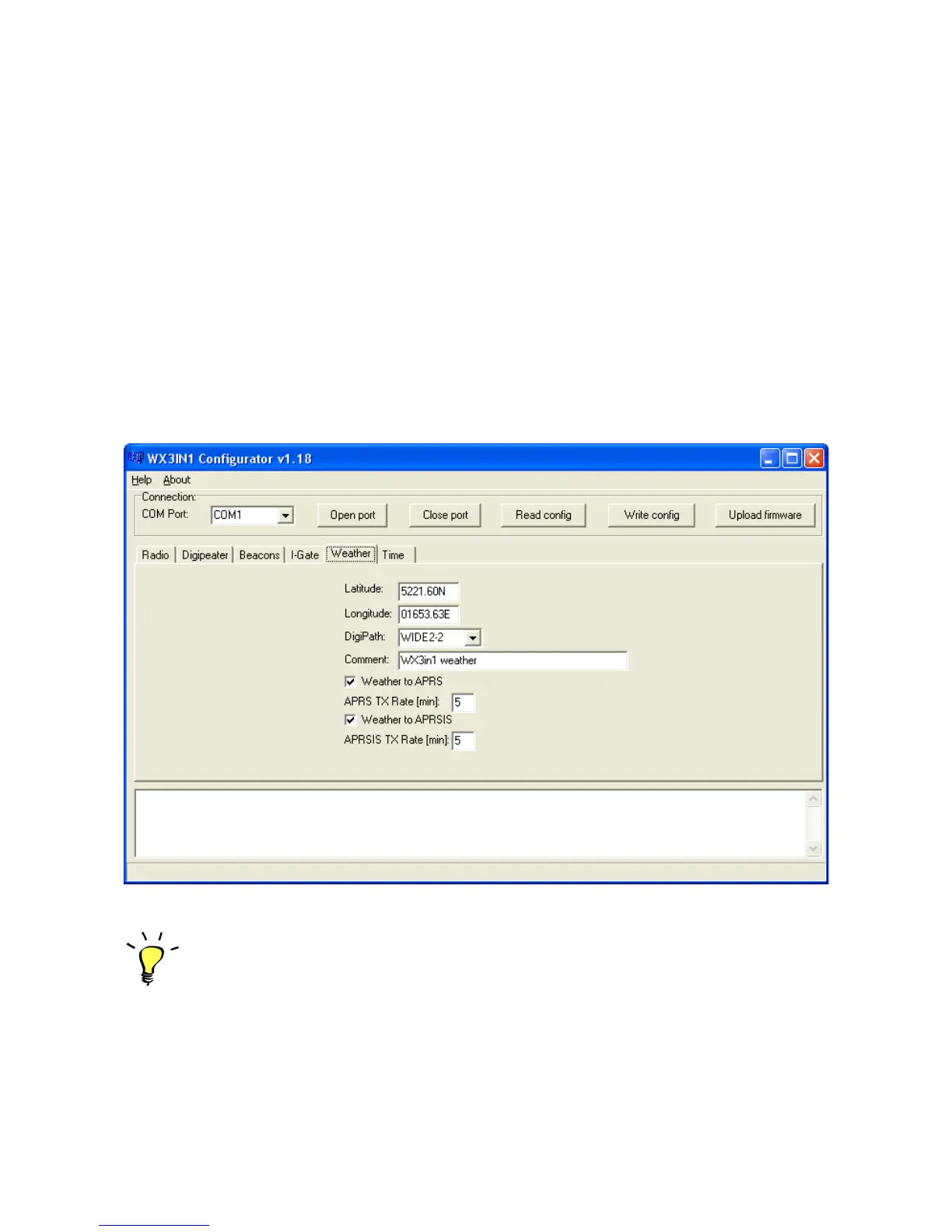
7.9. Weather reports configuration
Below is the description of functions and their meanings.
• Latitude – north-south position,
• Longitude – east-west position,
• DigiPath – APRS path for weather reports,
• Comment – Weather reports comment field,
• Weather to APRS – If checked, weather reports will be sent to APRS via radio,
• APRS TX Rate – Time, in minutes, how often weather reports will be sent to APRS
(minimum time - 5 minutes),
15


 To Next Page