5. Connecting to PC
WX3in1 device is configured with the WX3in1 Configurator software. To connect to
your computer, follow these steps:
• Power off the WX3in1 device,
• Connect the USB cable to your computer,
• Power on the WX3in1 device,
WX3in1 enters into configuration mode only when USB cable is detected while powering
up and it is indicated by SETUP led blinking.
After connecting and powering, WX3in1 is detected in Windows as a new device,
then system asks for the drivers that are available in the drivers directory of WX3in1
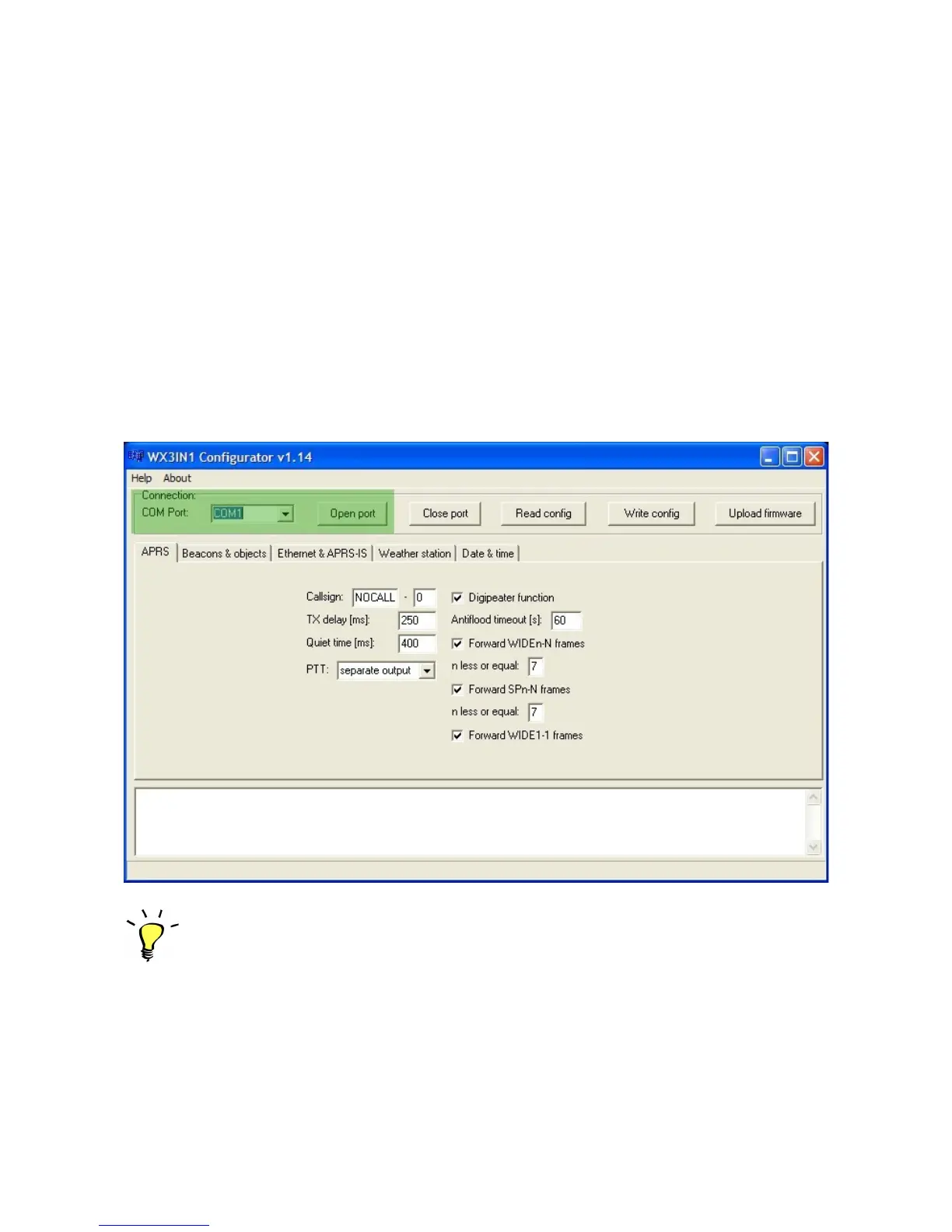
software package. After this, run the configuration software and select the COM port
where the device is installed. Then choose OPEN PORT (successful connection is
indicated by a message window).
The following image shows the application window, the fields highlighted in green
have been discussed above.
Sometimes WX3in1 can install on a higher port which is not available for selection
from within the application configuration. In this situation, please use the
Windows Device Manager to find the port of the device and change the COM port
number to lower in range of 1-10. Then disconnect the USB and after reconnecting
WX3in1 should appear on the appropriate COM port.
7


 To Next Page