6. Connectors and device status LEDs description
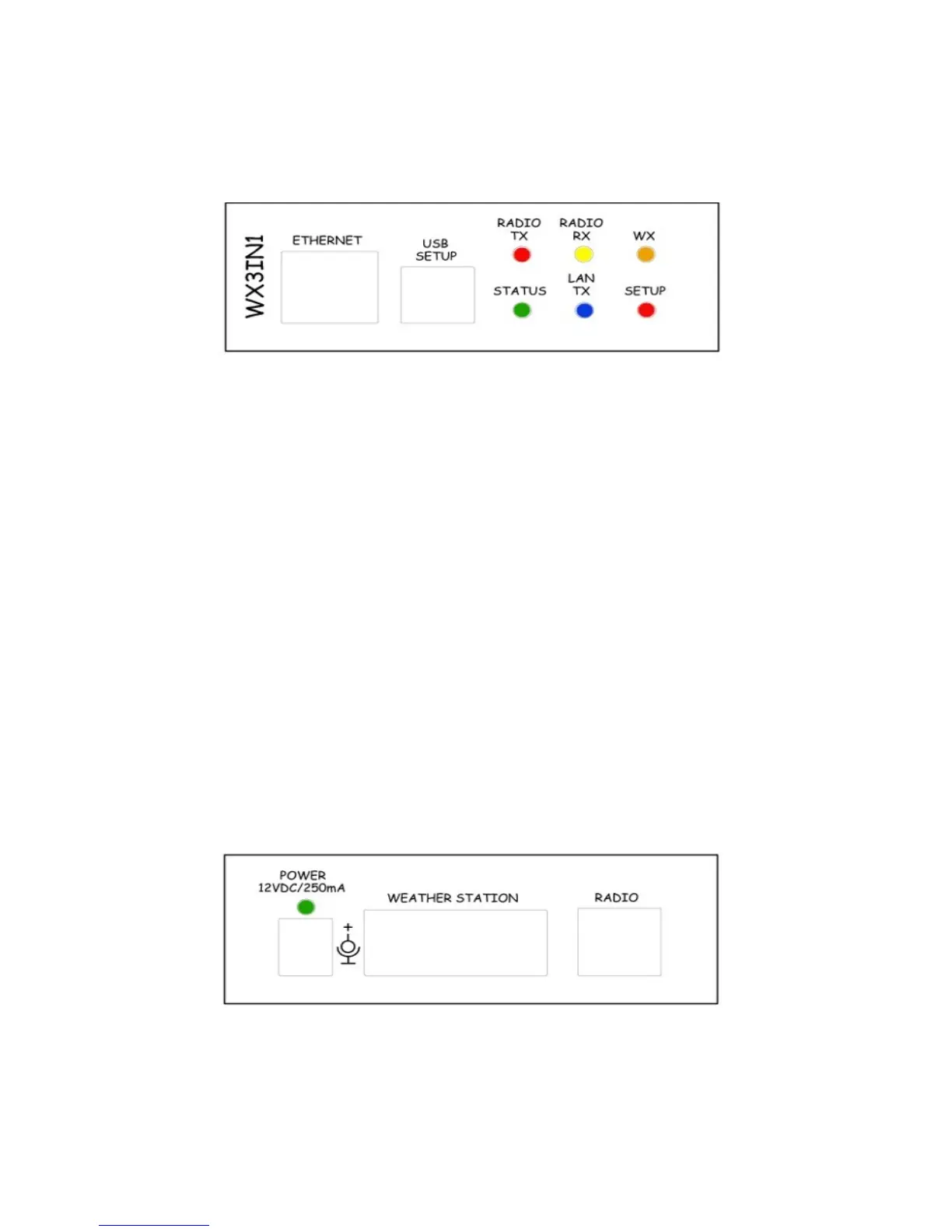
There are 6 leds on the front panel that show the status of device operation. The
following image shows the location of LEDs and their meaning.
• Radio TX - The red LED lights during transmission - the device sends an APRS data
frame,
• Radio RX - Yellow LED illuminates when receiving a signal from the radio
(indicates the channel is busy),
• WX - Orange LED indicates proper communication with weather station, it blinks
after correct weather data package reception,
• Status - Green LED indicates the status of the device (LED lights up regularly
every 3 seconds, indicating correct operation),
• Lan TX - Blue LED illuminates when sending TCP/IP to the Ethernet,
• Setup - The red LED blinks when the device is connected to the PC,
Connectors:
• Ethernet - RJ45 (ethernet network connection)
• USB - a USB socket-B (printer type), used to connect to a computer (PC).
There are two additional LEDs in the Ethernet connector that indicate the status of the
connection with the router. One of them lit all the time when the connection to the
router is correct (it only indicates valid physical connection and not the correct IP
address, gateway and netmask settings), a second LED is lit only when sending or
receiving data.
The following image shows the location of connectors on the back panel of the device.
The green LED above the power connector indicates power is applied.
Connectors:
8


 To Next Page