LVS-9580/9585 Operating Instructions - English
LVS-9580/9585 Operating Instructions - English Page 12 of 27
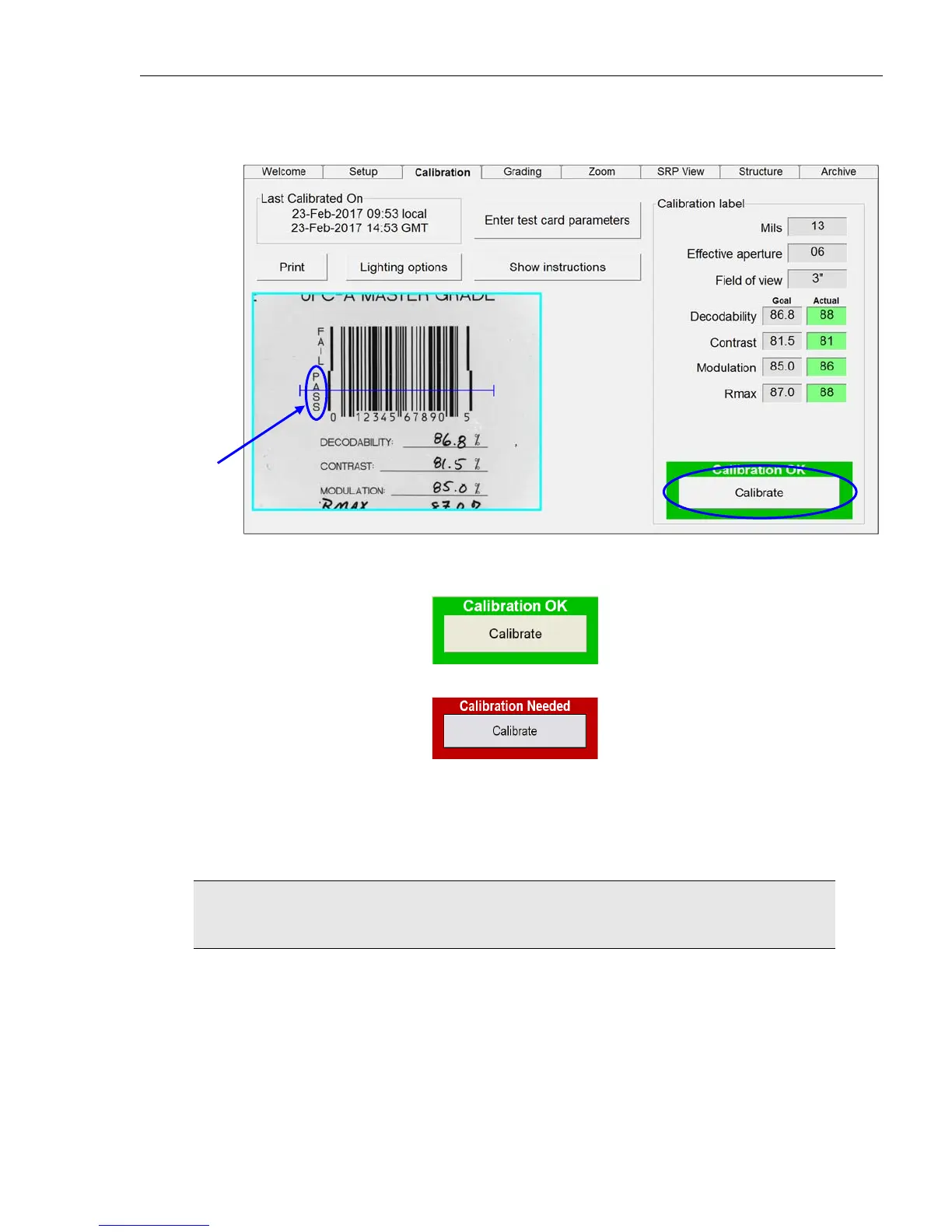
5. On the “Calibration” tab, make sure the blue line travels through the middle of the PASS portion of the
barcode as shown below.
6. Click the “Calibrate” button.
Successful calibration is indicated by a green “Calibration OK” message.
Failed calibration is indicated by a red “Calibration Needed” message.
7. If calibration fails:
o Re-scan the Master Grade barcode and follow the above steps to calibrate. It may take two or three
attempts before calibration is complete.
o If calibration continues to fail, contact Microscan or a Microscan representative for further
instructions.
IMPORTANT: The calibration score will hardly ever match exactly; this is normal and
acceptable as long as the scores are within +/- 3 percentage points.
8. When calibration is complete, click the “Grading” tab to grade barcodes. See the next section for steps
on grading barcodes.
The blue line
must pass
through the
“PASS” portion
of the barcode
.



 To Next Page