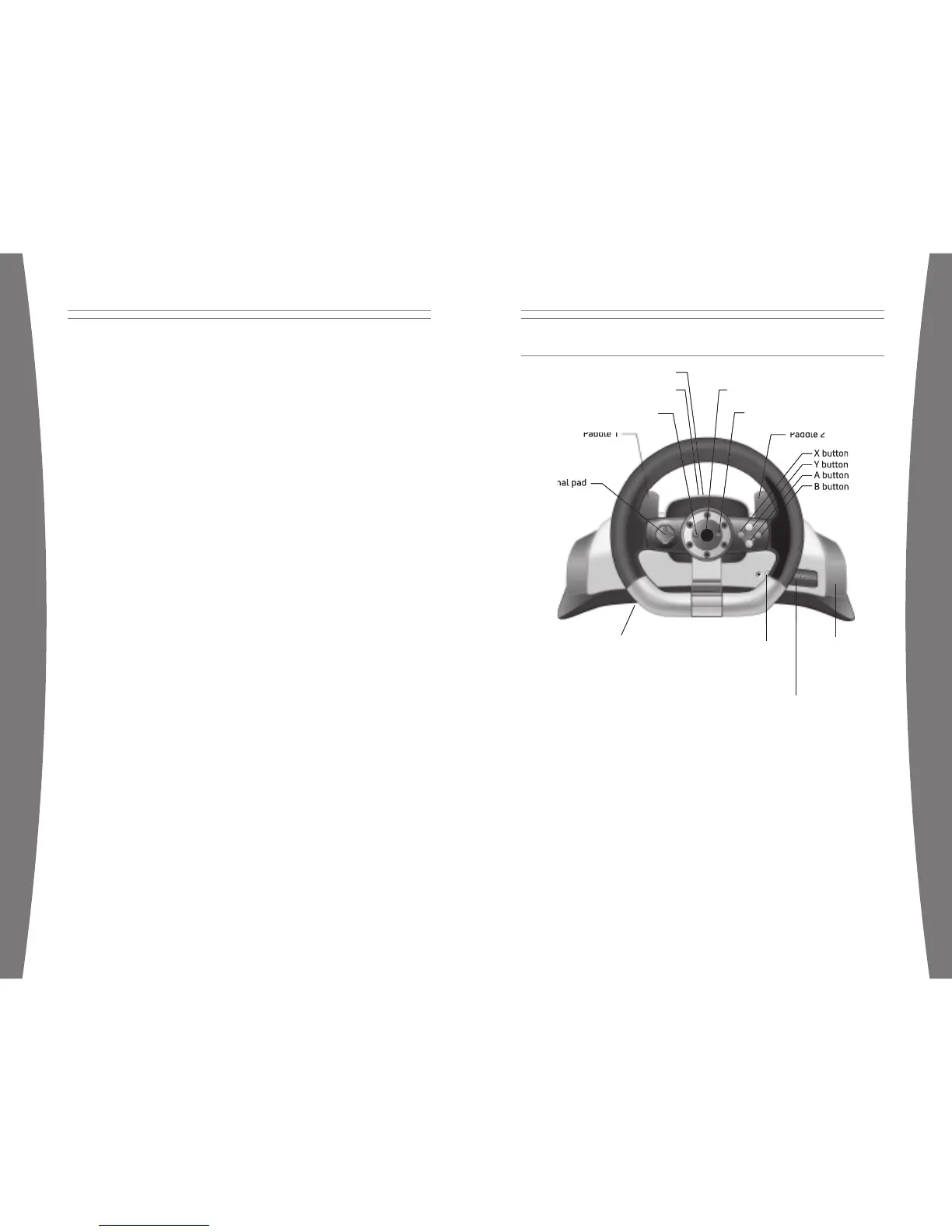
Xbox Guide Button
The Xbox Guide button in the center of your
racing wheel puts the Xbox 360 experience at
your ngertips. Press the Xbox Guide button
to turn your console on. Once on, pressing
the Xbox Guide button gives you immediate
access to the Xbox Guide. To turn off your
console, press and hold the Xbox Guide button
for three seconds and con rm your selection.
Ring of Light
Composed of four quadrants, the Ring of
Light surrounds the Power button on the
console and the Xbox Guide button on the
racing wheel. When you connect a racing
wheel to your console, it is assigned a speci c
quadrant, which glows green to indicate
the controller’s number and position. Each
subsequent racing wheel connected to the
console (up to four) is assigned an additional
quadrant.
Controls
The racing wheel offers a total of nine
controls: a directional pad (D-pad), A, B, X, Y,
Start, Back, Paddle 1, and Paddle 2. By default,
these controls mirror the corresponding
controls on an Xbox 360 Controller, but each
may be re-assigned to an alternate function.
To learn about control mapping for a speci c
game, see the documentation that came with
the game.
Turn Your Console and Racing
Wheel On
To turn your console and racing wheel on,
press and hold the Xbox Guide button
or the Start button.
Turn Your Console and Racing
Wheel Off
To turn your console and racing wheel off,
press and hold the Xbox Guide button on your
racing wheel for three seconds. Then select
whether you want to turn off just your racing
wheel or both your racing wheel and your
console. (Selecting the console will turn off
the console and all connected racing wheels.)
To turn off your console only, press the power
button on your console.
NOTES
• When you turn off your console, your
racing wheel will still be connected the
next time you turn it on.
• Your racing wheel is connected to only
one console at a time. You can connect
to a new console at any time, but your
connection to the previously connected
console will be lost.
• The racing wheel works only within 9
meters (30 feet) of the console. Objects
between the racing wheel and the console
can reduce this range.
• If you use batteries instead of the power
supply, force feedback will not be active.
• If you’re using the Xbox 360 Rechargeable
Battery Pack, the racing wheel will charge
your battery pack whenever the battery
pack and the AC power supply are both
connected. Charging will not interfere with
force feedback.
USING YOUR RACING WHEEL


















 To Next Page