53
12. Weekly Timer 2
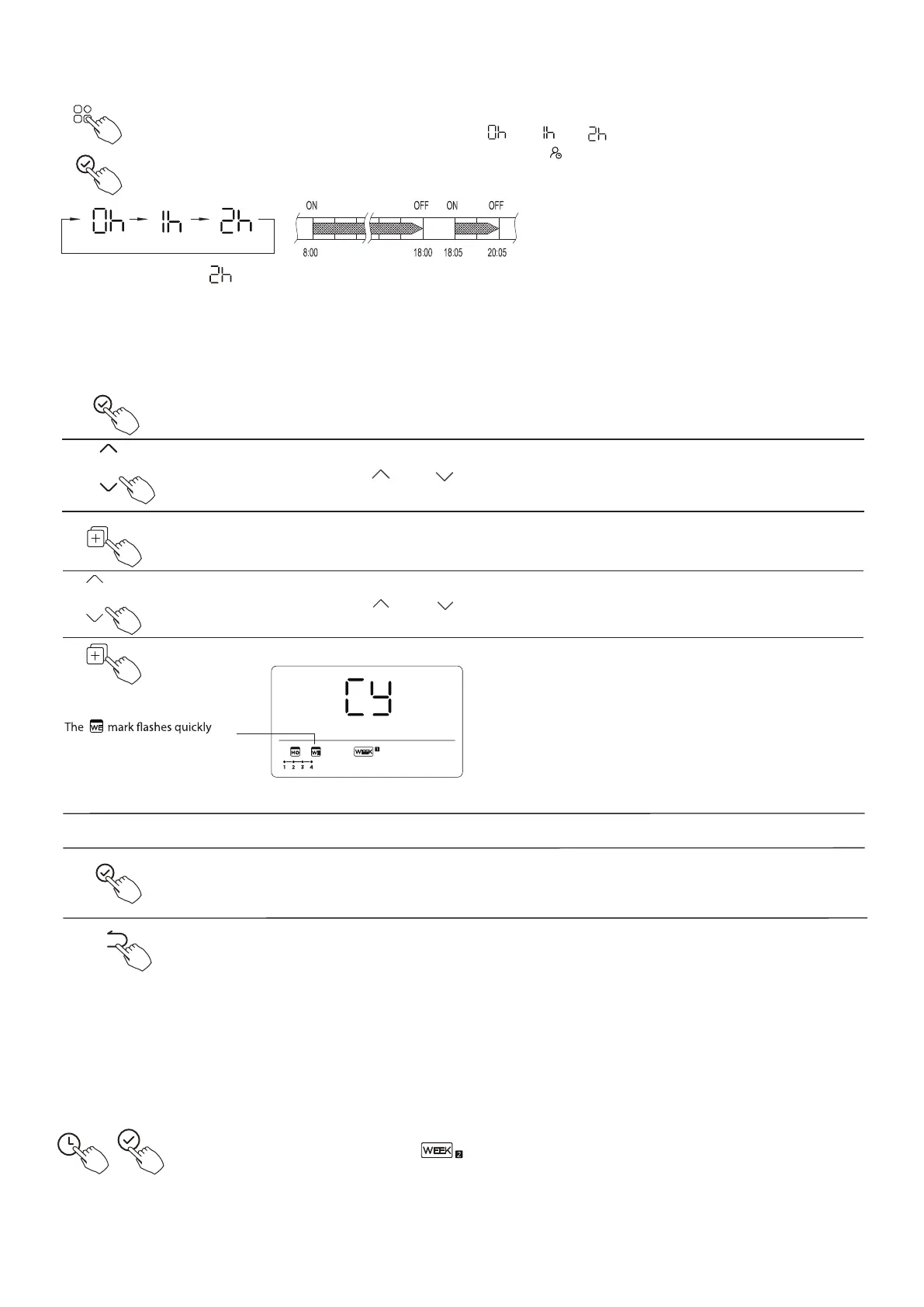
During the weekly timer, press the FUNC. button , select the delay function and
press the Confrm button,display" " " "" " and wait 3 seconds to confrm.
When the delay function is activated,the “ ”mark appears.
A reservation made once can be copied to another day of the week. The whole reservation of the selected
day of the week will be copied. The efective use of the copy mode ensures ease of making reservations.
During the weekly timer, press the Confrm button.
Press the button “ ” or “ ” to select the day to copy from.
Press the Copy button,the letter “CY” will be shown on the LCD.
Press the button “ ” or “ ” to select the day to copy to.
Press the Copy button to confrm .
ex. Copy the setting of Monday to Wednesday
Other days can be copied by repeating step 4 and 5.
Press the Confrm button to confrm the settings.
Press the Back button to back to the weekly timer.
Press Timer to select the and press Confrm.
ex. If press select “ ” at 18:05, the air conditioner will delay to turn of at 20:05.
The delay function can only be enabled in Weekly Timer 1 and Weekly Timer 2.
1. Weekly timer setting
DELAY function
Copy out the setting in one day into the other day.
1
2
3
4
5
6
7
8





 To Next Page