Remote Control
Instructions
27
This feature can be activated from the remote control
ONLY. To activate SLEEP feature, the set temperature
will increase(cooling) or decrease(heating) by 1°C/2°F
(or 1°F) in 30 minutes. The set temperature will then
increase(cooling) or decrease(heating) by another 1°C
/2°F (or 1°F) after an additional 30 minutes. This new
temperature will be maintained for 7 hours before it
thermostat allowing for the precise temperature
control at its location. To activate the Follow Me/Temp
Sensing feature, point the remote control towards the
unit and press the Follow Me/Temp Sensing button.
The remote control will send this signal to the air
conditioner until press the Follow Me/Temp Sensing
button again. If the unit does not receive the Follow
Me/Temp Sensing signal during any 7 minutes interval,
the unit will exit the Follow Me/Temp Sensing mode.
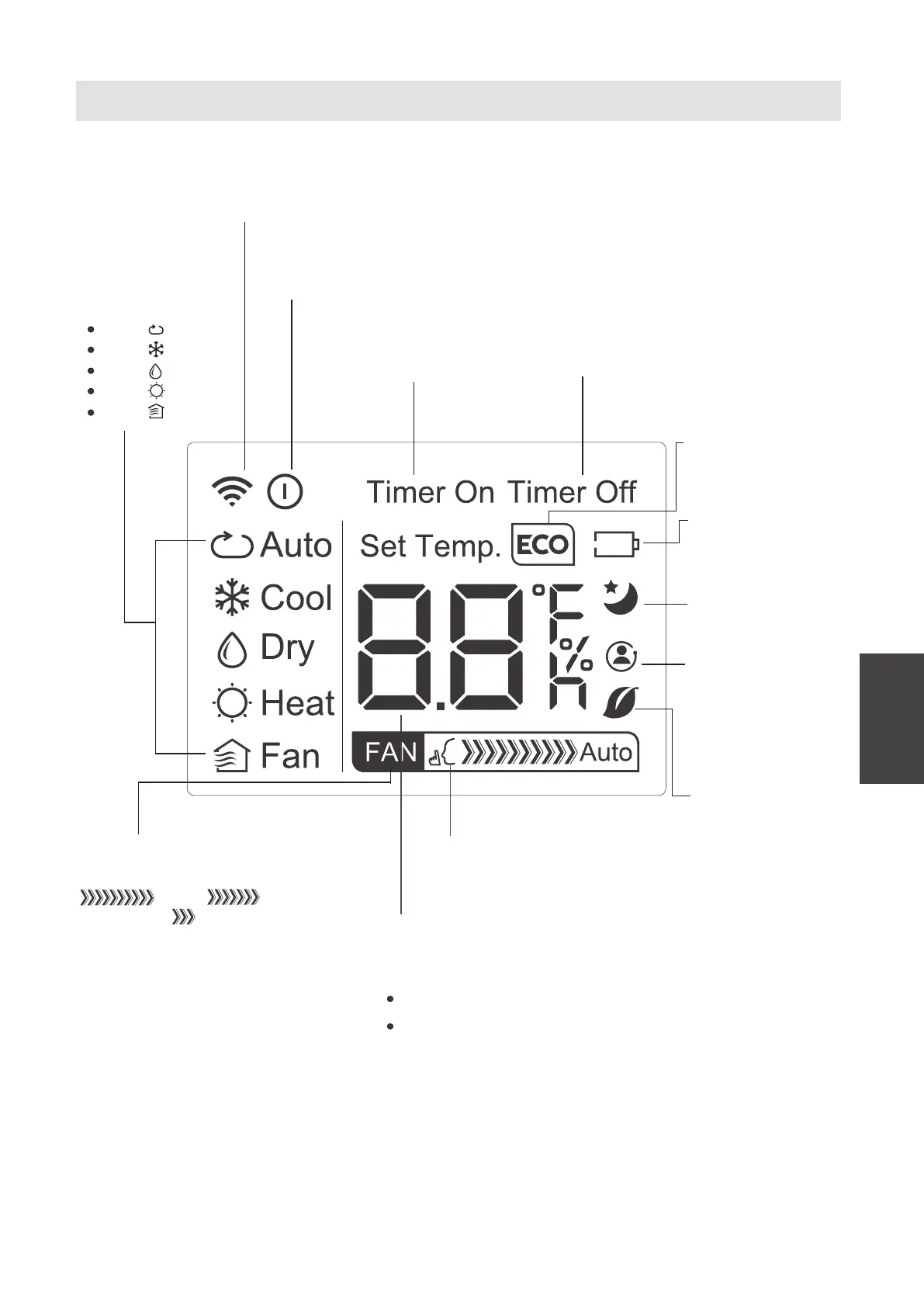
Remote LED Screen Indicators
MODE display
Displaysthecurrent
mode,including:
AUTO
COOL
DRY
HEAT
FAN
Transmission indicator
Lights up when the remote sends
asignal to the unit.
ON/OFF display
Appears when the unit is turned on
and disappears when it is turned o.
TIMER ON display
DisplayswhenTIMER
ONis set.
TIMER OFFdisplay
DisplayswhenTIMER
OFFis set.
SILENTdisplay
ECO display
FANSPEED display
Displays the selected FAN SPEED:
HIGH, MED(on some
models), or LOW.
This display is blank when
set to AUTO speed.
Temperature/Timer display
Displays the set temperature by default or timer setting
when using TIMER ON/OFF functions:
Temperature range: 17-30
O
C (62
O
F-86
O
F)
Timer setting range: 0-24 hours.
This display is blank when operating in FAN mode.
Not available for this unit.
Not available for
this unit.
Not available for
this unit.
TEMP SENSING
Temperature
sensingand
room temperature
display button.
(on some models)
(on some models)
Battery display
Low battery
detection.
(on some models)
SLEEP display
Displays when
the SLEEP function
is activated



 To Next Page