OVEN OPERATION
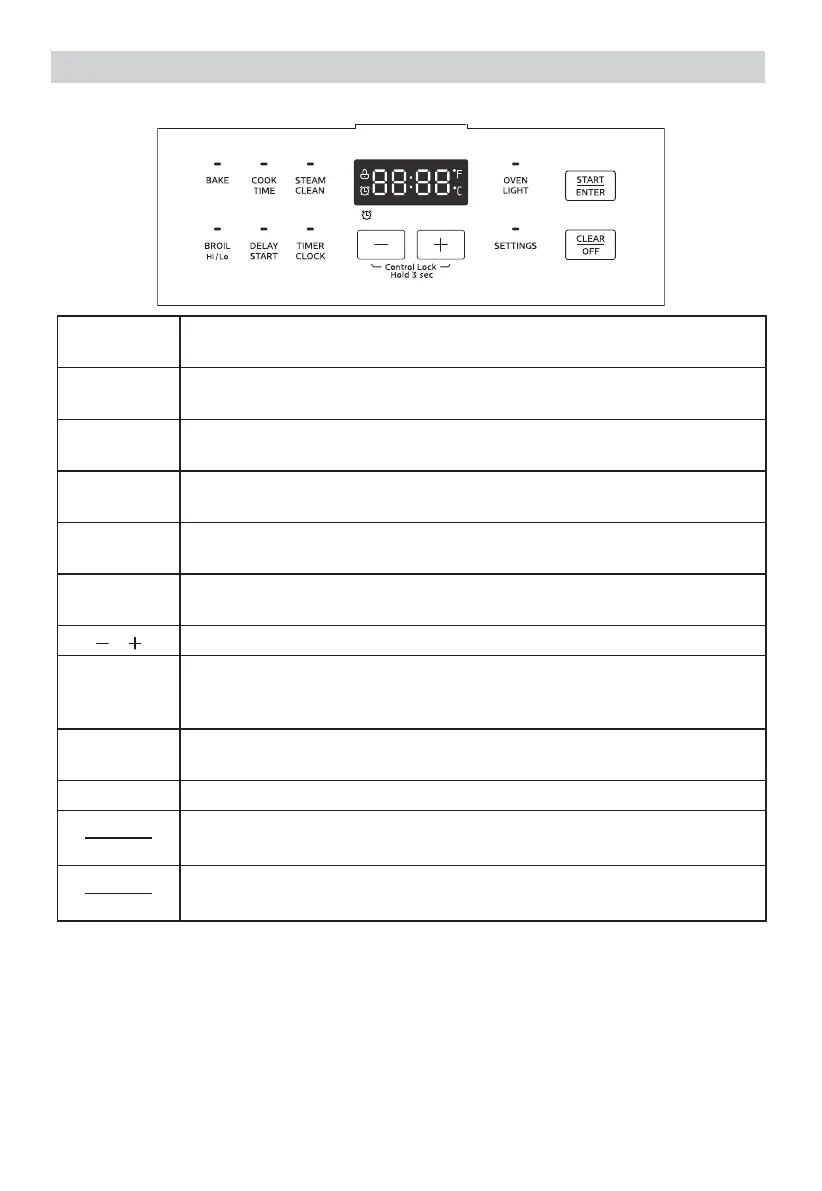
DISPLAY SCREEN
BAKE
Suitable for cooking foods, such as pizza, cakes and cookies for
even browning.
BROIL
Hi/Lo
Suitable for top browning and cooking foods such as steak or
toast.The default working time is 2 hours.
COOK
TIME
Counts down the cooking time and turns the oven off when
time is completed in the bake mode.
DELAY
START
Set the start time for the oven to turn on.
STEAM
CLEAM
Clean the cavity with steam.
TIMER
CLOCK
To set the timer and the current time on clock.
Parameter adjustment.
Control
Lock Hold 3
sec
Press the "+" and "-" pads for 3 seconds to enter or exit the
control lock state.
OVEN
LIGHT
Oven light control switch.
SETTINGS The system settings, such as volume and temperature units, etc.
START
ENTER
Start cooking or confirm parameters
CLEAR
OFF
Cancel the setting and return to standby.
Press and hold the "+/-" key to quickly adjust the temperature or time.
When the cooking end prompt sounds, you can press the "CLEAR/OFF" key to
cancel the prompt and return to the standby state.
When the unit is powered for the first time or in case of a power outage, the
control will display “12:00” and will be flashing until the time is set.
When the oven is OFF, the control will display the clock.


 To Next Page