STEAM CLEAN
CAUTION
BURN HAZARD
• Oven surfaces - especially oven bottom - may be hot. Use caution to avoid
contact with hot surfaces.
• Hot surfaces may create hot steam in wet sponge or cloth while cleaning. If
steam is evident when wiping out oven, wait until oven has cooled slightly.
Designed to generate steam and gently warm the oven surfaces to loosen
grease and light soils.
1. Start with oven at room temperature.
2. Remove all items from oven, including oven racks.
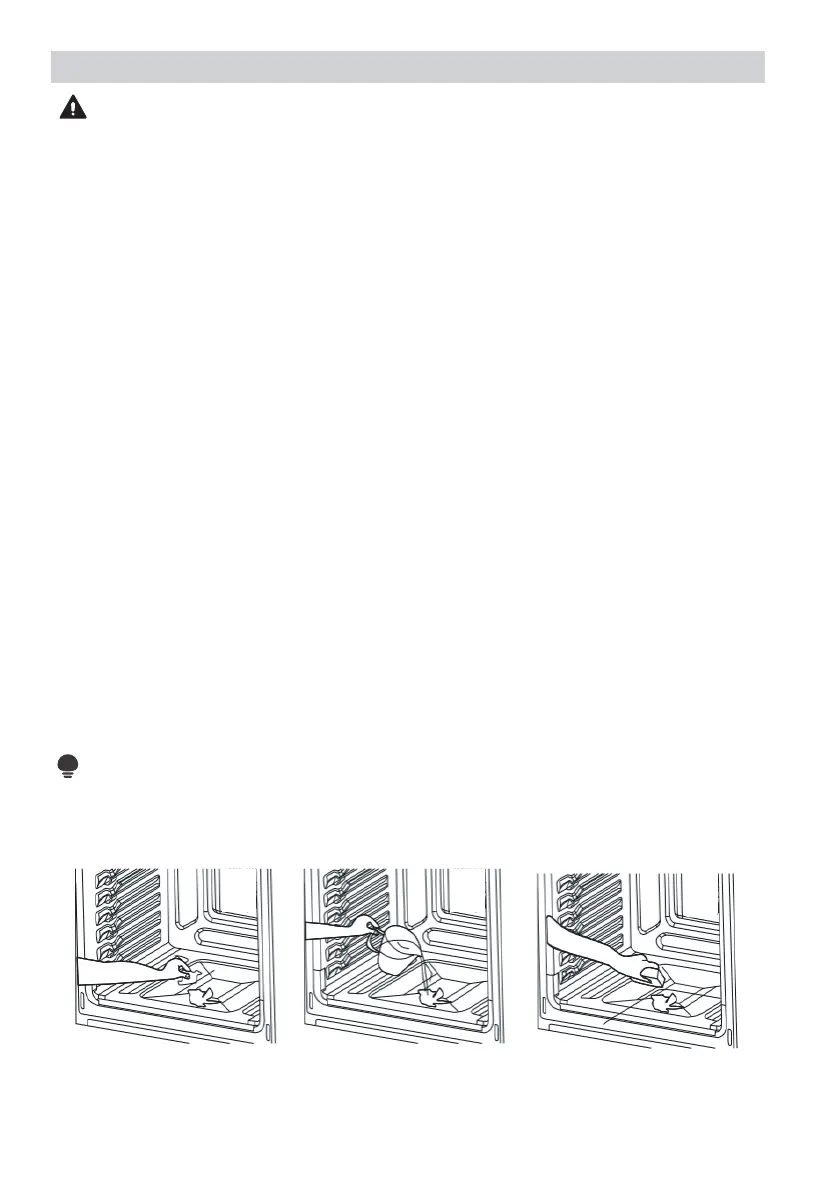
3. Wipe out any large spills or excess debris prior to starting steam clean.
Scrape off and remove any burnt-on debris with a stiff plastic utensil (hard
plastic spatula, plastic paint scraper, old credit card, etc.)
4. For improved softening of tough stains, spray inside surfaces with water
spray bottle or wipe surfaces with a wet sponge before starting.
5. Pour 1 cup (8 oz.) of water in the center bottom of the oven and close the
door.
6. Press "STEAM CLEAN" key.
7. Press the "START/ENTER" key.
8. Door does not lock during steam clean. Do not open door until steam clean
cycle has fully completed.
9. After steam clean cycle is complete, soak up any remaining water from oven
key and wipe down surfaces within oven with soft, dry, non-abrasive sponge
or cloth.
10. Press the "CLEAR/OFF" key to exit at any time.
NOTE
If oven temperature is higher than 100°F, Steam clean can not start. And the
screen will display "Hot". Allow the oven to cool.


 To Next Page