AUDITS
The Audits menus permit the operator to review the game play statistics. Additional menus give detailed
reports for each player position on game starts, ends, cabinet abuse, fault conditions, etc.
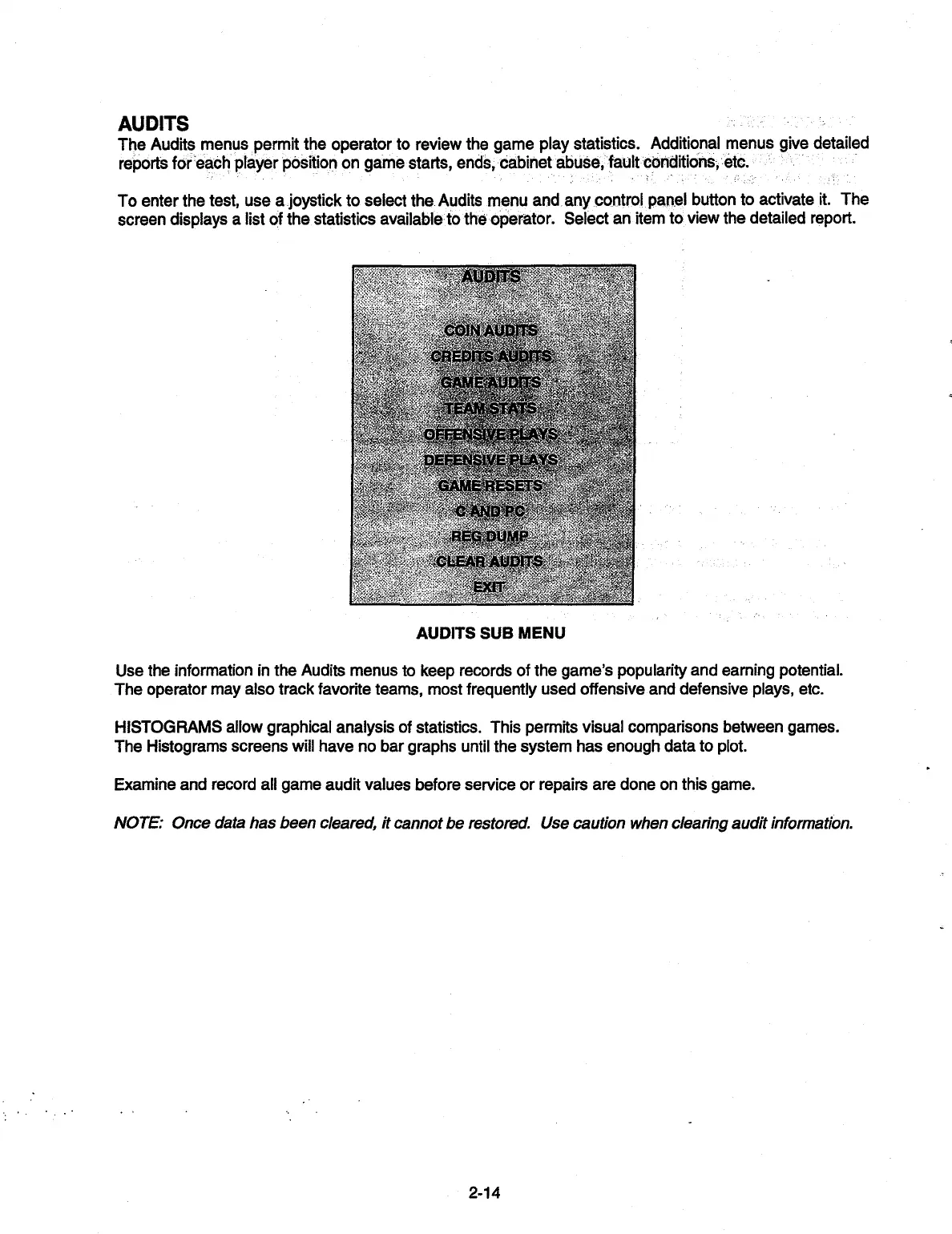
To enter the test, use a joystick to select the Audits menu and any control panel button to activate it. The
screen displays a list of the statistics available to the operator. Select an item to view the detailed report.
COIN AUDITS
CREDITS AUDITS
GAME.'AUDITS
TEAM
STA TS,
OFFEISWE..RLAYS
.
4
DEFENSIVE PLAYS
GAME RESETS
V
C ANDPC.
REG DUMP
.
CLEAR AUDITS
EXIT
AUDITS SUB MENU
Use the information in the Audits menus to keep records of the game's popularity and earning potential.
The operator may also track favorite teams, most frequently used offensive and defensive plays, etc.
HISTOGRAMS allow graphical analysis of statistics. This permits visual comparisons between games.
The Histograms screens will have no bar graphs until the system has enough data to plot.
Examine and record all game audit values before service or repairs are done on this game.
NOTE: Once data has been cleared, it cannot be restored. Use caution when clearing audit information.
2-14


 To Next Page