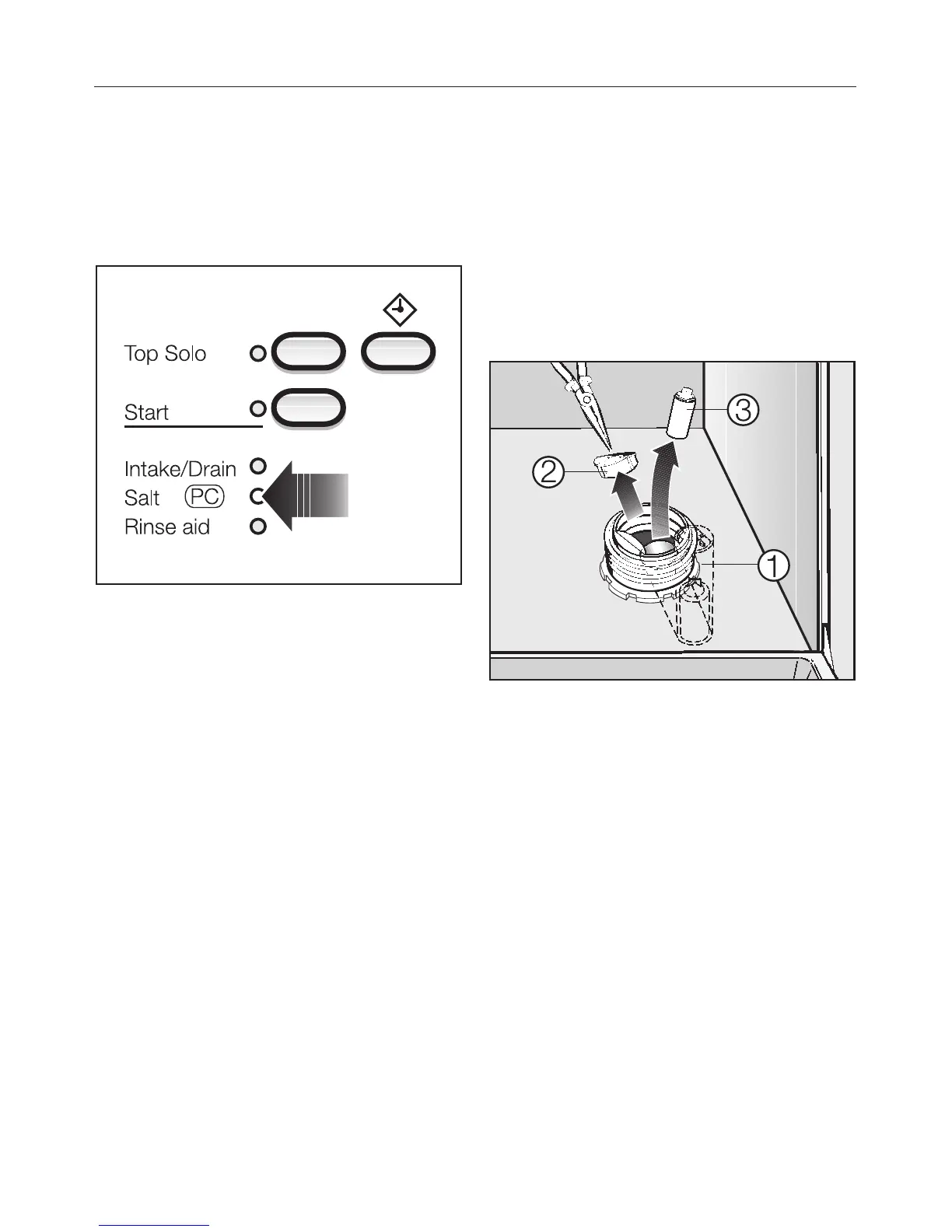
Salt indicator
When the salt reservoir is empty, the
“Salt-PC” indicator will light, indicating
that it should be refilled with reactiva
-
tion salt.
After the reservoir has been filled, the
water softener is automatically reacti-
vated the next time the dishwasher is
started. The “Softener” indicator will
light during this process.
Note:
If your water is soft (below 8 gr/gal) the
salt reservoir should not be filled with
salt. The indicator will remain lit and
should be disregarded or deactivated.
The “Salt-PC” indicator has also been
designed so that future program up
-
dates can be entered into the dish
-
washer. See the “After Sales Service”.
Bypassing the Salt indicator
To bypass the salt indicator, you will
need a screwdriver and needle nose
pliers.
^
Remove the salt reservoir cap.
Looking into the salt reservoir, you will
see the top of the float chamber on the
right hand side
b.
^ Using a screwdriver, carefully pivot
the float chamber towards the center
of the reservoir.
^
Using needle nose pliers, pull off the
cap
c from the float chamber and
remove the float
d.
^
Replace the float chamber cap, push
the chamber back into its upright po
-
sition, and replace the salt reservoir
cap. The indicator should now re
-
main off.
Before using for the first time
18


 To Next Page