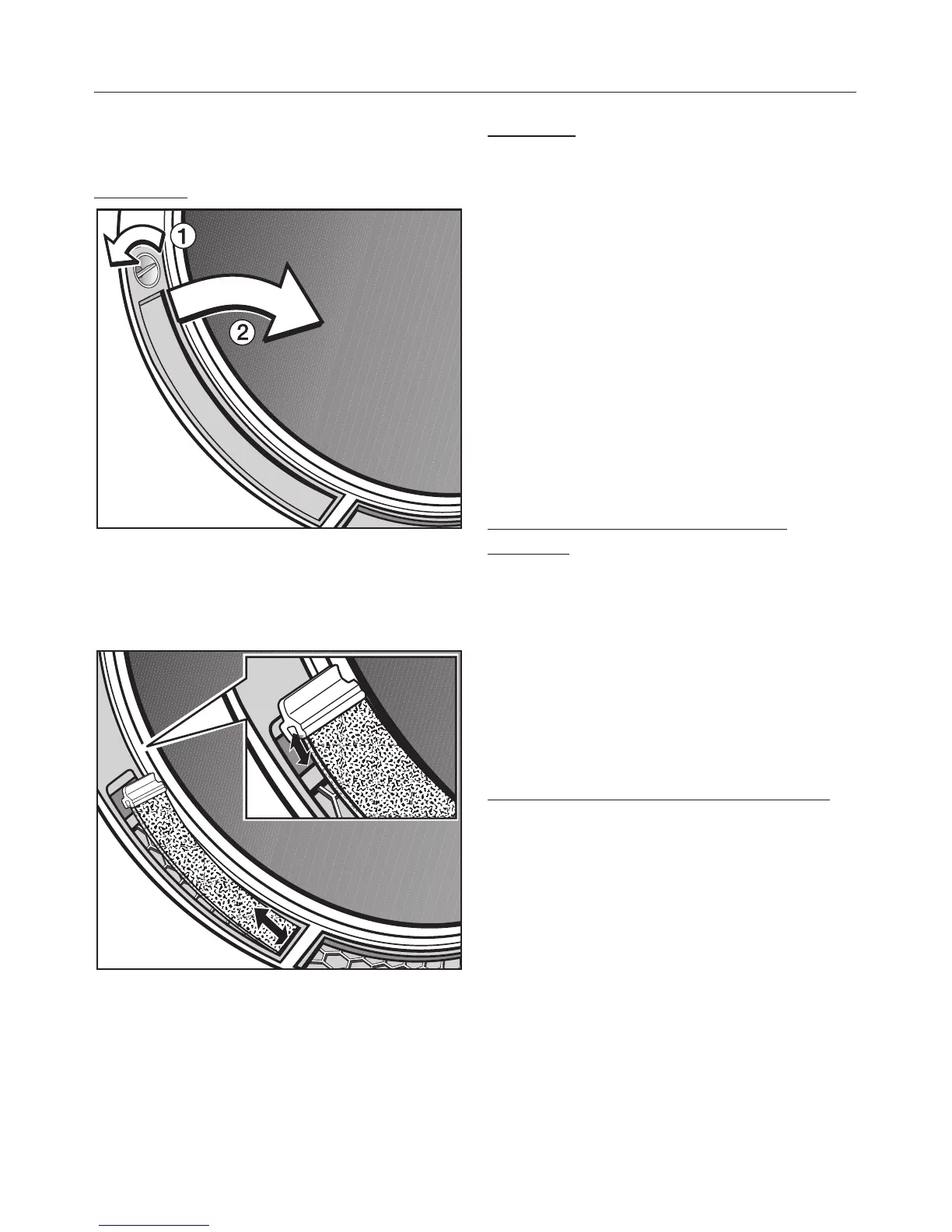
2. Cleaning the fine filters in the door
opening.
Removing
^ Turn dial a until you feel it click.
^ Pull the filter out of the door opening
by the dial as shown b.
^
Grasp the fine filter by its holder and
pull the fine filter upwards.
Cleaning
^
Clean both fine filters thoroughly
under running water.
^
Then squeeze the fine filters
thoroughly.
^
The surface of the fluff filters must
also be cleaned under running water
if there is a great deal of compacted
fluff on it.
^
Dry both fluff filters.
^
If necessary, clean the hollow area in
the door opening (underneath the
fluff filters) with a vacuum cleaner.
Replacing the fine filters (bottom
pictures)
^ Insert the holder of the fine filter with
its groove on top of the ridge (see
detail).
^ Insert the bottom end of the fine filter
under the edge.
Both fine filters must lie flush in the
middle of the hollow area.
Replacing the fluff filters (top picture)
^
Replace the fluff filters by inserting
them at the bottom and pressing
them into place at the top.
^
Lock both dials (you will feel them
click into position).
Cleaning and care
37





 To Next Page