Operating the washing machine
14
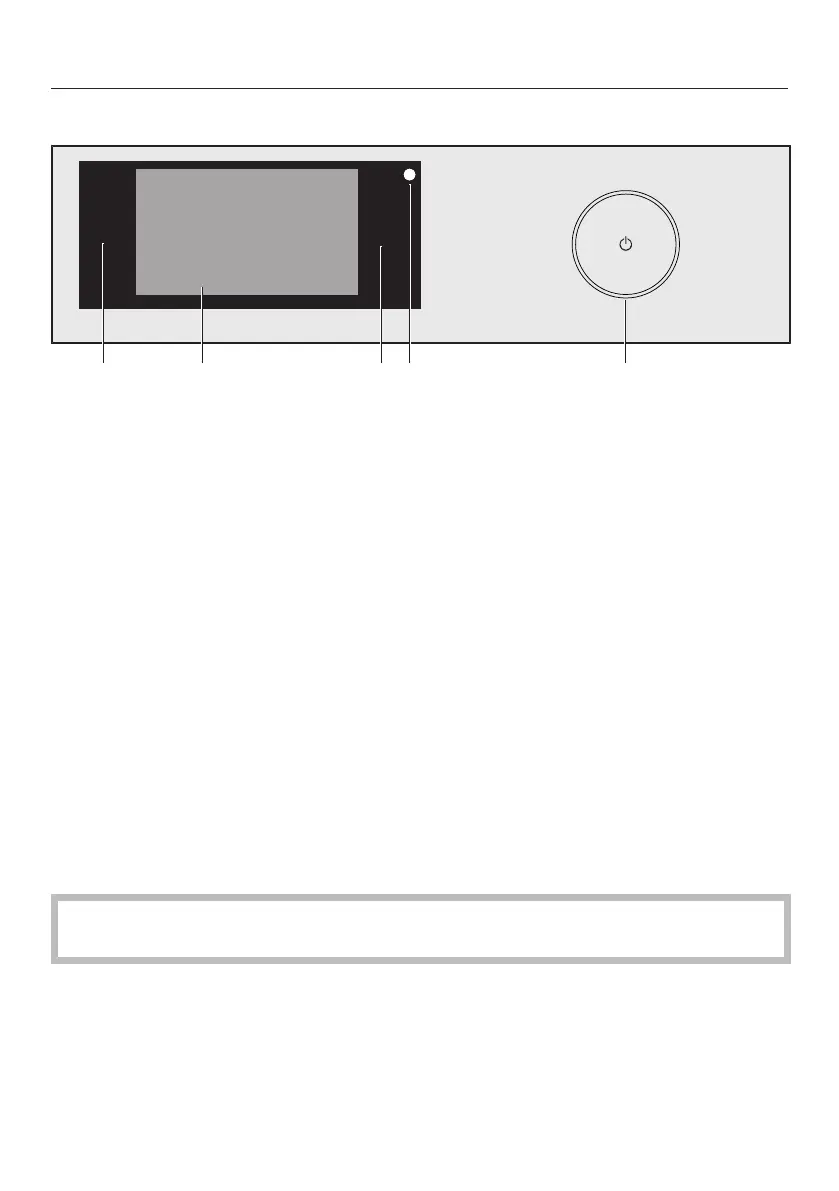
Control panel
a
Sensor
To go back a level in a menu.
b
Touch display
c
Start/Stopsensor control
Touching the Start/Stopsensor control starts the selected programme or can-
cels a programme that has already been started. The programme can be started
as soon as the sensor control is flashing on and off. The sensor control lights up
constantly once the programme has started.
d
Optical interface
This is used by the Service department as a transmission point.
e
Sensor
For switching the washing machine on and off. To save energy, the washing ma-
chine will switch off automatically. This occurs 15minutes after the end of the
programme/anti-crease phase, or after being switched on if no further selection
is made.
Touch display and sensor controls
The and Start/Stop sensors and the sensors in the display react to finger tip
contact.
The touch display can be scratched by pointed or sharp objects, e.g. pens.
Only touch the display with your fingers.


 To Next Page
 Loading...