
 Need help?
Do you have a question about the Mighty Mule 500 UL325 SERIES and is the answer not in the manual?
Safety precautions and instructions to be followed before installing the gate opener.
Safety guidelines and warnings to observe while installing the gate opener system.
Post-installation safety measures, including warning signs and maintenance.
Details on entrapment protection systems and compliance with safety standards.
Essential safety measures and recommendations for gate installation and operation.
Crucial instructions and guidance to review before starting the gate opener installation.
Details on the gate opener's drive mechanism, motor, and performance characteristics.
Information regarding the gate opener's power source, battery, and charging system.
Specifications for the control board, receiver, and associated features.
Chart showing estimated daily gate cycles based on gate weight and length.
Guidance on determining the correct gate swing direction for installation.
Instructions for verifying gate dimensions and material compatibility.
Essential checks to ensure the gate is correctly installed for opener compatibility.
Specific considerations and methods for installing the opener on various column types.
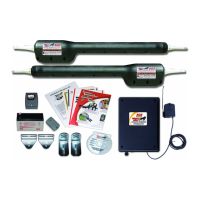
List of components and hardware provided with the gate opener kit.
List of necessary tools for the installation process.
List of additional items that must be purchased separately for installation.
Step-by-step guide for physically attaching the opener to a pull-to-open gate.
Step-by-step guide for physically attaching the opener to a push-to-open gate.
Instructions for mounting and preparing the control box for connection.
Detailed steps for wiring the AC transformer to power the system.
Guidance on installing the radio receiver for remote control operation.
Instructions for installing the physical gate stops to limit travel.
Information on positioning and connecting the solar panel for battery charging.
Explanation of DIP switch functions for configuring gate opener behavior.
Procedure for setting the closed position limit for pull-to-open gates.
Steps to clear and reset the previously set closed gate limit.
Procedure for setting the open position limit for push-to-open gates.
Steps to clear and reset the previously set open gate limit.
How to adjust sensitivity to obstructions and automatic closing delay.
Instructions for programming unique codes for remote transmitters.
General recommendations and compatibility notes for accessory devices.
Detailed explanation of the control board's input terminals and their functions.
Wiring diagrams and instructions for connecting various accessories.
Specific instructions for connecting the GTO Automatic Lock accessory.
Information on connecting other devices like mag locks, sirens, and lights.
Routine care and upkeep recommendations for the gate opener system.
Diagnostic steps and solutions for common operational issues.
Explains LED indicators and their meanings for system status.
Describes the meaning of the green power indicator light.
Explains the red charge indicator light and its different states.
Steps to follow if the gate opener requires repair or technical assistance.
Conversion factors for units between metric and imperial systems.
Conversion factors for units between imperial and metric systems.
Formulas for converting between Celsius and Fahrenheit temperature scales.
Section to record serial number, date, and place of purchase for warranty.
Overview of optional accessories for the gate opener system.
 General
| Maximum Gate Length | 16 feet |
|---|---|
| UL325 Compliant | Yes |
| Remote Control Range | 100 feet |
| Power Consumption | 1.5 Amps |
| Motor Type | DC motor |
| Model | Mighty Mule 500 UL325 SERIES |
| Gate Type | Swing |
| Control Type | Remote control |
| Safety Features | Auto-reverse, Obstruction Detection |
| Battery Backup | Yes (Optional) |
| Warranty | 12 months |












 To Next Page