ÊFormula Count Accumulator
ËOperation
—The Formula Count Accumulator provides the user with a means to keep track of the number of
times each formula has run. The SYSTEM 7 machine maintains a cumulative counter for each formula which is
automatically incremented at the beginning of the final extract step of the respective formula. Each counter may be
viewed periodically and compared to a previous reading to determine the number of operations since that time. The
range of each counter is 0 to 999; after 999 is reached, the counter will roll over to 0 on the next increment. At the
discretion of the user, any counter may be reset to 0.
As the accumulator is maintained under battery-backed memory, a brief power loss (less than 24 hours) should
not affect the accumulator count. A prolonged power loss, however, may cause a memory loss, in which case an
error message (E 06) will appear on the display to indicate that the contents of the counters were destroyed and reset
to 0. The user is required to acknowledge this condition by pressing the TERMINATE button before operation is
allowed.
ËViewing the Counter
—The accumulator may be viewed
only when a formula is not in progress and the machine is not in
Manual mode. To view the count of a particular formula, set the
FABRIC SELECTION switch to Other Fabrics and scroll to the
desired formula with the SELECT PROGRAM button. Press the
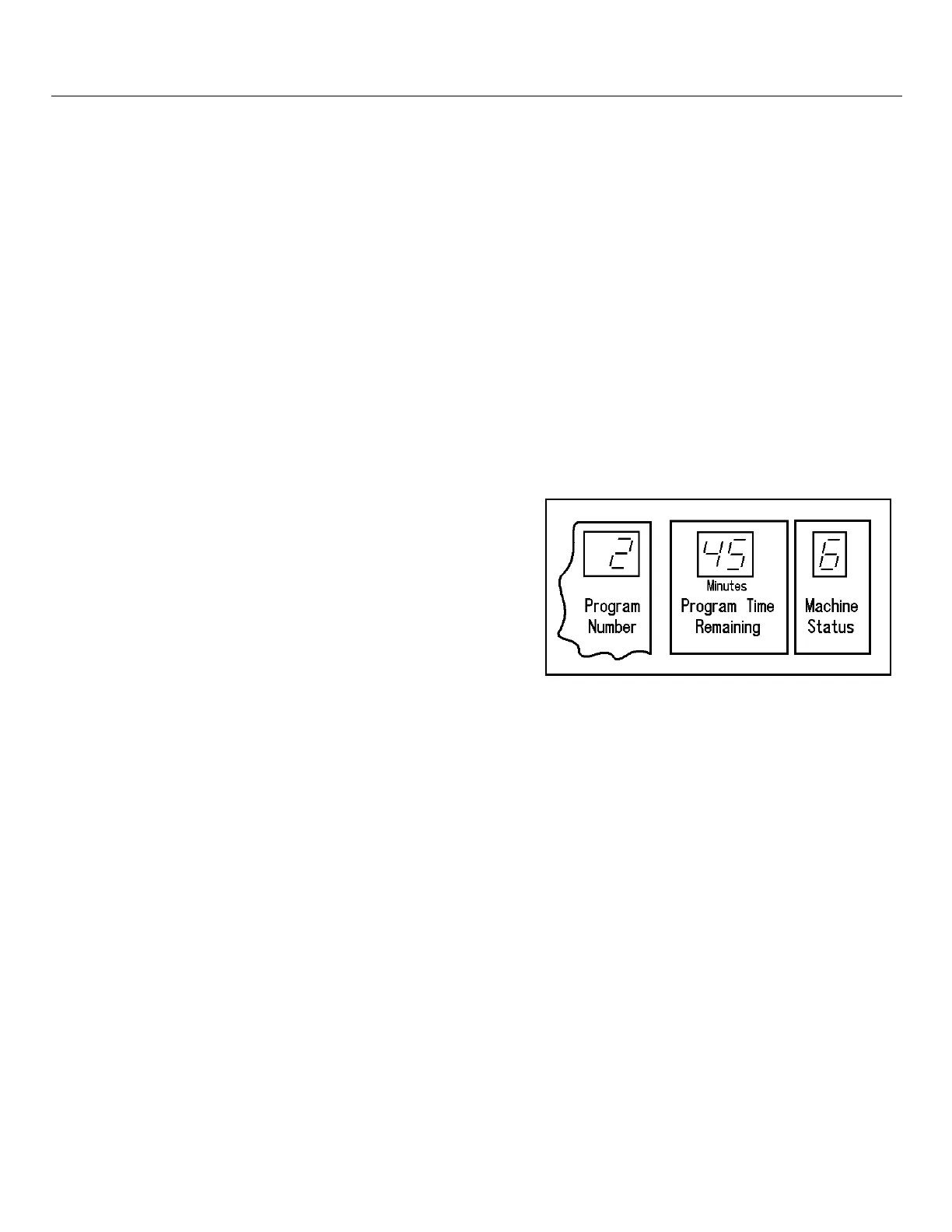
OVERSUDS button. The Program Number window shows the
program number selected while the Program Time Remaining
and Machine Status windows together show the number of time
the selected formula has run. Figure 2 shows that Program 2 has
run 456 times since the accumulator for this formula was cleared.
ËClearing the Counter
—To reset the counter for an individual formula to zero, scroll to the desired formula
as above. While holding OVERSUDS, press and release the TERMINATE button. This resets the counter for the
selected program to zero.
ÊHow To Configure
Your MILNOR dealer will configure your System 7 machine for your particular application during installa-
tion. This configuration consists of setting the DIP switch on the processor board for your industry and attaching
labels to the control panel faceplate. Only switches 1 through 3 are used for industry configuration.
ËHOW TO SET DIP SWITCHES
TURN MACHINE POWER OFF. The DIP switch configuration must be set with power OFF for the
settings to be effective.
ÎFIGURE 2
(MSFD0802AE)
ÎAccumulator Totals Display
SYSTEM 7 MICROPROCESSOR SOFTWARE MSFD0802AE/8946DV (2 of 5)



 To Next Page