RMS
=
V
AC
2
+
V
DC
2
(AC+DC total RMS volts)
*
I
RMS
=
I
AC
2
+
I
DC
2
(AC+DC RMS amps)
* dBm readout: 10 x log(1000 x (Primary Display Readout)
2
/ R), R=600
Ω
* dB readout: 20 x log (Primary Display Readout / rEF), rEF=1V
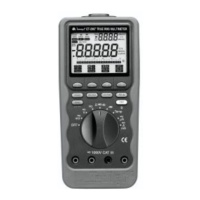
4.3 Pushbuttons
The buttons activate features that augment the function selected with
the rotary switch.
RANGE.
Use the RANGE button to manually select a range. Press and hold
RANGE button for two seconds to return the meter to auto range mode.
The meter is in auto range mode when the AUTO indicator is on.
The range and units are displayed on the LCD.
MIN/MAX.
Press this button to scroll through the minimum, maximum, and average
value. The minimum (MIN) reading is displayed first and this mode
calculates an average (AVG) of all readings taken since the mode was
activated. The meter beeps when a new maximum or minimum reading
is updated.
In the MIN/MAX mode, the primary display continues to show the
present measurement value.
Press and hold the MIN/MAX button for two seconds to exit MIN/MAX
mode.
Auto Power Off feature will be disabled automatically in this mode.
1ms PEAK.
Press this button momentarily to activate 1ms peak hold mode to cap-
ture transient voltage or current signal events as short as 1ms with its
display resolution of 5,000 counts. The LCD displays the 1ms and MAX
indicators at the upper left corner and - and EXIT indicators in the on
screen menu selection and the meter will display a captured maximum
value. Press the - menu key.


 To Next Page