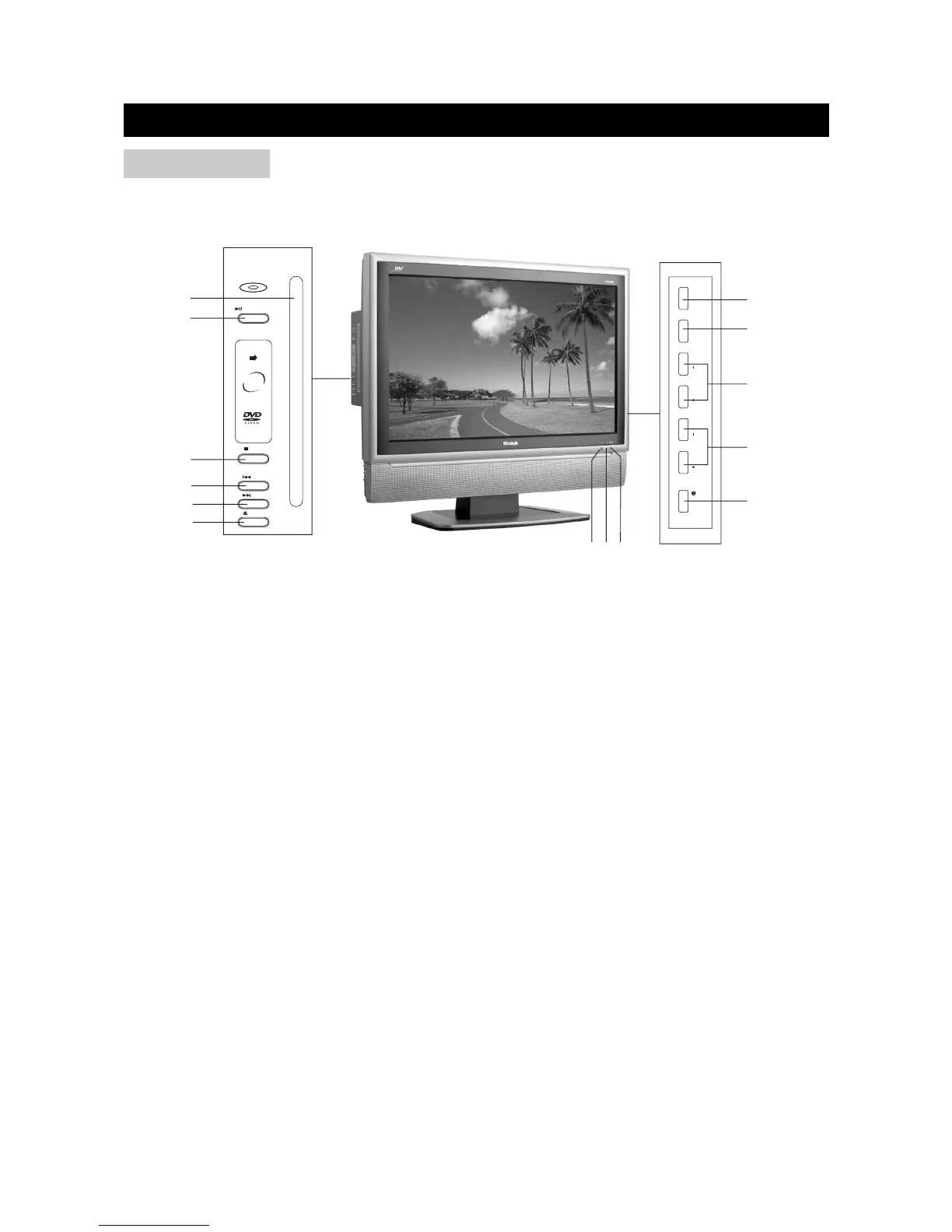
1) SOURCE: Use to select the AV signal source among: Digital TV, Analog TV, Composite 1,
Composite 2, S-Video, Component, DVD, HDMI and DVI.
2) MENU: Use to bring up the TV menu.
3) CH+/-: Use to skip to the next/previous channel.
4) VOL +/-: Use to adjust the volume.
5) POWER: Use to turn the unit on and off.
6) STANDBY Indicator
7) Power On Indicator
8) Remote Sensor
9) DISC SLOT: Insert a DVD or CD disc to play under DVD status. In other status, insert a disc to
change to DVD status.
10) PLAY/PAUSE BUTTON: Use to begin or pause the DVD playback. Only 12cm discs can be
inserted.
11) STOP: Use to stop the DVD playback.
12) PREV: Use to skip to the previous chapter.
13) NEXT: Use to skip to the next chapter.
14) EJECT BUTTON: Use to eject the disc being played in the disc slot. And the TV set returns to
the previous status.
DISPLAY
page6
FRONT VIEW


 To Next Page